AI Agent Stack Overflow Troubleshooting Guide
Urgent troubleshooting guide for diagnosing and fixing AI agent stack overflow, with practical steps, observability tips, and safeguards for resilient agent workflows.


The most common causes of an AI agent stack overflow are memory leaks, infinite recursion, and unbounded task growth. Start by checking logs, isolating components, and applying a simple retry/backoff strategy. Verify stack traces, reproduce under load, and implement guardrails to prevent runaway tasks. If the issue persists, escalate to a safer, rate-limited workflow.
Understanding AI Agent Stack Overflow
According to Ai Agent Ops, complex AI agent stacks frequently overflow not because of a single bug, but because of how tasks cascade through a network of agents, policies, and external services. When a single task triggers dozens of follow-up tasks—sometimes with recursive loops or unbounded retries—the call stack and task graph can swell beyond the system’s capacity. In practice, you’ll notice symptoms like CPU spikes, memory growth, and slower response times that ripple across services. The goal of this section is to translate symptoms into concrete areas to inspect: memory usage, task generation, and backpressure.
In modern agent architectures, stack overflow often arises from three intertwined patterns: (1) runaway task graphs where one step spawns many others without a natural cap; (2) unbounded recursion across agents or policies that never converge; and (3) insufficient backpressure or throttling that lets bursts of work overrun queues. Early in an incident, you should verify whether the overflow is localized to one agent, or if it propagates across the agent network. For developers and product teams, the mental model to deploy here is: isolate, measure, throttle, and guard. By focusing on depth, breadth, and rate of task creation, you can often stop a stack overflow before it catastrophically degrades your entire workflow.
Ai Agent Ops emphasizes proactive monitoring and disciplined design as the first line of defense. This article uses a practical troubleshooting approach you can apply in minutes, not hours. The goal is to give you a repeatable playbook you can adapt across different agent frameworks while keeping the system safe and observable.
Steps
Estimated time: 1-2 hours
- 1
Reproduce and baseline
Reproduce the overflow in a controlled environment using representative workloads. Establish a baseline of key metrics: stack depth, queue length, latency, memory usage, and error rates. Capture a clean, repeatable run so you can compare after each change.
Tip: Use a small, known workload first to ensure you can replicate the overflow consistently. - 2
Isolate the components
Map the flow of tasks to agents and policies. Disable non-essential paths to see if a single component or a small subgraph is responsible for growth. Instrument logs with context fields such as depth, task_id, and retry_count to trace origins.
Tip: Add unique task identifiers to every log line for easier tracing. - 3
Apply guardrails (depth and rate)
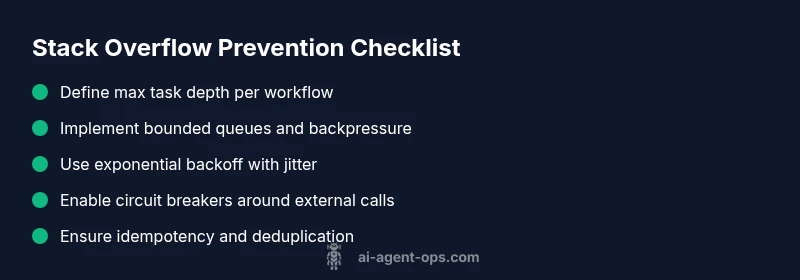
Enforce a maximum task depth per workflow and per agent, plus bounded queues that trigger backpressure when full. Implement a retry policy with capped attempts and jitter to prevent synchronized bursts.
Tip: Start with conservative limits and progressively tighten after observing behavior. - 4
Introduce backpressure and circuit breakers
Add circuit breakers around fragile external calls and introduce backpressure between upstream and downstream components. Ensure downstream capacity signals upstream to slow down new work.
Tip: Monitor breaker states and ensure fast recovery paths are in place. - 5
Improve observability
Upgrade tracing and metrics to capture depth, queue growth, and backpressure events. Ensure dashboards alert on rapid increases in stack depth or retries.
Tip: Create a dedicated overflow alert with clear remediation steps. - 6
Validate idempotency and deduplication
Ensure retried or duplicate tasks do not cause additional growth. Implement idempotent handlers and de-duplicate work where possible.
Tip: Test with duplicate task bursts to confirm safety.
Diagnosis: AI agent stack overflow during long-running task chain
Possible Causes
- highMemory leak in agent caches or state that accumulates over time
- highUnbounded task generation due to misconfigured policies or retrial logic
- mediumRecursive policy calls or circular dependencies that fail to converge
- mediumBlocking IO inside asynchronous loops creating hidden backlogs
- lowInadequate backpressure, timeouts, and missing circuit breakers
Fixes
- easyEnable memory profiling and fix identified leaks in caches or state stores
- easyIntroduce task depth limits and bounded queues to cap growth
- easyAdd exponential backoff with jitter for retries and make them idempotent
- mediumImplement circuit breakers and proper backpressure around external services
- mediumRefactor to reduce cross-agent dependencies and simplify task graphs
Questions & Answers
Why does an AI agent stack overflow occur?
Stack overflows in AI agent stacks usually result from runaway task graphs, uncontrolled recursion, or insufficient backpressure. Examining depth, rate of task creation, and interactions with external services helps identify which pattern is at fault.
Overflows come from runaway task growth, recursion, or lack of backpressure. Check task depth, rates, and external calls to identify the culprit.
What is the first thing to check during an overflow incident?
Begin with observability: verify logs, traces, and dashboards to locate the deepest path in the task graph. Confirm whether the overflow is isolated to a single agent or propagates across the network.
Start with logs and traces to find the deepest task path and see if only one agent is affected or the whole network.
How do I implement backpressure and task depth limits?
Set explicit depth limits per workflow and implement bounded queues with capacity checks. Use backpressure signals upstream to slow down task creation when downstream capacity is reached.
Put depth limits and bounded queues in place, and make upstream components slow down when needed.
Are there recommended testing strategies for overflow scenarios?
Create synthetic workloads that mimic bursts and growth, run chaos experiments, and validate that guardrails activate as intended before production.
Test with bursty workloads and chaos experiments to ensure guardrails work before going live.
Can third-party APIs cause stack overflow?
Yes. Retries against flaky APIs can amplify workload and backpressure issues. Monitor API health and apply smarter retry policies and timeouts.
External APIs can trigger retries that worsen overflow; monitor and throttle those calls.
When should I escalate to architectural review?
If guardrails and backpressure fail to stabilize the system, escalate to a broader architectural review with incident data, metrics, and traces.
If nothing fixes it, bring in architecture review with all incident data.
Watch Video
Key Takeaways
- Identify root causes with depth-focused metrics
- Implement layered guardrails to stop runaway growth
- Use bounded queues and backpressure to limit inflow
- Make retries safe with idempotency and jitter
- Plan incident playbooks with Ai Agent Ops guidance