Urgent Troubleshooting Guide: n8n AI Agent Overloaded
Urgent guide to diagnosing and fixing overloaded AI agents in n8n workflows, with step-by-step fixes and prevention tactics from Ai Agent Ops.


Most overload issues with an n8n ai agent arise from high concurrency, large AI payloads, or retry storms. Quick fixes: lower parallel executions, batch AI calls, and enable basic rate limits. If problems persist, isolate AI tasks into separate flows, monitor queue depth, and scale resources as needed. Ai Agent Ops recommends a measured, test-driven approach.
Why n8n ai agent overloaded happens in modern automation
According to Ai Agent Ops, overloads in n8n ai agent workflows often start small and escalate quickly. The root cause is usually systemic: too many AI requests fired in parallel, large payloads that take longer to serialize or decode, and retries triggered by transient errors. In practice, teams run into this when they push hard on latency targets or when automation expands without governance. The result is queuing pressure, higher memory use, and timeouts that cascade into failed tasks and user-visible slowdowns. The good news is that most overloads follow a predictable pattern: control the flow, throttle the calls, and isolate the expensive AI work from the rest of the pipeline. By understanding the bottlenecks, you can lift throughput without sacrificing reliability.
Immediate symptoms you might notice when the ai load spikes
Look for increased latency, timeouts, and bursts of AI-call errors. CPU and memory spikes during AI-heavy windows are common, as is a growing backlog in the execution queue. You may see duplicate tasks caused by automatic retries after transient failures. If you have observability, correlate spikes with specific AI model calls, data payload sizes, or workflow triggers. Quick checks include verifying that AI calls aren’t firing in parallel across multiple workflows and confirming that you aren’t hitting rate limits on external AI services.
Core causes of overload: concurrency, payloads, and hosting limits
The most frequent culprits are excessive concurrency, large payloads, and long-running model inferences that back up the queue. Network variability and API quotas can compound the issue, while memory limits and CPU saturation in the hosting environment reduce throughput. A common misstep is assuming AI tasks can scale indefinitely without governance; even scalable systems have bottlenecks when backpressure isn’t implemented. Identify whether the problem relates to the number of AI calls, the size of the data sent to the model, or the resources available to the n8n worker process.
Diagnostic signals to collect and how to interpret them
Start with runtime metrics: queue depth, average and 95th percentile AI-call latency, and the count of in-flight AI tasks. Gather resource metrics: CPU %, memory usage, and swap activity on the host. Capture error rates from AI providers and the frequency of retries. Collect logs from the specific workflows that trigger AI calls, noting which nodes are involved and the payload shapes. With this data, you can map bottlenecks to specific components and decide whether to throttle, batch, or scale.
Step-by-step: defuse overload in n8n (practical fixes you can apply now)
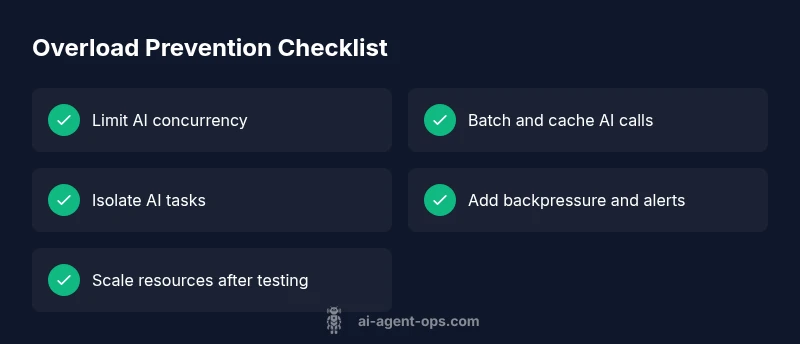
- Reduce AI concurrency: lower per-workflow parallelism and cap global AI tasks to a safe threshold. 2) Batch and cache: group small requests into batches and reuse previously computed results where possible. 3) Isolate AI calls: move expensive AI tasks into their own workflow or queue to decouple from user-facing paths. 4) Introduce backpressure: add guards to stop new AI tasks when the queue is full, and implement retry limits. 5) Right-size resources: adjust container/VM CPU and memory allowances or move to a plan with higher ceilings. 6) Validate with controlled load tests: simulate peak conditions, observe behavior, and rollback if needed. 7) Document a rollback plan: ensure you can restore prior configurations quickly if issues reappear.
Architectural patterns to prevent future overload
Adopt a decoupled, event-driven approach: separate AI processing from immediate user interactions, use a lightweight gateway to throttle requests, and implement circuit breakers for AI providers. Micro-batching and caching reduce redundant calls, while observability dashboards give early warnings of looming pressure. Consider auto-scaling rules tied to concrete metrics and establish governance around AI task ownership to avoid unbounded growth.
Steps
Estimated time: 60-90 minutes
- 1
Audit AI workload and current concurrency
Review active workflows, identify which AI nodes run in parallel, and quantify peak AI traffic. Use n8n logs and any external monitoring to pinpoint where AI tasks cluster.
Tip: Enable a simple baseline dashboard to track AI call counts per workflow. - 2
Limit parallelism and implement per-workflow caps
Set conservative concurrency limits on AI nodes and add guards that prevent new AI calls when limits are reached. This prevents queue buildup and reduces burst risk.
Tip: Consider a fixed cap that matches your available CPU and memory headroom. - 3
Batch small AI requests and cache results
Group small or related requests into batches and cache deterministic results for repeated queries. This reduces repetitive load on AI providers and speeds up responses.
Tip: Cache key should include input hash and model version. - 4
Isolate AI tasks into a separate flow/queue
Create a dedicated workflow or queue for AI-heavy steps. This decouples user-facing paths from AI processing and enables independent scaling.
Tip: Use a simple wait node to space out bursts if needed. - 5
Tune timeouts and retry behavior
Shorten or stabilize timeouts for AI calls and cap retry attempts to prevent exponential backoff from causing backlog.
Tip: Implement backoff with maximum attempts and jitter. - 6
Scale resources or move to a higher plan
If load remains high after optimizations, increase CPU/memory or migrate to a hosting tier that supports higher throughput.
Tip: Run a controlled load test before and after scaling.
Diagnosis: n8n ai agent overloaded causing slow responses or timeouts on AI-heavy workflows
Possible Causes
- highExcessive concurrent AI calls across workflows
- mediumLarge payloads or long-running AI model inferences
- lowInsufficient CPU/memory or restrictive hosting environment
Fixes
- easyReduce concurrency on AI nodes and enable basic batching
- easyEnable backpressure and rate limiting for AI calls
- mediumIsolate AI tasks into separate workflows or queues and apply per-flow limits
- hardScale resources or optimize hosting for higher throughput
Questions & Answers
What is the most common cause of an overloaded n8n AI agent?
The most common cause is high concurrency paired with large AI payloads that saturate the available CPU and memory. This leads to queuing and timeouts. Start by reducing parallel AI calls and batching requests.
The common cause is too many AI calls happening at once. Start by reducing parallel AI tasks and batching where possible.
How can I monitor resource usage in n8n when AI tasks overload?
Use built-in metrics or external observability to track queue depth, AI call latency, and CPU/memory. Set alerts on escalating latency and queue size to catch overload early.
Monitor queue depth and AI call latency, and set alerts for sudden spikes.
Should I scale horizontally or vertically to fix overload?
If the bottleneck is CPU or memory, vertical scaling can help. If workloads keep increasing, horizontal scaling with a decoupled AI task layer is often best.
Scale up if you need more power; scale out with a separate AI task queue for large growth.
Can I pause AI calls safely without losing data?
Yes, temporarily pausing AI calls and relying on cached results can prevent data loss while you stabilize the system. Ensure you have a rollback plan if you pause reduces throughput.
You can pause AI calls and rely on cached results to stabilize the system, with a rollback plan.
When should I seek professional support for overload issues?
If you have implemented the recommended throttling, batching, and isolation but still see persistent overload, it's time to consult a specialist who can audit your architecture and scaling strategy.
If throttling and isolation don’t help, get a specialist to audit your setup.
Watch Video
Key Takeaways
- Reduce AI concurrency to lose less throughput during spikes
- Decouple AI work from user-facing paths
- Batch, cache, and apply backpressure to AI calls
- Scale resources only after testing and with a rollback plan