Why AI Agents Fail: A Practical Troubleshooting Guide for 2026
A practical, urgent troubleshooting guide for developers and leaders to diagnose and repair failing AI agents, with a step-by-step flow, diagnostic checklist, and prevention tactics for robust agentic AI workflows.


The most common AI agent failures come from misaligned goals, flaky data, and brittle integrations. Start with a quick triage: verify the agent’s objective, sanity-check inputs, and test tool calls. This helps you distinguish design, data, or deployment issues before deeper debugging.
Why AI agents fail: root causes and quick triage
why ai agents fail is rarely the result of a single flaw. More often it’s a combination of misalignment between the agent's objective and the user’s intent, poor prompting stability, and brittle system integration. According to Ai Agent Ops, the most persistent failure mode is when the agent’s goal is ambiguous or not aligned with the task at hand, causing cascading errors across planning, memory management, and tool usage. In this section, we unpack the top root causes and establish a fast triage approach you can apply in minutes. You'll learn to classify failures into design (goal and prompting), data (quality and availability), and deployment (integration and observability) categories. Practical signals include output drift after prompt changes, inconsistent tool responses, latency spikes, and unexpected resets in state. With these patterns in hand, you can shift from reactive debugging to targeted fixes that address the real bottleneck.
Common failure patterns in agentic workflows
Most failures follow repeatable patterns. The agent may chase a vague objective, misinterpret user intent, or overfit to noisy inputs. Prompt brittleness often shows up as different results on similar queries, especially after model or tool updates. Data issues manifest as stale context, missing feeds, or inconsistent schemas between components. Deployment fragility appears when a wrapped tool or API returns errors, or when version drift breaks compatibility. By cataloging symptoms, you can map them to likely causes and apply the most impactful fixes first. In practice, a triage checklist helps teams stay aligned and speed up mean time to repair (MTTR) in production environments.
Data and input quality: the quiet bottleneck
Data quality is the linchpin of reliable AI agents. If inputs are noisy, misformatted, or delayed, the agent’s reasoning degrades fast. Start by validating input schemas, ensuring timely data feeds, and auditing context windows for freshness. Watch for drift: the agent may rely on outdated facts, leading to stale conclusions. In real workflows, even small inconsistencies (like timestamp formats or unit mismatches) can cascade into incorrect decisions. Implement input normalization, robust validation layers, and explicit handling for missing data. Remember: clean inputs reduce downstream risk and simplify debugging significantly.
Architecture and prompt design: goals, memory, and state
A strong architecture nails alignment between goals, prompts, and memory. If the objective is ill-posed, the agent will optimize the wrong metric or pursue subgoals. Prompt design should treat the agent as a problem-solver, not a black box. Memory and state management are critical: if the agent loses context or reuses stale memories, its outputs become inconsistent. Enforce clear goal declarations, stable prompt templates, and explicit memory boundaries. Include guardrails to prevent drifting toward unintended actions. In short, architecture choices determine whether errors are transient or systemic.
Integration pitfalls: APIs, wrappers, and observability
Agent failures often hide in the integration layer. API changes, wrapper bugs, and unstable dependencies can turn a once-robust agent into a brittle system. Maintain strict versioning, contract tests, and automated health checks for every external call. Observability is non-negotiable: end-to-end tracing, structured logs, and performance dashboards help you spot anomalies quickly. A missing or misconfigured observability stack is a common cause of prolonged outages and silent failures. Invest in reliable tooling and defensive coding practices to prevent these issues from escalating.
Real-world patterns and quick triage checklist
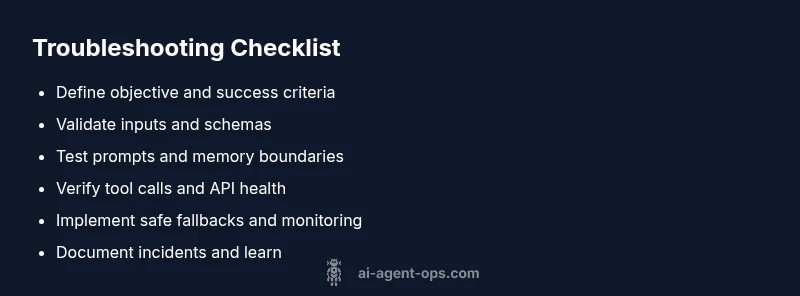
Use a practical triage routine when a failure occurs:
- Verify the agent’s stated objective matches the task.
- Check prompt stability and any recent changes.
- Validate input data freshness and schema compliance.
- Inspect tool calls for errors or timeouts.
- Review memory usage and context limits.
- Confirm API health and version compatibility.
- Roll back a recent change if the failure started after it. A compact, repeatable checklist reduces MTTR and keeps teams focused on the real bottleneck.
Recovery playbook: a practical, repeatable process
When an incident hits, follow a fixed playbook: (1) recreate the failure with a minimal, controlled test case; (2) isolate the root cause by toggling design, data, and integration layers; (3) implement a targeted fix and re-run end-to-end tests; (4) increase monitoring to verify the fix under real workloads; (5) document the incident and adjust guardrails to prevent recurrence. Operating in short, verifiable cycles helps teams learn quickly and stabilize agent performance.
Prevention and robust design practices
Prevention comes from design discipline. Establish clear objectives, deterministic prompts, and modular components with well-defined interfaces. Use synthetic data to stress-test edge cases, and implement failure modes with safe fallbacks. Build in observability from day one: traces, metrics, and logs that answer: what happened, when, and why. Finally, foster a culture of post-mortems that focuses on systems-level improvements rather than individual blame. With the right practices, you can reduce the likelihood of repeat failures and speed up recovery when issues arise.
Steps
Estimated time: 1-2 hours
- 1
Define and verify objective
Restate the task with a concrete success criterion and verify it aligns with user intent. Run a minimal test prompt to confirm expected behavior.
Tip: Keep the goal crisp and measurable to avoid ambiguity. - 2
Sanity-check inputs
Inspect inputs for format, freshness, and completeness. Normalize schemas and remove noisy or conflicting signals before reasoning.
Tip: Implement schema validators and default values. - 3
Test prompts and memory usage
Apply controlled prompts and monitor memory usage to detect drift in context. Compare outputs with and without memory to spot retention errors.
Tip: Log memory timestamps and context length for traceability. - 4
Validate tool calls
Trigger each tool in isolation to ensure responses are correct. Check for authorization errors, timeouts, and rate limits.
Tip: Use contract tests for tool interfaces. - 5
Check end-to-end latency
Measure response times across the flow. Identify bottlenecks in model inference, data retrieval, or tool orchestration.
Tip: Set realistic SLAs and alert on anomalies. - 6
Implement safe fallbacks
Add graceful degradation paths and safe defaults to prevent abrupt failure when a component misbehaves.
Tip: Document fallback behavior for users. - 7
Apply targeted fix and re-test
Implement the minimal patch, re-run the full workflow, and verify outputs against the success criteria.
Tip: Use a rollback plan in case of regression. - 8
Document and monitor
Record root cause, changes, and monitoring improvements. Update dashboards to catch similar issues earlier.
Tip: Automate post-incident notes for consistency.
Diagnosis: Agent produces incorrect outputs, inconsistent behavior, or fails to act on a task
Possible Causes
- highGoal misalignment or ambiguous objective
- mediumData quality issues (stale inputs, missing fields, noisy signals)
- mediumMemory/state drift or context leakage
- highExternal tool/API integration failures
Fixes
- easyReconfirm the agent's objective and success criteria; pin a single primary goal for the session
- easyAudit inputs, normalize data, and add guards for missing or out-of-range values
- mediumReview memory boundaries, reset context when needed, and minimize cross-session leakage
- mediumEnable robust retry logic, version contracts, and health checks for all tool calls
Questions & Answers
What is the most common cause of AI agent failures?
The most common cause is goal misalignment combined with data quality issues. Without a clear objective and clean inputs, the agent drifts and makes inconsistent decisions.
The most common cause is a mismatch between goals and data quality, which leads to drift and inconsistent decisions.
How can I quickly triage an AI agent failure?
Start by validating the objective, then check inputs and tool calls. If issues persist, examine memory boundaries and integration health. Use a minimal reproducible case to isolate the problem.
First confirm the goal, then check inputs and tool calls. If it still fails, look at memory and integrations with a small test case.
What role does observability play in troubleshooting?
Observability helps you see where failures occur in the chain, from model inference to tool wrappers. It enables faster root-cause analysis and safer rollbacks.
Observability shows where the failure happens in the chain, so you can fix it quickly and safely.
When should I involve professional help?
If you face repeated outages, security concerns, or complex architectural failures, escalate to a senior engineer or an AI/ML reliability specialist.
If outages keep happening or it’s a big architecture issue, bring in a senior engineer.
Can I prevent AI agent failures through design?
Yes. Build with clear objectives, deterministic prompts, robust validation, and strong observability. Regular post-mortems and guardrails reduce recurrence.
Absolutely. Clear goals, stable prompts, good input validation, and strong monitoring prevent most issues.
What is a safe fallback for failed tool calls?
Provide a conservative default response or escalate to human review when tool calls fail, ensuring users still receive a useful, non-destructive output.
If a tool fails, give a safe fallback or escalate to a human reviewer.
Watch Video
Key Takeaways
- Identify whether failure stems from goals, data, or integration.
- Establish a repeatable triage checklist for MTTR reduction.
- Prioritize observability and safe fallbacks to prevent outages.
- Document lessons learned to prevent recurrence.