Fixing Issues with AI Agents: A Practical Troubleshooting Guide
Diagnose and fix common issues with AI agents. A practical guide covering failure modes, debugging steps, safety considerations, and prevention tips for reliable agentic AI in production.


Diagnose and fix issues with AI agents using a practical, 6-step troubleshooting flow. Start with the symptom, then verify configuration, data quality, and observability. If simple fixes fail, broaden checks to external dependencies and safety controls. This approach restores reliability quickly while reducing risk in production. According to Ai Agent Ops, visibility gaps are the most common root cause.
Why AI Agent Issues Happen
AI agents sit at the intersection of language models, tools, data, and orchestration layers. When one component misbehaves, the whole workflow can derail. In practice, the most disruptive issues arise from misconfigured prompts or memories, stale data inputs, tool or API changes, and gaps in observability that hide root causes. According to Ai Agent Ops, many organizations struggle with visibility into agent decision-making and data dependencies, which compounds every other problem. This is especially true for agentic AI that coordinates several subsystems in real time. To understand issues, think in terms of four domains: configuration, data, tools, and governance. A failure in any domain can propagate into longer runtimes, incorrect outputs, or safety violations. By recognizing these domains, you can map symptoms to likely root causes and start targeted fixes without unnecessary downtime.
Immediate Fixes to Try Now
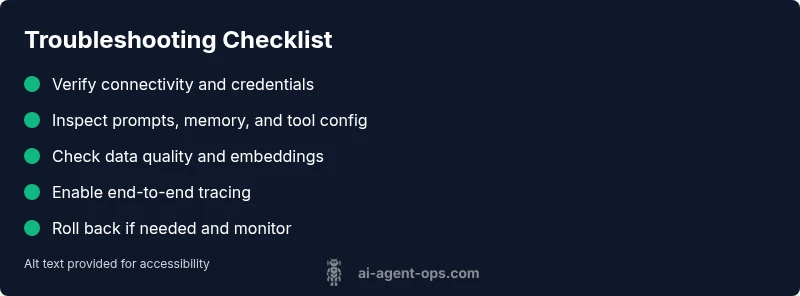
When you first encounter an issue with AI agents, start with the easiest, lowest-risk steps. First, confirm the environment is running the expected version and that all services are reachable. Check API keys, endpoints, and credentials to rule out simple auth or network problems. Review recent changes to prompts, tool configurations, or memory state that could have caused drift. If outputs look biased or inconsistent, test with a known-good dataset in a sandbox. Enable verbose logging and structured telemetry to get context around failures. Finally, if a rollback is possible, revert to a stable version while you investigate. These quick actions often uncover the majority of transient faults without needing deep debugging.
Observability is Often the Missing Link
Most issues with AI agents are not just about the model, but about what you can observe. Without end-to-end traces, you may see timeouts or incorrect results but miss the exact step where things went wrong. Ensure you have tracing across prompts, tool invocations, memory reads/writes, and external API calls. Centralize logs and metrics so you can correlate events across components. Create a baseline of normal latency and success rates, and set alerts for deviations. This visibility is essential not only to fix current faults but to prevent future ones.
Diagnostic Strategy: Map Symptoms to Causes
A disciplined diagnostic approach starts with a concrete symptom and a hypothesis about potential causes. For each symptom, list probable causes, note how likely they are, and propose fixes. Start with high-impact, easy fixes and then move to deeper checks. Create reproducible test cases that you can run in isolation. Document your findings so that future issues can be resolved faster. This strategy reduces guesswork and accelerates mean time to recovery.
Step-by-Step: Reproduce the Most Common Cause and Fix It
The most common root cause often involves data drift or prompt/configuration mismatches. Reproduce the issue in a controlled environment, compare it to a known-good baseline, and systematically apply fixes. Start by validating the latest prompts, memory state, and tool configurations. Then verify data inputs and dependencies, including embeddings and caches. Finally, implement the fix and monitor the system to ensure outputs align with expectations. Keep a changelog of adjustments for future reference.
Safety, Governance, and Prevention
Debugging AI agents must prioritize safety and governance. Protect sensitive data, enforce access controls, and pause automated actions if confidence is low. Use feature flags to isolate changes, run tests with synthetic data, and avoid exposing production data in logs. Document all changes, and review them against policies for privacy and security. Regularly rehearse recovery drills to ensure readiness. These practices minimize risk while maintaining agility.
Common Pitfalls to Avoid
Avoid rushing to code fixes without validation, skipping logs, or ignoring data quality. Relying on single checkpoints can miss multi-step failures. Never deploy debugging changes directly to production without staging and validation. Finally, do not neglect post-fix monitoring—verify that the issue is resolved over time and that performance remains stable under load.
Steps
Estimated time: 60-90 minutes
- 1
Reproduce the symptom
Capture the exact inputs, prompts, and tool calls that lead to the failure. Create a minimal, repeatable test case in a sandbox to ensure the issue is not environment-specific.
Tip: Use synthetic data to avoid exposing production datasets during reproduction. - 2
Verify configuration and prompts
Check that prompts, memory state, and tool configurations match the last known-good baseline. Look for drift, recent edits, or conflicting policies that could alter behavior.
Tip: Use a diff tool to compare current and baseline configurations side-by-side. - 3
Check data quality and dependencies
Inspect input data, embeddings, caches, and any external data feeds. Confirm data schemas and versioned artifacts align with expectations.
Tip: Run data health checks and validate input schemas before processing. - 4
Inspect logs and telemetry
Review end-to-end traces that cover prompts, tool calls, and outputs. Look for anomalies in latency, error codes, or missing events.
Tip: Correlate timestamps across services to locate the fault quickly. - 5
Implement fix and monitor
Apply the identified fix in a controlled environment, then monitor outputs for several cycles. Compare against the baseline to confirm restoration of expected behavior.
Tip: Enable a rollback plan and alerting if symptoms recur.
Diagnosis: AI agent produces incorrect outputs, delays task completion, or fails to perform expected actions.
Possible Causes
- highConfiguration drift or prompt/tool mismatch
- highData quality issues or stale embeddings
- mediumExternal API changes or rate limits
- mediumObservability gaps and insufficient telemetry
- lowResource constraints (cpu/memory) causing timeouts
Fixes
- easyAudit current prompts, memory usage, and tool configurations; align them to baseline
- easyVerify credentials, endpoints, and access to external services; fix auth issues
- easyEnable comprehensive logs and traces across prompts, tools, and data paths
- mediumTest in a sandbox with a known-good dataset and synthetic data to reproduce the issue
- easyIf stable, rollback to a known-good version and reapply changes incrementally
- easyEngage vendor support with reproducible steps if the issue persists in production
Questions & Answers
What is the most common reason AI agents fail?
Misconfigurations and data quality issues are the leading causes. Start by validating prompts, memory state, and inputs, then review tool configurations for drift. A structured check helps you quickly identify and fix the root cause.
The most common cause is misconfigurations and data issues. Start with prompts, memory, and inputs, then check tool configurations.
How can I safely test AI agents before production?
Use a sandbox with synthetic data, enable feature flags, and run end-to-end tests to validate behavior without risking real data or user impact.
Test in a sandbox with synthetic data and feature flags before production.
Which tools help diagnose AI agent failures?
Leverage centralized logs, distributed tracing, and telemetry that cover prompts, tool calls, and memory access. Pair with a test harness to reproduce failures reliably.
Use logs, tracing, and telemetry across prompts and tool calls.
When should I escalate to vendor support?
If issues persist after structured troubleshooting and impact business goals, contact vendor support with reproducible steps, environment details, and logs.
If problems persist after debugging, reach out with evidence and context.
Are there safety concerns when debugging AI agents?
Yes. Avoid exposing sensitive data, enforce access controls, and pause automated actions during debugging. Follow governance policies and use synthetic data when possible.
Be mindful of data privacy and governance when debugging.
Watch Video
Key Takeaways
- Follow a structured diagnostic flow to isolate faults.
- Prioritize observability and data quality as core fixes.
- Test in a sandbox before production deployment.
- Document changes and maintain governance throughout fixes.