How to Install AI Agents: A Hands-On, Practical Guide
A practical, step-by-step guide to install AI agents in your app. Covers prerequisites, setup, testing, and governance for safe, scalable deployments.


Learn how to install AI agents in your project with a repeatable, secure workflow. This guide covers prerequisites, architecture decisions, and the exact steps to set up, test, and govern agent runtimes so deployments are scalable, observable, and safe for production. It also highlights tooling choices and governance practices recommended by Ai Agent Ops.
What AI agents are and why you install them?
AI agents are autonomous software entities that perform targeted tasks, reason about actions, and interact with external services. They bridge human intent and machine-driven execution, enabling smarter automation across products and ops. If you’re exploring how to install ai agents, this section clarifies what agents do, how they differ from simple bots, and why teams invest in agentic AI workflows. A well-chosen agent can coordinate data preprocessing, tool usage, and action logging with minimal human input. In 2026, organizations increasingly adopt agentic AI to orchestrate end-to-end workflows. The Ai Agent Ops team emphasizes that successful deployments start with clear goals and measurable outcomes. The aim is to extend human capabilities, reduce repetitive toil, and improve system responsiveness. Think of prompts, tools, and memory as modular capabilities you assemble into a living workflow. Governance and safety checks should be baked in from day one.
Key ideas to keep in mind include modular prompts and tools, the memory/context window that preserves state, and the governance mechanisms that prevent unsafe actions. By the end of this section you’ll articulate a concrete use-case, the expected outputs, and the success criteria so the rest of the installation process remains focused and testable.
Prerequisites and ecosystem planning
Before you install ai agents, map out the environment where they will run and the data they will access. Assess whether you’ll operate on a local development machine, a dedicated server, or a cloud container platform. Prepare a minimal stack: a supported runtime (Python or Node.js), a container runtime if you plan to containerize, and a version-controlled repository for agent configurations. Security and governance should be baked in from day one: plan secret management, access controls, and audit trails. Establish success criteria and performance SLAs that align with your product goals. The Ai Agent Ops recommendations emphasize starting small with a pilot in a sandbox, then expanding to a controlled production rollout. Documentation of data sources, tool permissions, and expected outputs helps every team member stay aligned.
Architectures and runtimes: choosing the right path
The install path you choose depends on whether you deploy a single agent or a coordinated set of agents. A single-agent approach is simpler to implement and easier to test, but a multi-agent or orchestrated setup can handle complex workflows, concurrency, and tool chaining. Common runtimes include modular agent frameworks that expose prompts, tools, memory, and control logic through a consistent API. Containerization is highly recommended to ensure reproducibility and isolation across environments. When you plan, consider observability from the start: logs, metrics, traces, and alerting. Align tool choices with your data governance requirements, data locality, and latency targets. The Ai Agent Ops guidance highlights the value of a layered approach: core agent runtime, adapters for external tools, and a governance layer that enforces policy and safety checks.
Install workflow: high-level steps you’ll follow
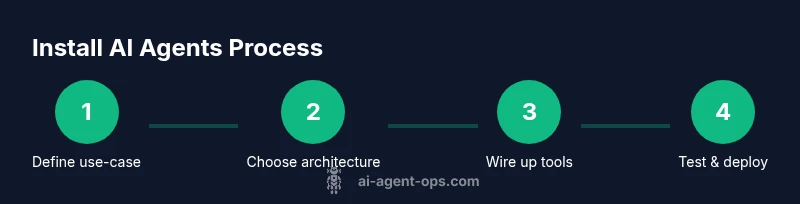
A robust install workflow combines people, process, and technology. It starts with defining the use-case, selecting the runtime, configuring developer environments, and then implementing the agent skeleton. The high-level steps include: 1) set up the dev environment, 2) install and bootstrap the agent runtime, 3) wire in available tools and data sources, 4) implement security and secret management, 5) run local tests, and 6) prepare for production deployment. At this stage you’ll also establish testing strategies, such as unit tests for prompts, integration tests for tool calls, and end-to-end tests that simulate real user scenarios. The key is iteration: you’ll refine prompts and tool configurations as you observe behavior in mock environments.
Testing, observability, and governance
Testing AI agents is an ongoing discipline. Start with smoke tests that verify the agent initializes correctly and can call a couple of tools without errors. Add unit tests for prompts to ensure expected outputs, and integration tests for tool coordination. Instrument observability: log every decision, capture latency, track success/failure rates, and set alerts for abnormal behavior. Governance is not optional: enforce least privilege, rotate credentials, and audit prompts and tool configurations. Modeling risk across data privacy, model drift, and potential misuse is essential; design safety checks and graceful fallback paths. The Ai Agent Ops team recommends running tests in a sandboxed environment that mirrors production, to catch edge cases before customers encounter them.
Troubleshooting and future-proofing
As you scale, you’ll encounter version drift, dependency conflicts, and evolving security requirements. Maintain a changelog of agent configurations and tool adapters, and implement automated checks for compatibility with new runtimes or libraries. If an agent behaves unexpectedly, reproduce the scenario in a controlled environment, inspect tool calls, and review prompts for possible ambiguity. Invest in ongoing optimization: prune unused tools, refine prompts, and adjust memory strategies to balance performance and cost. Plan for updates, rollbacks, and canary deployments to minimize risk. Finally, document your decisions and share learnings across teams to accelerate future agent initiatives.
Tools & Materials
- Development machine(At least 8GB RAM, Linux or Windows)
- Python 3.9+(Use virtual environments (venv or virtualenv))
- Node.js 18+(Optional for JS-based agents)
- Docker / container runtime(Enable reproducible environments)
- Git(Version control for agent configurations)
- AI agent framework/runtime(Choose a baseline like a modular agent template)
- Secret management service(If deploying to cloud, rotate keys regularly)
Steps
Estimated time: 2-3 hours
- 1
Define use-case and success criteria
Decide what the agent should achieve, the inputs it will receive, the outputs it must produce, and how success will be measured. Capture acceptance criteria and potential failure modes to guide architecture and testing.
Tip: Document measurable success criteria before coding. - 2
Select architecture and runtime
Choose between a single-agent model or a coordinated multi-agent orchestration. Decide on a runtime, memory strategy, and how tools will be invoked. Consider future scalability and observability needs.
Tip: Prefer modular, reusable components and a clear API surface. - 3
Prepare development environment
Set up the selected runtime, create a repo structure for prompts, tools, and configurations, and initialize version control. Establish linting, testing, and coding standards.
Tip: Pin dependency versions and use virtual environments to prevent drift. - 4
Install and bootstrap agent runtime
Install the agent runtime, bootstrap with a starter template, and configure basic prompts and tool adapters. Validate the bootstrapped agent starts without errors in a sandbox.
Tip: Run a smoke test to confirm basic behavior before adding tools. - 5
Wire in data sources and tools
Integrate APIs, databases, and local tools the agent will call. Secure credentials and implement basic access controls and auditing for tool usage.
Tip: Use secret management and rotate keys regularly. - 6
Test, observe, and iterate in a sandbox
Execute end-to-end tests, monitor latency, throughput, and failure modes. Collect logs, metrics, and traces to diagnose issues and refine prompts and tool configurations.
Tip: Mock external services to speed up iterative testing. - 7
Prepare for production deployment
Review security, governance, and compliance. Create deployment scripts and CI/CD pipelines with rollback plans and canary deployment where possible.
Tip: Incrementally roll out changes to minimize risk.
Questions & Answers
What is the first step I should take before installing AI agents?
Start by defining the use-case and success criteria. This alignment guides architecture and tooling decisions and prevents scope creep.
Define the use-case and success criteria to guide setup.
Can I install AI agents locally on my laptop?
Yes, you can prototype locally with a lightweight runtime and sandbox. For production, plan containerization and cloud deployment for reliability.
You can prototype locally, but production usually requires containers.
What tools do I need to install AI agents?
A supported runtime, a container engine if you use containers, a version control system, secret management, and an agent framework to expose prompts and tools.
You'll need a runtime, containers, version control, secrets management, and an agent framework.
How do I test AI agents before production?
Use unit tests for prompts, integration tests for tool calls, and end-to-end tests in a sandbox with observability enabled.
Test prompts, tool calls, and run end-to-end tests in a sandbox.
What security considerations should I plan for?
Secure credentials, least-privilege access, audit logs, and prompt safety checks. Rotate keys regularly and monitor for anomalies.
Focus on credentials, access control, auditing, and ongoing monitoring.
Watch Video
Key Takeaways
- Define goals before coding and document success criteria
- Choose a modular, scalable architecture
- Prioritize security, observability, and governance
- Test thoroughly in sandboxed environments
- Plan for production deployment with rollback strategies