How to Build AI Agents: A Practical Step-by-Step Guide
Practical, step-by-step guide to building AI agents from goals to deployment. Learn architecture, tool integration, testing, and monitoring with Ai Agent Ops insights.


You will learn how to design and build an AI agent from goals, data flows, and evaluation criteria. This guide covers defining agent roles, selecting a framework, wiring tool integrations, and validating behavior through tests and monitoring. Essential requirements include a clear objective, modular components, safety constraints, and observability for ongoing improvement.
What is an AI agent and why build one?
An AI agent is an autonomous software entity that perceives its environment, makes decisions, and takes actions to achieve a goal. In modern workflows, AI agents orchestrate tools, fetch data, reason about tasks, and adapt to new information. According to Ai Agent Ops, building AI agents unlocks faster automation, better decision support, and scalable productivity for developers and business teams. If you're exploring ai agent how to build, this guide provides a practical blueprint grounded in agentic AI concepts and real-world constraints. Start with a clear objective, define success metrics, and map out the cognitive cycle from perception to action. The goal is to create a modular system where components can be swapped as needs evolve, rather than a single monolithic bot.
Core components of an AI agent
An effective AI agent typically includes perception (input handling), a reasoning layer (decision-making), action execution (tool use and commands), and a memory layer (context and history). Perception collects signals from users, sensors, or APIs. The reasoning layer interprets prompts, plans steps, and selects tools. Action execution interacts with external systems (APIs, databases, files) to produce outcomes. A lightweight memory stores recent context to improve consistency across conversations. Designing these components as modular building blocks supports rapid iteration and safer experimentation. For teams learning ai agent how to build, the emphasis should be on clean interfaces, clear data contracts, and observable behavior.
Choosing a framework and architecture
Choosing the right framework is foundational. Look for support for agent orchestration, modular tool integration, and safe prompt handling. Consider architectures that separate planning, execution, and memory so you can swap parts without rewiring the entire system. Evaluate whether you need a single process, microservices, or serverless components based on expected load and latency. Emphasize reusable prompts, standardized tool adapters, and centralized logging. For teams, this avoids lock-in and accelerates future agent expansions.
Data, prompts, and tool integration
Data quality is critical for reliable agents. Map where prompts come from, what data sources feed the agent, and how tool results are returned. Design prompts with clear goals, constraints, and fallback behaviors. Build adapters for external tools (APIs, databases, search services) that expose consistent interfaces. Remember to guard sensitive data and implement prompt templating to reduce drift over time. In practice, good data hygiene and stable tool interfaces dramatically improve agent reliability.
Safety, governance, and monitoring
Operational safety means implementing guardrails, access controls, and audit trails. Define failure modes and automatic fallbacks when tools fail or data is ambiguous. Establish monitoring dashboards that surface latency, error rates, and decision rationales. Create runbooks for common incidents and ensure logs are structured for quick troubleshooting. Ethical considerations—bias, privacy, and user consent—should be embedded in design decisions from the start.
Step-by-step blueprint overview
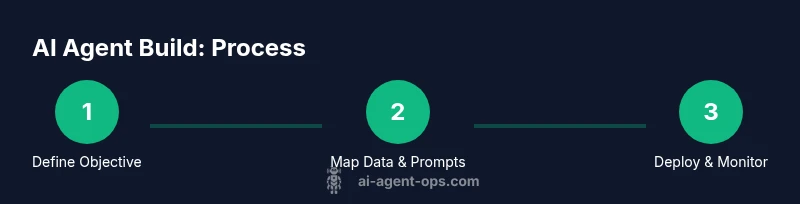
Below is a high-level blueprint you can use to plan your first AI agent: (1) define objective and success criteria, (2) map data sources and prompts, (3) select architecture and tooling, (4) implement tool integrations, (5) test across representative scenarios, (6) deploy with monitoring and governance. Each stage builds on the last, enabling safe, iterative progress while keeping stakeholders aligned. For teams asking about ai agent how to build, this blueprint emphasizes modularity and observability.
Practical examples and pitfalls
Real-world examples show why modular design matters. A finance assistant agent may need real-time data from market feeds and a risk checker, while a customer-support agent relies on knowledge bases and sentiment analysis. Common pitfalls include overcomplicating prompts, coupling components too tightly, and neglecting monitoring. Start with a minimal viable agent that performs one clear task well, then expand capabilities in small, testable increments. Learning from these patterns improves both speed and quality of implementations.
Tools & Materials
- Computing resources (CPU/GPU)(Sufficient capacity for model size and concurrent runs)
- Development environment (IDE, Python, libraries)(Set up a clean virtual environment and dependency management)
- API keys and access to AI services(Secure storage and rotation policies)
- Version control (Git)(Track changes and enable collaboration)
- Data sources and test datasets(Quality data for prompts and evaluation)
- Monitoring and observability tools(Dashboards, alerts, and logs)
- Security and safety policies(Access controls and data handling rules)
- Documentation and runbooks(Operational guidance and incident response)
- Toolset plugins/integrations(Adapters for APIs, databases, and services)
- Test harness and evaluation metrics(Objective criteria for success and regression checks)
Steps
Estimated time: 2-4 hours
- 1
Define objective and scope
Clarify the agent's core goal, success criteria, and safe operating boundaries. Document non-goals to prevent scope creep and align stakeholders.
Tip: Write clear acceptance criteria and outline failure modes. - 2
Map data sources and prompts
Identify inputs, data flows, and prompt designs. Define tool interfaces and expected outputs for each step in the agent's reasoning.
Tip: Create templates for prompts to reduce drift. - 3
Choose architecture and framework
Select a modular architecture that separates planning, execution, and memory. Pick frameworks that support tool integration and safe prompt handling.
Tip: Favor interchangeable components over hard-coded logic. - 4
Implement tool integrations
Connect APIs, databases, and services your agent will use. Ensure adapters expose stable, minimal interfaces and clear error handling.
Tip: Use feature flags to enable/disable tools safely. - 5
Test, evaluate, and iterate
Run representative scenarios, capture outcomes, and identify edge cases. Iterate prompts and tool usage based on results.
Tip: Define objective metrics and run regression tests. - 6
Deploy, monitor, and govern
Roll out to production with logging, alerting, and governance policies. Establish runbooks for incidents and review cycles.
Tip: Automate key alerts and require review before major changes.
Questions & Answers
What is the difference between an AI agent and a traditional software bot?
An AI agent autonomously perceives, reasons, and acts to achieve goals, often using AI models and tool integrations. A traditional bot follows scripted rules and has limited adaptability.
An AI agent can perceive, reason, and act on its own to reach goals, while a traditional bot relies on fixed scripts and has less flexibility.
How long does it typically take to build an AI agent?
Initial prototypes can take a few days to a couple of weeks, depending on scope and data readiness. Full production agents with safety and governance will take longer as you implement monitoring and incident processes.
A basic prototype may take days to weeks; full production agents require more time for safety, monitoring, and governance.
What are common failure modes I should plan for?
Tool failures, data drift, prompts causing unintended actions, and latency spikes are common. Prepare fallbacks, retries, and clear alerting to catch these early.
Common failures include tool outages, drift in data, and prompts behaving unexpectedly. Have fallbacks and alerts ready.
Which frameworks are best for starting an ai agent how to build?
Look for frameworks that support modular tooling, clear interfaces, and safe prompt handling. Start with lightweight orchestration and gradually add tools as you validate needs.
Choose frameworks that let you swap tools easily and keep prompts safe; start small and expand.
How should I evaluate an AI agent's performance?
Define objective metrics aligned to the goal, run representative scenarios, and monitor outcomes over time. Use human-in-the-loop reviews for edge cases.
Use objective metrics and real scenarios; involve humans for tough cases.
Is it safe to deploy AI agents in production?
Yes, with governance: guardrails, monitoring, access controls, and incident runbooks. Start with a staged rollout and clear rollback plans.
Production is possible with proper guardrails and monitoring, plus staged rollouts.
Watch Video
Key Takeaways
- Define a precise objective and success metrics.
- Design modular components for scalability.
- Prioritize safety, governance, and observability.
- Iterate with real scenarios and user feedback.
- Document decisions and maintain runbooks for operations.