How to Get an AI Agent: A Practical 2026 Guide
Learn how to get an AI agent for your team in 2026. Define goals, choose platforms, design prompts, and deploy with governance. Step-by-step guidance, governance insights, and risk considerations for responsible automation.


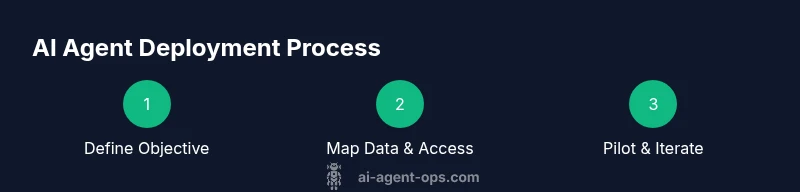
To get an AI agent, start by clearly defining goals, choosing a suitable platform, and configuring prompts with safety guards. Connect your data sources, set governance policies, and run a controlled pilot before broader deployment. This approach helps teams test value, manage risk, and scale responsibly. Document decisions, measure impact, and establish rollback plans from day one.
What is an AI agent and why you might want one
AI agents are autonomous software components that take inputs, reason about tasks, and act across systems with minimal human direction. They can schedule, summarize, fetch data, trigger actions, or drive workflows, enabling faster decision-making and consistent execution. According to Ai Agent Ops, AI agents extend human capability by operating across tools and domains, reducing handoffs and speeding up delivery. For teams evaluating how to get ai agent, the core value comes from shifting repetitive, rule-based tasks to automated agents while keeping humans in the loop for oversight and exception handling. Start by mapping a few end-to-end tasks that consume time, then design an agent that can handle those steps with clearly defined outputs and fallback paths. This foundation supports scalable automation while mitigating risk.
Defining your objective for an AI agent
Before you acquire or build an AI agent, define what you want it to accomplish and how you will measure success. Break down goals into tangible outcomes such as 'triage customer requests within 2 minutes', 'pull latest price data from sources X and Y', or 'update a dashboard with a daily summary'. Ai Agent Ops analysis shows that well-specified goals correlate with faster value realization and fewer scope creep. Document constraints, required data inputs, success criteria, and exit conditions (when to stop or roll back). Also decide on governance: who owns the agent, who can approve data access, and what happens if the agent fails. Clear objectives help both engineers and product leaders align on scope and risk.
Approaches to getting an AI agent: off-the-shelf vs custom
There are two common paths. Off-the-shelf solutions provide agent primitives, templates, and connectors that accelerate learning and deployment for standard workflows. Custom approaches involve building a tailored agent with internal data, specialized tools, and bespoke prompts—offering maximum control but requiring more time and governance. Start with an off-the-shelf pilot to understand capabilities and limits, then add custom components if your use case demands unique data handling, regulatory compliance, or complex integrations. Ai Agent Ops recommends a staged approach to balance speed with guardrails.
Architecture and data needs: inputs, outputs, governance
Your AI agent sits at the edge of your tech stack, consuming data from sources, transforming it, and producing outputs such as actions, alerts, or reports. Define inputs (data types, frequency, privacy constraints) and outputs (actions, summaries, or decisions). Map data flows, access controls, and logging requirements. Establish guardrails: rate limits, error handling, and consent checks. Governance considerations include auditability, versioning, compliance, and risk assessment. By outlining architecture up front, teams can design scalable connectors, maintainable prompts, and robust monitoring.
Choosing a platform and provider: evaluation criteria
Evaluate platforms on interoperability, latency, security, cost, and support. Look for connectors to your core tools, robust authentication, and clear SLAs. Review pricing models, data retention policies, and whether the platform supports prompt versioning and rollback. Prioritize providers with strong security track records and active user communities. Ai Agent Ops emphasizes aligning platform choice with your existing stack and governance requirements to reduce surprises later.
Designing the agent's prompts and safety guards
Prompts define how the agent understands tasks, reasons through steps, and decides when to escalate. Start with a core prompt that encodes your objective, data access rules, and escalation pathways. Create reusable templates for common tasks and version them to track improvements. Implement safety guards: rate limiting, content filters, and privacy protections. Define hard stops (manual override) and soft stops (time or resource constraints). Regularly review prompts against edge cases to prevent drift and ensure reliability.
Integration and deployment considerations
Plan how the agent will integrate with existing workflows: APIs, message queues, dashboards, and notification channels. Use a staged rollout: sandbox, small pilot, then broader adoption. Establish monitoring to detect failures, latency spikes, or data quality issues. Provide operators with dashboards and runbooks for quick triage. Ensure authentication, access control, and data provenance are documented, and plan for decommissioning or upgrades as systems evolve.
Testing, validation, and monitoring
Adopt a multi-layered testing strategy: unit tests for prompts, end-to-end simulations, and human-in-the-loop checks. Validate outputs against acceptance criteria and perform load tests to gauge performance under peak conditions. Implement monitoring for accuracy, latency, and drift. Set alert thresholds and incident response playbooks. Maintain a regression suite to guard against future changes and to ensure consistent quality as you scale.
Common pitfalls and how to avoid them
Avoid vague goals, scope creep, and lax governance. Don’t deploy without a controlled pilot or proper data governance. Watch for data leakage, biased results, and over-reliance on automation for critical decisions. Plan for explainability and rollback options so teams can understand and intervene when needed. By anticipating these traps, you can improve reliability, ROI, and stakeholder trust.
Tools & Materials
- Computing environment (cloud or on-prem)(Access to compute resources with preferred runtime (Python/Node.js) and security controls.)
- API access to data sources(Keys, permissions, sandbox credentials; ensure least privilege.)
- Identity and access management(OIDC/SSO, role-based access, audit logging.)
- Prompts/templates(Versioned base prompts and task templates.)
- Monitoring and logging tools(Prometheus, Grafana, or equivalent observability stack.)
- Security and compliance policies(Data handling rules, privacy controls, and retention policies.)
- Testing data sets(Representative data for pilot scenarios and edge cases.)
- Rollback and audit plan(Process to revert changes and preserve audit trails.)
- Documentation and runbooks(Operational docs for incident response and maintenance.)
Steps
Estimated time: 2-4 weeks for pilot; overall 1-2 months to reach a validated deployment
- 1
Define objective and success criteria
Clearly articulate what the agent should achieve and how you will measure success. Include concrete KPIs and a plan for how to verify results during the pilot.
Tip: Write measurable KPIs (e.g., time to respond, accuracy rate) and set a ceiling for pilot scope. - 2
Map data sources and access
Inventory data sources the agent will use, along with access controls and data quality checks. Define how data will be refreshed and how privacy will be protected.
Tip: Use a data catalog to track lineage and ensure least-privilege access. - 3
Choose an acquisition path
Decide between an off-the-shelf solution for speed or a custom-built agent for maximum control. Plan a phased pilot.
Tip: Start with a small, well-scoped use case to learn capabilities quickly. - 4
Design architecture and prompts
Draft the agent’s core architecture and create versioned prompts. Include escalation rules and safety guards.
Tip: Version prompts and track improvements over time. - 5
Implement integration and governance
Connect the agent to essential systems and establish governance: owners, approvals, and data handling.
Tip: Document decision rights and maintain an audit trail. - 6
Run a controlled pilot
Launch in a sandbox or limited environment to assess performance without impacting critical systems.
Tip: Limit scope to reduce risk and collect early feedback. - 7
Measure, iterate, and plan deployment
Analyze pilot results, iterate on prompts and connections, and outline a staged deployment plan.
Tip: Prepare rollback procedures before broader rollout.
Questions & Answers
What is an AI agent?
An AI agent is software that autonomously performs tasks by interacting with tools and data. It can initiate actions, fetch information, and respond to events with minimal human input, while still allowing human oversight when needed.
An AI agent is software that can act on its own, using data and tools to complete tasks—with humans available for supervision.
What can an AI agent do in a business setting?
AI agents can handle repetitive tasks, monitor systems, trigger workflows, summarize updates, and escalate issues. They enable faster responses and reduce manual workload, but require governance and ongoing validation to stay aligned with business goals.
In business, AI agents automate routine tasks, monitor systems, and drive workflows while staying aligned with governance.
How long does it take to deploy an AI agent?
Deployment time varies by scope. A small pilot can be up and running in a few weeks, while a full-scale rollout may take several weeks to a few months, depending on data readiness and integration complexity.
A pilot can take a few weeks; full deployment may take a couple of months depending on scope.
What are common risks when getting an AI agent?
Risks include data privacy concerns, misconfigurations, drift in prompts, and over-reliance on automation for critical decisions. Establish safeguards, monitoring, and rollback options to mitigate these risks.
Common risks are privacy, misconfigurations, and drift. Guardrails and monitoring help keep deployments safe.
Do I need to code to get an AI agent?
Not necessarily. Many off-the-shelf options provide low-to-no-code paths, while custom deployments may require programming for deeper integrations. Start with a pilot to decide which path fits your team.
You can start with no-code options, then scale with custom builds if needed.
Watch Video
Key Takeaways
- Define success before building.
- Pilot to de-risk and learn.
- Governance and data handling matter.
- Plan for gradual deployment.