How to Create Your Own AI Agent: A Practical Guide
Step-by-step guide to create your own AI agent, from defining goals and architecture to deployment. Learn to build, test, and scale with safety and governance in mind.


Creating your own ai agent begins with a clear objective, a minimal toolset, and an iterative mindset. By defining goals, inputs, and success criteria, you can ship a practical agent quickly and improve it over time. According to Ai Agent Ops, starting small and learning from real usage accelerates both impact and stability.
What is an AI agent and why build your own
An AI agent is a software component that perceives inputs, reasons about options, and takes actions to achieve a goal. It combines data sources, logic, and often a language model to make decisions, then executes those decisions through APIs or user-facing interfaces. Unlike a simple chatbot, an agent operates with autonomy, context, and a plan, with the ability to monitor results and adjust behavior over time. If you want to create your own ai agent, you gain control over data handling, governance, and integration with your existing workflows. This autonomy is valuable for automating domain-specific tasks, such as scheduling, triage, or inventory checks, where a tailored decision loop outperforms generic assistants.
According to Ai Agent Ops, the most successful agents start simple, then expand capability in small, measurable increments. The goal is not to build a perfect agent on day one, but a dependable system that delivers value while you learn from real usage. In practice, a first iteration might handle a narrow domain with a clear success criterion, a few reliable inputs, and a constrained set of actions. Over time, you can broaden scope, introduce safety rails, and refine prompts and memory to support richer workflows.
note_type():null
type:markdown():null
1st section content: null
2nd section content: null
Tools & Materials
- A computer with internet access(Modern laptop or desktop; 8+ GB RAM; capable GPU optional for local models)
- Python development environment(Install Python 3.9 or newer; use virtualenv or conda)
- Code editor / IDE(VS Code, PyCharm, or equivalent)
- LLM access API keys or local model runtime(An API key for an LLM or a local model setup)
- Basic integration targets (APIs, calendars, CRMs)(Examples: calendar API, ticketing API, CRM connector)
- Version control (Git)(Git + Git hosting (GitHub/GitLab) for collaboration)
- Sandboxed testing environment(Isolated workspace to prevent data leaks and unintended actions)
- Synthetic testing data(Use for prompt and edge-case testing)
- Optional vector store or memory layer(FAISS or similar for semantic search and recall)
Steps
Estimated time: Estimated total time: 2-6 weeks
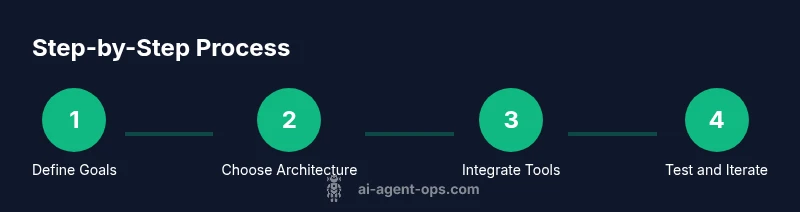
- 1
Define objective and boundary conditions
Articulate the primary task the agent should accomplish, the domain it will operate in, and the constraints it must respect (privacy, latency, tone). Document success criteria and the kinds of inputs the agent will handle. This sets the direction for the entire project.
Tip: Write a one-page objective and an example interaction to anchor scope. - 2
Choose architecture and interaction model
Decide whether you’ll use a rule-based layer, a language-model-based planner, or a hybrid approach. Map inputs to actions and identify the tools the agent will orchestrate (calendars, tickets, databases).
Tip: Start with a simple decision tree and a single tool first. - 3
Set up your development environment
Install Python, create a virtual environment, and set up version control. Install any SDKs for LLMs and tools you plan to integrate. Create a minimal repository structure for modularity.
Tip: Document interfaces and dependencies in a README from Day 1. - 4
Create a minimal viable agent (MVA)
Build a focused MVP that handles one domain with a constrained action surface. Implement input normalization, a lightweight reasoning loop, and a safe fallback if tools fail.
Tip: Limit scope to keep iteration fast and observable. - 5
Integrate data sources and tools
Connect the agent to core services (calendar, ticketing, data sources) through adapters. Establish data flows, authentication, and error handling.
Tip: Mock real services during early testing to reduce risk. - 6
Implement testing and safety rails
Develop unit tests for inputs/outputs, validate prompts, and add guardrails to prevent unsafe actions. Create a sandboxed environment for experimentation.
Tip: Automate prompt tests to catch regressions. - 7
Deploy to a controlled environment
Move the MVP to a staging environment, enable feature flags, and monitor latency and success rate. Establish rollback procedures in case of failures.
Tip: Use gradual rollouts to minimize impact. - 8
Observe, learn, and iterate
Collect logs, metrics, and user feedback. Use this data to refine prompts, expand domains, and improve safety checks.
Tip: Plan a monthly iteration cycle aligned to business goals.
Questions & Answers
What is an AI agent and how is it different from a chatbot?
An AI agent autonomously selects actions to achieve a goal and can execute tasks through tools. A chatbot primarily generates conversational responses. Agents combine perception, reasoning, and action in an integrated loop.
An AI agent can take real actions to reach goals, not just chat. It uses tools and memory to decide what to do next.
Do I need to code to create your own ai agent?
You can start with no-code templates or prompts, but deeper capabilities typically require coding. A basic agent can be assembled with APIs and lightweight scripts.
You can begin with templates, but coding unlocks full customization.
How should I handle data privacy when building an agent?
Minimize data collection, anonymize inputs, enforce access controls, and implement retention policies. Avoid sharing sensitive data with external services unless strictly necessary.
Protect user data by design, limit what you collect, and audit data flows.
What metrics matter for evaluating agent performance?
Track task completion rate, latency, accuracy of decisions, and user satisfaction. Establish thresholds and monitor drift over time.
Watch how fast and accurately the agent gets tasks done, and how users feel about it.
How long does it take to build a basic agent?
A basic MVP can take days to weeks depending on scope and integration complexity. A production-ready agent grows with iterative improvements.
You can ship a small MVP quickly, then expand gradually.
Can I build an agent without cloud services?
Yes, it’s possible with local models and in-house data. However, compute constraints and maintenance effort increase with complexity.
It’s doable offline, but you’ll trade convenience for control.
Watch Video
Key Takeaways
- Define a clear objective before building.
- Start with an MVP to validate value early.
- Iterate with real usage and feedback.
- Prioritize safety, privacy, and governance from day one.
- Measure progress with defined success criteria.