How to Get Rid of a Agent: Safe Decommissioning for AI Agents
Learn a step-by-step method to safely decommission an AI agent, revoke access, purge or anonymize data, and update governance—minimizing risk and ensuring compliant migrations.


To safely get rid of an AI agent, you should decommission it by stopping the agent, revoking access, and securely handling data. Start with disabling the agent and removing it from active workflows, then purge or anonymize stored data and update governance records. This approach minimizes risk and supports compliant migrations.
how to get rid of a agent
Decommissioning an AI agent is a structured process that safeguards data, preserves governance, and prevents orphaned processes from running. The decommissioning plan should cover scope, data policy alignment, and risk assessment. Ai Agent Ops emphasizes clear governance and traceability to avoid data leakage or operational gaps during migration. Begin by mapping all touchpoints the agent has—APIs, webhooks, queues, and storage locations—so you can terminate access comprehensively. This foundation supports secure handoffs and reduces post-decommission surprises for teams across engineering, security, and product. By establishing ownership, deadlines, and success criteria, you create a reproducible playbook for future decommissions. The result is a cleaner tech stack, lower risk exposure, and a clear record of decisions for audits and compliance checks.
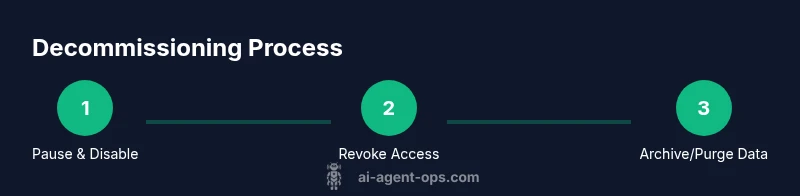
Step 1: Pause and disable the agent
Pause active tasks and disable the agent’s schedulers and triggers. Remove the agent from any automation workflows, queues, or event streams it listens to. Verify that no new tasks can be assigned and that telemetry or data streams are redirected or halted. This step prevents partial shutdowns or data inconsistencies during later steps. Why this matters: it stops new data flow while you perform a controlled shutdown and prevents race conditions during cleanup. Pro tip: run a short diagnostic to confirm there are no orphaned jobs still in progress.
Step 2: Revoke access and disconnect integrations
Revoke all credentials the agent uses to access systems (API keys, OAuth tokens, IAM roles). Remove the agent from identity providers and disconnect it from integrations (CRM, data lakes, ticketing, monitoring). Update service accounts and rotate related secrets to prevent resurgence. This is critical to stop data exfiltration and to ensure no automated tasks resume after decommissioning. Pro tip: perform this in a change-management window to minimize user impact and track all revocations in a ticket.
Step 3: Archive or purge data
Decide which data must be retained for compliance, analytics, or rollback purposes, and which data can be securely deleted or anonymized. Purge or anonymize high-risk identifiers, and preserve logs, metrics, and relevant metadata in an approved retention vault. If backups exist, ensure they are aligned with your retention policy and are protected from unauthorized access. Document deletion scopes and timelines to ensure auditable proof of compliance. Pro tip: automate anonymization for any residual PII before purge.
Step 4: Update documentation and governance records
Record the decommissioning decision in the governance wallet: rationale, scope, stakeholders, and the architecture changes. Update data maps, runbooks, and the agent’s lifecycle documentation. Notify product, security, and compliance teams and archive the final runbook in the change-management system. This helps future teams understand why the agent was retired and how to proceed with replacements or migrations. Pro tip: attach a Lessons Learned section to capture improvements for next time.
Step 5: Plan migration or future replacement
If you anticipate a replacement or upgrade, map a clean migration path: extract reusable components, plan a minimal viable agent, and schedule phased rollouts. Validate data continuity, access controls, and monitoring on the new solution. Conduct a post-decommission review to capture risks and opportunities for automation, cost savings, and safety improvements. Pro tip: run a dry-run migration in a sandbox to validate end-to-end safety before production.
Tools & Materials
- Admin access to production systems(Ensure you have the necessary permissions to disable agents and revoke credentials)
- Audit/logging tooling(Capture before/after states for verification)
- Data retention policy documentation(Align deletion/purging with compliance)
- Data deletion/anonymization tooling(Tools for secure purge and PII masking)
- Change-management ticketing system(Track scope, approvals, and rollback plans)
- Backups and archives access controls(Verify retention rules apply to backups)
Steps
Estimated time: Total time: 1-2 hours
- 1
Pause and disable the agent
Identify all active tasks and disable the agent’s schedulers and triggers. Remove the agent from automation workflows and ensure no new events are routed to it. Confirm that telemetry streams are halted and no data is being written to active stores.
Tip: Run a verification check showing zero in-flight jobs before proceeding. - 2
Revoke access and disconnect integrations
Revoke all credentials (keys, tokens, and IAM roles) used by the agent. Remove the agent from identity providers and disconnect from external systems (CRMs, data lakes, monitoring services). Rotate related secrets and document revocations.
Tip: Coordinate with security and IT to ensure revocations propagate to all connected services. - 3
Archive or purge data
Determine retention needs for logs, metrics, and data maps. Purge or anonymize PII; preserve required analytics data in a compliant vault. Ensure backups follow retention rules and remain inaccessible to the decommissioned agent.
Tip: Automate anonymization to reduce manual error in sensitive fields. - 4
Update documentation and governance
Record the decommissioning decision in runbooks and governance records. Update data maps, incident reports, and change logs to reflect the retirement. Communicate outcomes to stakeholders and archive the final plan.
Tip: Attach a Lessons Learned section to capture improvements for future decommissions. - 5
Plan migration or replacement
If a replacement is planned, outline a migration path with milestones, data continuity checks, and security reviews. Test in a staging environment and perform a controlled rollout with monitoring.
Tip: Run a dry-run migration to validate end-to-end safety before production.
Questions & Answers
What is decommissioning an AI agent and why is it needed?
Decommissioning an AI agent is the controlled removal of an agent from production, ensuring no active tasks, revoked access, and compliant data handling. This reduces security risks and prepares the organization for a safe migration or replacement.
Decommissioning an AI agent means safely removing it from production by stopping tasks, revoking access, and handling data in line with policy.
How should data be handled during decommissioning?
Follow a retention policy to archive or purge data. Anonymize PII where required and ensure backups align with governance rules. Document deletions to satisfy audits.
Archive or purge data according to retention rules, anonymize PII, and log deletions for audits.
What if the agent is part of a larger workflow?
Identify all touchpoints and dependencies. Remove the agent from all workflows and update orchestration rules to prevent orphaned tasks.
Make sure there are no leftover connections or tasks in chained workflows after decommissioning.
What governance artifacts should be updated?
Update runbooks, data maps, risk registers, and incident reports to reflect the retirement. Include decisions and dates for future reference.
Update documentation and risk records to reflect that the agent was retired.
Can I repurpose components from the old agent?
Yes, if components are modular and compliant with security standards. Map reusable parts to a new agent design and test thoroughly.
You can reuse safe, modular components after careful evaluation and testing.
What are common pitfalls to avoid?
Avoid partial shutdowns, unrevoked credentials, and uncontrolled data remnants. Document every step and verify post-decommission state.
Watch for lingering access, incomplete shutdowns, and hidden data remnants.
Watch Video
Key Takeaways
- Pause and disable before deleting any components
- Revoke credentials and disconnect integrations
- Purges or anonymizes data per retention policy
- Update governance records to reflect retirement
- Plan for migration or replacement with a tested path