How to Disable Agentic AI: Practical Step-by-Step Guide
A practical, security-focused guide to safely disable agentic AI features in deployments, covering prerequisites, configuration changes, validation, and governance.


To disable agentic AI in your deployment, pinpoint all agentic components, turn off their agentic mode through configuration, revoke runtime permissions, and verify the change with a test harness. This guide also covers safety, rollback, and governance considerations. According to Ai Agent Ops, a staged disable minimizes risk and preserves data integrity.
What is agentic AI and why disable it?
Agentic AI refers to systems that autonomously set goals and carry out actions without continuous human input. In practice, this includes agents that can decide tasks, reallocate resources, or adapt strategies in real time. For developers, product teams, and business leaders exploring AI agents, understanding the implications is essential. If you're searching for how to disable agentic ai, this section clarifies the concept and why disabling certain capabilities can be a prudent safety measure. According to Ai Agent Ops, agentic AI can improve efficiency, but it also raises governance, safety, and compliance concerns that demand careful management. In this guide we’ll outline a structured approach to safely reduce autonomy, keeping critical operations intact while eliminating undesired agentic behavior. By the end you’ll know when it makes sense to disable agentic AI, what parts to target, and how to validate that autonomy is truly off.
Identify the scope: where agentic AI is implemented
Begin by mapping all components that participate in autonomous decision making. Look for agent cores, planning modules, orchestration layers, and any subsystems that dynamically allocate tasks or resources. Review deployment manifests, configuration maps, and policy engines across your environment. Ask engineers to run a targeted inventory: which services declare goals, which can initiate actions without human prompts, and where autonomy is gated by permissions. Documentation and version control histories are valuable here; use them to trace which modules have agentic features and when they were introduced.
Prerequisites and safety considerations
Before touching any live system, establish a safety-first baseline. Create a rollback point by exporting backups of data, configuration, and state. Obtain necessary approvals from governance bodies and security teams. Ensure you have a staging or canary environment that mirrors production. Prepare a test plan that exercises typical workflows without exposing sensitive data. Finally, confirm access controls and audit logging will capture all changes for accountability. The goal is to minimize risk while ensuring you can restore operations if needed.
Plan and prepare: deactivation strategy
Develop a concrete deactivation strategy that preserves essential capabilities while removing autonomous behavior. Decide which agentic modules to disable first, and whether to implement a toggle flag, feature gate, or policy change. Outline dependencies so disabling autonomy in one component won’t cause cascading outages. Document success criteria, such as “no autonomous task initiations” and “no agentic decision outputs” in the test environment. Prepare communication plans for stakeholders and a clear rollback path if validation reveals gaps.
High-level deactivation steps overview
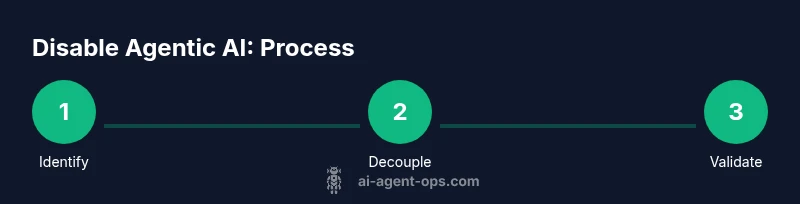
The following overview maps to a safe, staged approach. First, isolate the agentic components from production data flows and user-visible interfaces. Next, disable autonomy at the policy or configuration level, then revoke runtime privileges that enable autonomous actions. Finally, verify by running a battery of tests that cover edge cases, normal workflows, and failure modes. This high-level plan minimizes disruption while ensuring you can re-enable features if needed with proper governance checks.
Validation and monitoring after disabling agentic AI
Validation should confirm that no autonomous actions occur post-disablement. Run end-to-end tests, rehearse failure scenarios, and check telemetry for any residual agentic signals. Review logs for unexpected task creation, goal redefinitions, or autonomous decision triggers. Establish monitoring dashboards focused on autonomy indicators and alert on deviations. If any autonomous behavior surfaces, halt changes, re-audit permissions, and consult the governance board before proceeding.
Governance, logging, and rollback considerations
Disablement is not only a technical change; it’s a governance event. Update policy documents, changelogs, and security notes. Ensure all changes are auditable with timestamps, user identities, and rationale. Maintain a rollback plan with versioned configurations and a tested revert procedure. Notify stakeholders and document potential operational impacts to planning and compliance.
Best practices for future agentic AI governance
Adopt a proactive governance posture: define autonomy boundaries, implement strict RBAC for agentic components, and use feature flags to control autonomy in production. Regularly review safety and ethics guidelines, perform drift checks on autonomy behavior, and schedule periodic red-teaming exercises. Invest in transparent monitoring and explainable autonomy so leadership can understand and intervene when needed.
Tools & Materials
- Administrative access to deployment environment(Enable MFA; limit to roles required for disablement)
- Configuration management tool(Access to manifests, Helm charts, or Ansible playbooks)
- Backup snapshot of data and configs(Export before changes; verify integrity before apply)
- Test harness / staging environment(Mirror production workloads without customer data)
- Audit logs viewer(Ensure you can verify who changed what and when)
- Change request & approvals workflow(Track approvals, risk assessment, and rollback plan)
Steps
Estimated time: 60-120 minutes
- 1
Identify agentic components
Locate all modules, services, and policies enabling autonomous behavior. Use code searches for keywords like agent, autonomy, goals, and decision. Map each component to its data flows and security permissions to understand impact before changes.
Tip: Document every finding with a diagram and tag critical paths for quick reference. - 2
Isolate critical paths
Separate autonomous decision paths from user-facing interfaces. Ensure core workflows can continue with human prompts or fixed rules. Prepare to flip autonomy off without breaking essential operations.
Tip: Avoid cutting off essential monitoring or alerting paths during isolation. - 3
Disable agentic modules
Apply configuration changes or feature gates to deactivate autonomy in the identified components. If possible, decouple policy engines from runtime actions to minimize ripple effects.
Tip: Use a staged rollout to reduce blast radius and enable quick rollback if needed. - 4
Revoke permissions
Tighten RBAC and revoke runtime privileges that enable autonomous actions. Remove any service accounts or tokens associated with agentic behavior.
Tip: Double-check downstream services that rely on these permissions to avoid unintended outages. - 5
Update configuration and policies
Reflect disablement in all configuration stores and policy definitions. Apply a global flag indicating autonomy is off and ensure it propagates to all environments.
Tip: Keep the change controlled with a single source of truth to avoid drift. - 6
Run validation tests
Execute end-to-end tests that simulate real workflows without autonomous actions. Validate data integrity, user prompts, and failure-handling since autonomous behavior is disabled.
Tip: Include load and resilience tests to reveal any hidden dependencies. - 7
Document rollback plan
Record exact steps to revert changes, including versions, commands, and expected outcomes. Ensure the plan is accessible and rehearsed with relevant teams.
Tip: Always test the rollback in staging before applying to production.
Questions & Answers
Is it safe to disable agentic AI in production?
Disabling agentic AI in production carries risks if autonomous tasks support critical workflows. Use staging, feature flags, and a clear rollback plan to minimize disruption.
Disabling in production can be risky; use staging and a rollback plan to stay safe.
Will disabling agentic AI affect existing workflows?
Yes, autonomous tasks may pause or require manual triggers. Map dependencies and prepare manual fallback processes before disablement.
Autonomous tasks may pause; plan manual steps as backups.
How do I verify that agentic AI is fully disabled?
Run end-to-end tests, inspect telemetry for autonomy signals, and confirm policy flags are off across environments.
Run tests and check logs to confirm autonomy is off.
Can I re-enable agentic AI later safely?
Yes, but re-enable through a controlled rollback with versioned configs and monitoring to detect drift.
You can re-enable later, but do it with a controlled rollback.
What governance steps should accompany disablement?
Update policies, document changes, notify stakeholders, and review security implications as part of the change.
Update policies and notify stakeholders when you disable agentic AI.
Watch Video
Key Takeaways
- Identify all agentic components before changes
- Use staged disablement and rollback plans
- Validate with comprehensive tests and logs
- Document governance implications and outcomes