How to Use OpenAI Agent: A Practical Step-by-Step Guide
Learn how to deploy and orchestrate OpenAI agents for smarter automation. This practical guide covers setup, prompts, monitoring, and best practices for reliable agent workflows.


This guide shows you how to use OpenAI Agent to automate tasks with minimal friction. You’ll learn the core concepts, pick the right agent pattern, and set up a safe, observable workflow. Prerequisites include an API key, a development environment, and basic prompt design knowledge to start building effective agents.
What is an OpenAI Agent and When to Use It
An OpenAI agent is a modular software component that combines language models with tool usage to autonomously plan, act, and observe outcomes. It can access external services, fetch data, compute results, and adjust its behavior based on feedback. Use agents when tasks require multi-step decision making, dynamic data retrieval, or orchestrating several services in sequence. This approach is particularly powerful for automating workflows that previously demanded manual scripting, API glue, and human-in-the-loop oversight. According to Ai Agent Ops, adopting agentic patterns accelerates automation while preserving controllability, especially in complex, data-driven environments. If you’re wondering how to use OpenAI Agent effectively, start by framing a concrete objective, such as “aggregate daily metrics from three sources and present a summary.” This helps anchor your prompt design, choice of tools, and monitoring strategy. The goal is to produce reliable, auditable outputs without requiring continuous hand-tuning.
Throughout this guide you’ll see practical patterns, templates, and safety considerations that align with the Ai Agent Ops framework for responsible AI.
Core Components of an OpenAI Agent
A functional OpenAI agent typically comprises four core components: a planner, a tool interface, a memory or state store, and an observer loop. The planner decides what to do next, choosing from tools like data fetch, calculation, or external APIs. The tool interface provides consistent wrappers for each capability, including input validation and error handling. Memory stores keep context across steps, helping the agent remember previous goals and results. The observer loop monitors outcomes, triggers retries, and logs decisions for auditing. Together, these parts enable a robust, reusable pattern: plan → act → observe → learn. For teams building agents, standardizing tool wrappers and prompts reduces drift and makes behavior more predictable over time.
When you design an agent, define clear boundaries for each tool, specify expected inputs/outputs, and implement graceful degradation if a tool fails. This leads to more resilient automation that can recover from transient issues without human intervention, while still offering an auditable trail of reasoning.
Planning vs. Acting: How an Agent Executes Tasks
Effective agents separate high-level planning from low-level actions. The planning phase outlines a sequence of goals and decisions, while the acting phase executes concrete steps using tools. This separation makes it easier to reason about the agent’s behavior and to test individual components. In practice, prompts often describe a plan in natural language, followed by concrete tool invocations with structured inputs. The agent then observes results, updates its plan, and repeats until completion. Ai Agent Ops analysis shows that well-structured plans dramatically reduce unnecessary tool calls and improve end-to-end reliability. For practitioners, start by specifying the final objective, success criteria, and a minimal viable sequence of actions, then incrementally add branches for exceptions and data variability. Always log each decision point so you can audit the agent’s behavior later.
Keep prompts focused on observable outcomes and avoid hard-coding steps that don’t adapt to changing data.
Setting Up Your First OpenAI Agent
Before you build, gather essential prerequisites and a simple baseline: an API key, a local development environment, and a small script to initialize the OpenAI client. Choose a programming language you’re comfortable with (Python or JavaScript/Node.js are common starting points). Install the necessary SDKs or libraries, and create a minimal agent skeleton that accepts a goal, then executes a single tool call. This baseline helps you validate connectivity, authentication, and basic prompt routing. As you expand, you’ll add more tools, memory, and error handling. Remember to keep credentials secure and to rotate keys periodically. If you’re unsure where to start, consult the OpenAI API docs and Ai Agent Ops best practices for a safe, scalable setup that scales with your use case.
Once your baseline works, you can incrementally add prompts, store context, and implement monitoring hooks to observe agent behavior in real-time.
Designing Prompts and Tool-Use Patterns
Prompt design is central to agent quality. You should craft prompts that describe the objective, outline the plan structure, and constrain tool usage to well-defined interfaces. Use tool schemas to standardize inputs and outputs, making it easier to compose calls and validate results. Common patterns include: 1) Tool-first prompts where the plan prioritizes tool usage; 2) Memory-aware prompts that preserve essential context across steps; 3) Guardrails prompts that constrain actions to safe domains. When integrating tools, define clear input schemas and expected output shapes, so the agent can validate results before proceeding. Relative to traditional chatbots, agents require explicit state transitions and auditable tool invocations. In practice, keep prompts modular and testable—swap or upgrade tools without rewriting the entire agent.
Experiment with scaffold prompts that describe triggers, data sources, and success criteria. Use variables to minimize hard-coded content and enable reusability across tasks.
Observability, Safety, and Governance
Operational observability is non-negotiable for production agents. Instrument your agent with structured logging, tracing, and metrics that reveal decision points, tool calls, and outcomes. Implement safety constraints, such as action boundaries, rate limits, and fallback behavior when data is incomplete. Data handling should follow policy requirements: minimize data exposure, anonymize where possible, and store only what is necessary for auditability. Governance should include versioned prompts, change management for tool schemas, and periodic reviews of agent performance. Ai Agent Ops emphasizes continuous monitoring and prompt hygiene as core pillars of responsible deployment. In practice, set up dashboards that surface latency, success rate, and tool-call distribution so you can detect drift early and adjust prompts or tool configurations accordingly.
Real-World Use Cases and Implementation Tips
OpenAI agents are versatile across domains such as customer support, data analysis, and workflow automation. For instance, an agent can pull recent sales data from a CRM, summarize trends, and generate a routine report. In software development, an agent can fetch build results, interpret test reports, and issue recommendations. A practical tip is to start with a narrow scope and a single data source, then progressively broaden the scope and integrations as you gain confidence. Document lessons learned and update your playbooks. The Ai Agent Ops team has observed that aligning agent capabilities with clear business outcomes yields faster ROI and more predictable outcomes. Build your agent with iterative feedback loops so it improves with each cycle while staying aligned with business goals.
Common Pitfalls and How to Avoid Them
Many teams underestimate the importance of observability and safety. Common mistakes include overloading prompts with too many duties, bypassing guardrails in edge cases, and failing to validate tool outputs before acting. Start with strict input validation and explicit termination conditions. A frequent issue is tool incompatibility or version drift; maintain a changelog for tool schemas and automate compatibility checks. Finally, avoid data leakage by separating data used for training or context from sensitive inputs. The Ai Agent Ops verdict is simple: design for resilience first, then optimize for performance. Proactive monitoring, conservative defaults, and clear escape hatches are the keys to durable agents.
Tools & Materials
- OpenAI API key(Store securely; control access using least privilege)
- Development environment(VS Code, JetBrains, or similar IDE with terminal access)
- Python 3.x or Node.js 18+(Choose based on your team's preference)
- OpenAI SDK or client library(pip install openai or npm install openai)
- Minimal use-case brief(One-liner describing the task the agent should perform)
- Documentation and examples(OpenAI docs, agent patterns, and sample prompts)
Steps
Estimated time: 60-90 minutes
- 1
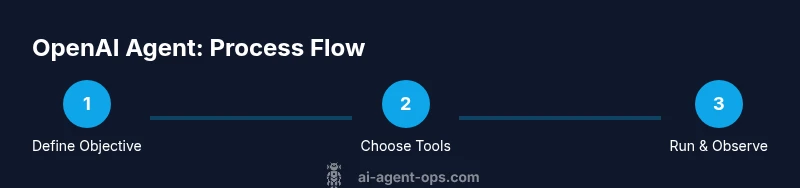
Define the objective
State a concrete goal for the agent and establish measurable success criteria. This anchors the entire build and helps you design prompts and tool interfaces.
Tip: Write a one-sentence success criterion and keep it achievable in the first iteration. - 2
Select tools and data sources
Choose the external services the agent will use (APIs, databases, docs). Create simple adapters that expose a uniform input/output shape.
Tip: Start with 1-2 tools; add more only after the core flow is solid. - 3
Draft the baseline prompt
Create a modular prompt that describes the goal, plan structure, and tool usage constraints. Include a guardrail for unsafe actions.
Tip: Keep prompts focused and test each module independently. - 4
Implement planning and observation
Code the loop that generates a plan, executes tools, observes results, and updates the plan. Log each decision point for auditability.
Tip: Use deterministic prompts and explicit exit conditions. - 5
Run a controlled test
Execute the agent against a fixed dataset or sandboxed environment. Validate outputs against expected results.
Tip: Track false positives/negatives and refine prompts accordingly. - 6
Deploy with monitoring
Move to a staging or limited production rollout. Monitor latency, success rate, and tool usage; set alert thresholds.
Tip: Automate retraining or prompt tweaks when metrics drift.
Questions & Answers
What is an OpenAI agent?
An OpenAI agent combines a language model with tools to plan, act, and observe outcomes, enabling autonomous task execution across services.
An OpenAI agent uses a language model plus tools to plan and act on tasks without constant human input.
Do I need to code to use an OpenAI agent?
Basic setup usually requires coding, but there are low-code patterns and templates to bootstrap common workflows.
You’ll typically code a starter agent, then you can reuse templates for common tasks.
Can agents access live data sources?
Yes. Agents can query APIs, databases, and documents in real time, provided you define secure access and data handling rules.
Yes, but you must configure secure access and data handling first.
What are common risks with agents?
Common risks include data leakage, unsafe actions, and tool misbehavior. Implement guardrails, auditing, and fail-safes.
Risks include data leakage and unsafe actions; use guardrails and audits to prevent them.
How do you test an OpenAI agent?
Test in a sandbox with synthetic data, then validate against real-world scenarios in stages, adjusting prompts and tool use as needed.
Test in a sandbox first, then expand to real-world cases gradually.
What’s the difference between an agent and a bot?
An agent plans and uses tools to achieve goals autonomously, while a bot typically handles scripted interactions without broad tool use.
Agents plan and use tools; bots handle scripted tasks.
Watch Video
Key Takeaways
- Define the objective before building.
- Choose a minimal viable tool set first.
- Test in isolation and iterate based on data.
- Prioritize observability, safety, and governance.
- Document decisions and maintain versioned prompts.