Azure AI Agent vs Assistant: An Analytical Comparison
An analytical comparison of Azure AI Agent and Azure Assistant, examining capabilities, architecture, governance, deployment, and real-world use cases to guide enterprise decisions.


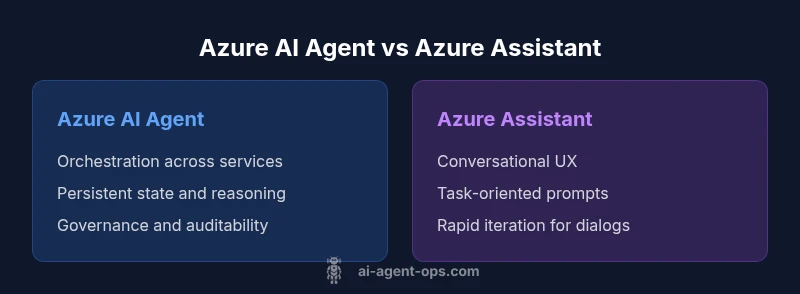
Azure AI Agent vs Assistant: In enterprise automation, the Azure AI Agent emphasizes orchestrated workflows, persistent reasoning, and cross-service coordination, while Azure Assistant centers on natural-language interaction and task execution through guided prompts. The best choice hinges on your goals: scalable, governable agent orchestration versus straightforward conversational capabilities. For teams pursuing agentic AI workflows, Azure AI Agent typically aligns with broader modernization efforts.
Understanding the Distinction: Azure AI Agent vs Azure Assistant
According to Ai Agent Ops, the Azure AI Agent is designed for orchestrated, agentic workflows that span multiple Azure services, data stores, and external APIs. In contrast, Azure Assistant leans toward conversational interfaces that drive task execution through natural language prompts. This distinction matters because it shapes how teams architect automation, manage data, and govern behavior across an organization. The choice is rarely binary; many enterprises end up combining both approaches to cover both orchestration and user-facing conversation. The Ai Agent Ops team notes that the decision should reflect your automation maturity, governance requirements, and the scale of your workflows, rather than chasing a single feature set.
Why the Distinction Matters for Enterprise Automation
For large organizations, the ability to coordinate hundreds of services with strong governance is a game changer. Azure AI Agent supports long-running, stateful workflows where agents can reason, plan, and execute across systems, logging decisions for auditability. Azure Assistant shines when user interfaces demand fluent, human-like dialogue, quick task completion, and intuitive prompts. The combination can reduce cycle times, improve user experience, and unlock new productivity patterns. The trade-off often comes down to control versus convenience: more control and observability with agents, more speed and ease-of-use with assistants.
Core Capabilities: Orchestration, Reasoning, and Persistence
Azure AI Agent emphasizes multi-step orchestration, cross-service decision making, and persistent context. It enables agents to sequence actions, retry failed steps, and adapt to changing data, which is essential for complex business processes such as order orchestration, data pipeline management, or incident response. Azure Assistant prioritizes natural-language understanding, intent recognition, and dialog management to carry out tasks through chat-like interactions. For teams, the meaningful distinction lies in whether the system needs sustained, agent-level reasoning or primarily conversational task execution. Ai Agent Ops observations indicate that teams with complex workflows benefit more from agents, while teams prioritizing UX around chat interactions may derive immediate value from assistants.
Architectural Differences Within the Azure Ecosystem
Azure AI Agent typically relies on orchestration surfaces that connect to Azure Logic Apps, Durable Functions, and custom action handlers, enabling persistent state, planning, and cross-service coordination. Azure Assistant leverages conversational services, language models, and prompt-driven flows, often integrated with Bot Framework and QnA Maker-like capabilities. The architecture choice affects how you model data, where you store state, and how you secure cross-service access. In practice, a combined approach may map natural-language prompts to agent-initiated workflows, delivering both conversational UX and robust orchestration under a common governance umbrella.
Deployment Models: Cloud, Edge, and Hybrid Considerations
Azure AI Agent is well-suited to cloud-centric deployments where you leverage centralized control planes, enterprise data stores, and governance tooling. For organizations with edge constraints or data residency requirements, you may extend orchestration patterns towards hybrid architectures, ensuring agent actions respect local data policies. Azure Assistant deployments often prioritize edge-friendly UX or lightweight deployments where chat interfaces operate with limited latency. Understanding latency tolerance, data locality, and device constraints helps you decide where and how to place each component for optimal performance.
Governance, Compliance, and Security Considerations
Governance for agentic workflows requires robust policy enforcement, role-based access, and comprehensive auditing of decisions and actions. Azure AI Agent can be integrated with policy frameworks, telemetry dashboards, and centralized security controls to ensure compliance. Azure Assistant adds an emphasis on conversation privacy, prompt hygiene, and secure handling of user data. A mature strategy often combines both: agents handle orchestrated tasks with auditable logs, while assistants manage user-facing interactions with strict prompt and data-handling policies. Ai Agent Ops highlights that governance, not just capability, determines long-term success.
Data Handling, Privacy, and Residency
Data flow in agentic architectures traverses multiple services and storage layers. Azure AI Agent requires careful data governance to avoid leakage across steps, with clear data retention and access controls for each stage of the workflow. Azure Assistant focuses on ensuring that user dialogue remains private and that PII is protected throughout conversational interactions. Teams should implement data masks, access policies, and end-to-end encryption where feasible, along with explicit data provenance to maintain trust in automated decisions.
Developer Experience: Tooling, SDKs, and Patterns
Developers working with Azure AI Agent gain tooling for defining states, rules, and action sequences, plus SDKs that help integrate with Azure services. Durable patterns, state machines, and action plumbing support complex workflows while enabling testability and observability. Azure Assistant offers streamlined tooling for rapid prototyping of conversational flows, with guided prompts and templates that accelerate initial deployment. The trade-off is that agents demand more upfront architecture work, whereas assistants can yield faster wins for simple use cases. Both need strong monitoring and continuous improvement cycles.
Performance and Scalability in Real Workloads
In practice, Azure AI Agent scales by distributing task authorship across agents and services, allowing concurrent operations, retries, and parallel data processing. Latency becomes a function of workflow complexity and service dependencies, not just model latency. Azure Assistant performance hinges on model quality and prompt design, with throughput tied to chat interactions. For enterprises, the recommended approach is to profile end-to-end latency, monitor bottlenecks, and implement caching or state management strategies to ensure predictable performance at scale.
Pricing and Total Cost of Ownership Considerations
Pricing for both paths varies with usage, data volumes, and feature sets, and exact figures depend on your Azure contract. A thoughtful TCO analysis considers build time, maintenance, governance overhead, and the value of reduced cycle times. While Azure AI Agent may incur higher initial investment due to orchestration design and state management, it can yield longer-term savings through automation at scale. Conversely, Azure Assistant can provide quick wins with lower upfront costs for conversational tasks. Ai Agent Ops recommends a structured cost model that includes data transfer and storage, compute for agents, and governance tooling.
Migration Paths: From Assistant to Agent or Vice Versa
Migrating from a conversational assistant toward a more agentic pattern often starts with identifying candidate workflows that would benefit from orchestration, then incrementally introducing stateful components and action handlers. Moving in the opposite direction may involve extracting tightly scoped agent steps into stand-alone services that can be exposed via a conversational layer. A staged approach reduces risk, preserves user experience, and helps preserve data governance continuity. Documentation and a rollback plan are essential during transitions.
Use-Case Archetypes: When to Choose Each Approach
Choose Azure AI Agent when you need cross-service automation, complex decision-making, long-running processes, and centralized governance. Choose Azure Assistant when the primary objective is a natural, fluent user interface for task execution, quick onboarding, and rapid iteration of prompts. Real-world teams often combine both: a conversational front-end routed to orchestrated agents in the back end. This hybrid pattern balances UX quality with enterprise-grade automation.
Risks, Limitations, and Best Practices
Common risks include over-automation, data privacy gaps, and integration fatigue from too many moving parts. Limitations may include longer initial setup times and steeper learning curves for agent-based architectures. Best practices involve starting small with a clear governance strategy, adopting modular design for actions, and implementing robust observability. Regularly review security policies, ensure data lineage, and iterate prompts and workflows to maintain reliability and user trust.
The Decision Framework: A Practical Checklist for Teams
To decide between Azure AI Agent and Azure Assistant, map your goals to four criteria: orchestration scope, governance requirements, data locality, and long-term maintenance. Score each on a 1–5 scale, align with your organizational risk tolerance, and consider a phased rollout that adds agent capabilities atop an existing conversational layer. The decision framework should also include a pilot schedule, success metrics, and a plan for incremental value delivery.
Comparison
| Feature | Azure AI Agent | Azure Assistant |
|---|---|---|
| Orchestration scope | High; cross-service coordination across Azure and external systems | Low; conversational task execution within a defined UX |
| Context persistence | Yes; supports long-running stateful workflows with retries | Limited; primarily stateless prompts with session context |
| Governance & auditing | Strong policy enforcement and audit trails | Basic governance with logging of conversations |
| Azure ecosystem integration | Deep integration with Azure data services, Logic Apps, and Durable Functions | Strong integration for chat flows, with broad API support |
| Performance drivers | Workflow complexity and service dependencies drive latency | Prompt quality and model latency drive responsiveness |
| Deployment options | Cloud-first with potential hybrid patterns | Cloud-first with edge-ready UX options |
Positives
- Stronger cross-service orchestration for complex workflows
- Improved governance and auditability for enterprise use
- Better scalability across large teams and datasets
- Tighter integration with Azure data services and security tooling
What's Bad
- Higher upfront complexity and longer time-to-value
- Steeper learning curve for developers
- Potential for vendor lock-in if architecture heavily tailors to Azure services
- Higher maintenance burden for large-scale agent maps
Azure AI Agent is the preferred option for scalable, orchestrated agentic workflows.
If your priorities include end-to-end automation, governance, and enterprise-scale orchestration, Azure AI Agent generally provides the right foundation. Azure Assistant remains compelling for rapid UX-focused tasks and conversational interfaces. Most teams will benefit from a hybrid approach that leverages both layers where each excels.
Questions & Answers
What is the key difference between Azure AI Agent and Azure Assistant?
Azure AI Agent provides orchestrated, stateful workflows across services, while Azure Assistant focuses on fluent conversational interfaces for task execution. The choice depends on whether your priority is automation scale and governance or user-facing chat experiences.
Azure AI Agent orchestrates actions across services, whereas Azure Assistant handles chat-based tasks. The choice depends on whether you need automation scale or a conversational UX.
Can Azure AI Agent replace a traditional assistant?
It can replace or augment some assistant tasks by adding orchestration and decision-making capabilities, but many teams will keep a conversational layer for user interactions and reserve agent orchestration for backend workflows.
It can augment or replace parts of an assistant with more automation, but many teams still need a conversational layer for users.
What governance features are available with Azure AI Agent?
Governance features typically include policy enforcement, access controls, auditing, and centralized monitoring of agent decisions and actions. These controls help ensure compliance and traceability of automated workflows.
There are strong governance features to track what agents do and who can change them.
Is Azure AI Agent suitable for on-premises deployments?
Azure AI Agent deployment is generally aligned with cloud-based architectures in Azure. Hybrid or on-premises needs depend on service integrations and data residency requirements, and may require architecture adaptations.
It’s mainly cloud-focused, but some hybrid patterns are possible depending on services and data needs.
How should I estimate the total cost of ownership?
Estimate by considering development time, runtime compute, data storage, data transfer, and governance tooling. Include maintenance and potential savings from automation time and reliability.
Think about development, runtime, data storage, and governance costs, plus potential savings from automation.
What are typical migration steps between the two options?
Start by identifying candidate workflows, prototype with a minimal agent layer, gradually introduce state and orchestration, and validate against governance and UX requirements before full rollout.
Start small, prototype, then scale up the orchestration gradually while keeping users informed.
Key Takeaways
- Prioritize orchestration when workflows span multiple services
- Leverage governance and auditing for compliance-heavy environments
- Use assistants for rapid UX and conversational tasks
- Adopt a phased migration to minimize risk and ensure data integrity
- Plan for cost with a structured TCO that includes governance tooling