Fix AI Agent: Step-by-Step Troubleshooting Guide
Learn proven steps to diagnose, patch, and validate AI agent failures. A developer-focused, educational guide to fix ai agent with data hygiene, architecture checks, and safe deployment.


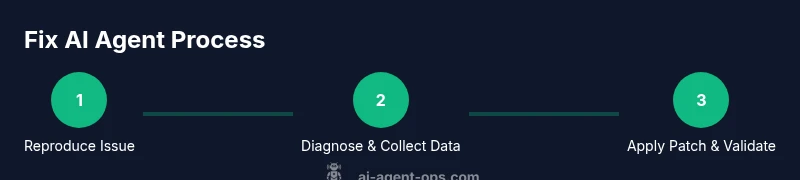
Fix ai agent effectively by diagnosing data and prompts, validating architecture, and deploying safe patches. This quick answer outlines the essential steps: reproduce the issue, isolate the failing component, apply a targeted fix, and verify with tests and monitoring. You’ll also learn when to rollback and how to document changes.
What fixing an AI agent means in practice
Fixing an AI agent is about restoring reliable, predictable behavior by investigating data quality, prompt design, and the surrounding decision logic. It requires a structured approach: reproduce the issue, identify the failing subsystem, implement a measured patch, and validate the outcome in a controlled environment before promoting changes to production. According to Ai Agent Ops, effective fixes start with clear problem statements, traceable data lineage, and guardrails to prevent recurrence. The goal is not to overwrite cleverness with shortcuts, but to harden the system against similar failures in the future while preserving agent autonomy and usefulness.
- Reproducibility matters: you must observe the failure under the same conditions to investigate.
- Traceability matters: collect logs, prompts, and versioned data to establish a proper audit trail.
- Guardrails matter: implement checks that prevent dangerous or misleading actions by the agent.
These principles help teams move from ad-hoc patching to repeatable, auditable fixes that scale across agents and workflows.
Common failure modes in AI agents
AI agents fail for a variety of reasons, often at the intersection of data, prompts, and policy. Common failure modes include misinterpretation of user intent due to ambiguous prompts, drifting model behavior from outdated or biased training data, brittle orchestration logic that queues tasks incorrectly, and insufficient safety guards that allow undesirable actions. In production, you may see latency spikes, intermittent accuracy drops, or hallucinations where the agent generates irrelevant or incorrect outputs. By cataloging failures into consistent categories, teams can prioritize fixes effectively and reduce time-to-resolution for future incidents. Ai Agent Ops emphasizes that failure mode taxonomy improves triage speed and minimizes regression risk when deploying fixes.
- Data drift: incoming inputs diverge from training data expectations.
- Prompt misalignment: user intent is misunderstood due to vague prompts.
- Orchestration gaps: task sequencing causes deadlocks or race conditions.
- Safety gaps: missing guardrails permit unsafe or non-compliant actions.
Diagnosing data hygiene: inputs, prompts, and training data
A robust fix begins with data hygiene. Start by auditing inputs: normalize formats, remove outliers, and mask sensitive information. Examine prompts for ambiguity and ensure they map clearly to the agent’s action space. Review training data snippets and labeled examples to spot drift or mislabeled instances that could mislead inference. Establish a data lineage checklist that traces each decision from input to output. Use synthetic test data to reproduce edge cases and validate that the agent now handles them correctly. Ai Agent Ops recommends validating changes against a small, representative user cohort before full rollout to minimize risk and observe how improvements affect downstream tasks and metrics.
- Create a data lineage graph that links inputs to decisions.
- Use synthetic data to test edge cases without exposing real users.
- Validate privacy controls in logs to avoid leaking PII.
Architecture and policy checks: modules, prompts, and guardrails
Beyond data, fixes require inspecting the agent’s architecture: the prompt layer, the planner or controller that selects actions, and the execution environment. Verify that prompts are consistent across sessions and versions, and that the planner correctly interprets outcomes from each step. Check guardrails, rate limits, and safety policies to ensure they’re not overly permissive or too restrictive. Confirm that model versions, connectors, and external API calls are compatible and that error handling paths lead to safe fallbacks rather than crashes. Update documentation for any policy changes to keep engineers aligned and future-proof. Ai Agent Ops stresses the value of automated tests for prompts and policies so that changes don’t introduce regressions in behavior.
- Align prompts with the agent’s capabilities and safety requirements.
- Maintain versioned policy files and guardrail configurations.
- Validate integration points and error-handling routes.
Debugging steps: a practical playbook
A practical playbook provides a repeatable path to diagnose and fix issues without guesswork. Start by reproducing the issue in a sandbox or staging environment that mirrors production. Collect telemetry: provenance of inputs, timestamps, model versions, and any relevant logs. Isolate components to determine whether the problem lies with data, prompts, or orchestration. If a patch is needed, make the smallest possible change that addresses the root cause and run a full suite of tests—unit, integration, and end-to-end. Validate the patch with real user scenarios in a canary or feature-flagged release, and set up monitoring to detect regression quickly. Finally, document the change and share learnings with the team to reduce future incidents.
- Reproduce in a safe environment before touching production.
- Patch minimally and test thoroughly before deployment.
- Use feature flags to limit exposure and enable quick rollback.
Production considerations: observability and rollback
Production readiness means observability, governance, and a safe rollback plan. Instrument the agent with traces, metrics, and logs that quantify success rates, latency, and error modes. Establish alert thresholds so operators know when a fix behaves unexpectedly in production. Create a rollback plan that can be executed with a single command if metrics deteriorate after deployment. Regularly rehearse incident response runbooks so the team can act quickly under pressure. Ai Agent Ops notes that disciplined post-incident reviews turn repairs into durable improvements rather than one-off hotfixes.
- Monitor both outcome metrics (accuracy, success rate) and system metrics (latency, error rate).
- Prepare rollback scripts and tested canaries before deployment.
- Schedule post-incident reviews to extract actionable improvements.
Authority sources
- https://www.nist.gov/topics/artificial-intelligence
- https://www.ieeexplore.ieee.org/
- https://www.acm.org/
- https://ai.google/responsible-ai
Ai Agent Ops practical recommendations
The Ai Agent Ops team recommends building a culture of proactive maintenance for AI agents. Establish a fixed cadence for data audits, prompt reviews, and policy updates. Leverage a modular design so fixes to one component don’t ripple across the system. Apply guardrails and testing early in the development cycle to catch issues before they reach production. When in doubt, revert to a known-good baseline and iterate with focused experiments. This approach minimizes risk and accelerates learning for teams building autonomous systems.
Authority sources (expanded)
Tools & Materials
- Agent sandbox environment(Isolated instance that mirrors production data structures for safe reproduction of issues.)
- Telemetry dashboards(Real-time metrics for success rate, latency, and error modes.)
- Versioned prompts and policies(Store in VCS; include metadata about model versions.)
- Test data vault(Contains synthetic data to validate edge cases without real user data.)
- Logging and tracing stack(Ensure input provenance, timestamps, and decision traces are captured.)
- Rollback utilities(One-click rollback to previous production state if needed.)
- Documentation templates(Capture changes, rationale, and next steps for future incidents.)
Steps
Estimated time: 2-4 hours
- 1
Reproduce the issue
Create a faithful reproduction of the failure in a safe environment. Document the input, user intent, and environment. This establishes a concrete baseline for diagnosis.
Tip: Record the exact prompts, model versions, and timing to avoid ambiguity. - 2
Collect telemetry and logs
Gather inputs, outputs, decision paths, and system traces. Correlate events with time and version numbers to identify the root cause.
Tip: Include data lineage and guardrail state in logs to illuminate weak spots. - 3
Isolate the failing component
Use a structured triage to determine whether the data, the prompt, or the orchestration layer is responsible. Disable one component at a time to observe effects.
Tip: Change only one variable per test to isolate impact. - 4
Validate inputs and prompts
Review input normalization, prompt formulation, and edge-case handling. Ensure prompts map cleanly to expected actions and stay within safety policies.
Tip: Add unit tests for common prompt variations. - 5
Patch and test
Implement the smallest, verifiable fix. Run unit, integration, and end-to-end tests in the sandbox before production rollout.
Tip: Always run a canary test with a small user cohort. - 6
Deploy with rollback and monitor
Release the fix with a rollback plan and continue monitoring key metrics to detect regressions.
Tip: Keep a quick-rollback button and automatic alerts ready.
Questions & Answers
What is an AI agent?
An AI agent is a software system that perceives its environment, reasons about goals, chooses actions, and executes tasks—often with autonomy and ongoing learning.
An AI agent acts on goals by sensing its environment, thinking through options, and taking actions to achieve results.
How do I reproduce a failure safely?
Reproduce in a sandbox that mirrors production, using synthetic data when possible to avoid exposing real users. Capture inputs, timing, and environment details.
Reproduce the issue in a safe space and keep exact conditions recorded.
Which metrics matter after a fix?
Monitor accuracy, success rate, latency, error rate, and safety guardrail usage. Look for regression signals and drift after the patch.
Track success rate, latency, and safety controls to ensure the fix works in practice.
When should I roll back a fix?
If automated tests fail or production metrics worsen after deployment, initiate rollback and re-evaluate the fix.
Rollback if the fix causes more problems than it solves.
How can I protect user data during debugging?
Mask or anonymize PII in logs, limit data collection to what is strictly necessary, and store debugging data securely.
Keep user privacy in mind; mask sensitive information in all debug data.
Should I rewrite prompts during fixes?
Only if necessary to resolve the failure and improve alignment, and after testing in isolation to avoid introducing new issues.
Only rewrite prompts if the current ones are clearly the root cause and tested.
Watch Video
Key Takeaways
- Identify root causes with structured data and prompts.
- Test changes in a sandbox before prod to prevent regressions.
- Use minimal patches, validated by automated tests.
- Document fixes and rationale for future incidents.