How to Use AI in an App: A Practical Step-by-Step Guide
Learn how to integrate AI into apps with practical steps, model choices, architecture patterns, and best practices. This guide helps developers and product teams build smarter, faster AI-powered experiences.


You can use AI in an app by outlining a concrete use case, selecting models and APIs, integrating with your stack, and validating with real user data. Start small with a single capability, then expand. According to Ai Agent Ops, AI adoption in apps grows when teams focus on agentic AI workflows and clean governance.
Why integrating AI in apps matters
In modern software development, AI is no longer a niche enhancement—it's a core capability that can personalize experiences, automate routine tasks, and unlock new business models. When you embed AI in your app, you move from static functionality to dynamic, adaptive behavior that scales with user needs. For developers and product teams, the payoff includes faster iteration, better insights, and stronger competitive differentiation. According to Ai Agent Ops, AI adoption in apps continues to rise as teams explore agentic workflows and multi-model orchestration. The key is to connect a real customer problem to a clean, maintainable AI solution rather than deploying models for its own sake. This requires a disciplined approach to choose the right problem, data, and governance from day one. You’ll also want to align AI capabilities with your product strategy, ensuring your AI adds measurable value while staying within ethical and privacy guidelines. This section establishes the context for practical, staged adoption rather than a big-bang rollout.
Define concrete use cases for your app
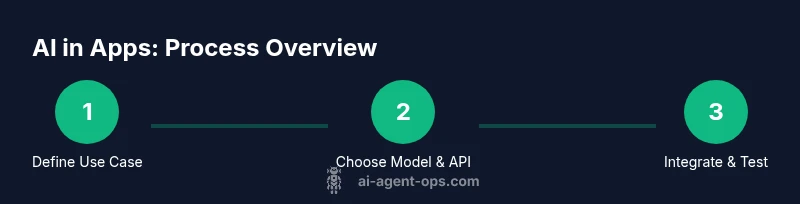
Start by listing user journeys where AI adds measurable value: search, recommendations, natural language interfaces, automation, and anomaly detection. For each use case, write a one-sentence user story and a simple success metric (e.g., reduce time-to-answer by 20%). Prioritize high-impact, low-risk opportunities for your MVP. This step prevents scope creep and aligns stakeholders. Also consider non-functional aspects like latency budgets, data privacy, and failure modes. A well-scoped AI use case acts as the north star for model choice, data requirements, and evaluation criteria. In practice, teams often begin with a single capability—such as a smart search or chat-based assistant—and then expand to multi-agent or orchestrated workflows as confidence grows.
Choose the right AI model and tooling
There are broadly three paths: hosted APIs, on-device inference, and hybrid approaches. Hosted APIs deliver quick time-to-value but require robust network connectivity and careful cost management. On-device models improve privacy and latency but demand smaller, efficient architectures. Hybrid setups route sensitive tasks on-device while offloading heavier inference to cloud services. Evaluate models for accuracy, latency, and memory usage against your use case. Tools like prompts, adapters, and fine-tuning strategies can dramatically shift performance without large retraining. Ai Agent Ops analysis suggests that teams benefit from starting with a well-documented prompt strategy and a minimal viable adapter suite to test real user outcomes before scaling.
Architecture patterns for AI in apps
Two common patterns are the "agent-davinci" style orchestrator and the "embedded-model" approach. In the orchestrator pattern, a central orchestrator routes tasks to specialized agents or microservices (e.g., one agent for intent understanding, another for action execution). In the embedded approach, a single model handles multiple tasks with structured prompts. A hybrid approach combines both. Choose data flows that minimize round trips, cache results, and recover gracefully from partial failures. Consider event-driven architectures with message queues and streaming analytics to monitor AI-driven decisions in real time. The architecture should support versioning, rollback, and safe shutoffs to prevent cascading failures in user sessions.
Data handling and privacy considerations
AI in apps relies on data; how you collect, store, and process it determines both user trust and legal compliance. Minimize data collection to what is strictly necessary for the task, and consider techniques like anonymization and differential privacy when appropriate. Implement strong access controls, encryption at rest and in transit, and audit trails for model interactions. Be transparent with users about what data is used and for what purpose. Use synthetic data for testing, and separate training data from production data to reduce the blast radius of any breach. The goal is to protect user privacy while still enabling accurate, useful AI.
Integration steps: API wiring and data flows
Plan your data journey from input to action. Begin with a lightweight, well-documented API contract and clear data schemas. Implement idempotent requests, robust error handling, and meaningful retries to handle AI latency spikes. Establish a data flow diagram that shows where data is stored, how it's transformed, and where insights are consumed. Use feature flags to enable controlled rollouts and quick rollbacks if results deviate from expectations. Document expected inputs/outputs for each AI call and align with your product metrics.
Observability and governance
Observability is essential when AI is part of user workflows. Instrument key metrics such as latency, error rates, and success rates of AI-driven actions. Collect feedback loops from users to continuously improve prompts and prompts’ guidance. Establish governance policies for model updates, data retention, and incident response. Regularly review model behavior for bias, safety, and compliance with regulatory requirements. A clear governance process reduces risk as you scale AI capabilities in production.
Deployment strategies and scaling
Adopt a staged deployment approach: start with a single, low-risk feature and escalate to multi-agent workflows as confidence grows. Use A/B testing to compare AI-driven outcomes against a control, and set stop criteria if the AI underperforms. Build modular services that can be replaced or updated without breaking the entire app. Plan for model versioning and rollback, notice when data drift occurs, and maintain a rollback path for user-facing features. This reduces the blast radius of model failures and keeps user trust intact.
Common pitfalls and debugging tips
Pitfalls include underestimating data quality needs, over-optimizing prompts without guardrails, and neglecting latency implications. Always test prompts against diverse inputs and edge cases, and maintain a robust rollback strategy. Keep a human-in-the-loop plan for critical user flows and implement clear fallback UX when AI outcomes are uncertain. The final tip is to document every decision—data sources, prompts, and evaluation criteria—to accelerate future iterations and audits. The Ai Agent Ops team recommends starting with a pilot and iterating based on real user feedback.
Tools & Materials
- API access for chosen AI provider(Obtain API keys and plan limits; track costs)
- Model documentation and usage guides(Read docs for limits, rate, and usage policies)
- Data schema and sample datasets(Prepare sample data for prototyping; ensure privacy compliance)
- SDKs or client libraries(Install appropriate libraries (e.g., fetch, axios, or provider SDK))
- Testing and observability tools(Unit tests, end-to-end tests, and monitoring dashboards)
- Security and privacy guidelines(Ensure encryption, access controls, and data minimization)
- Prototype UI components for AI interactions(Basic chat widget or input control)
- Fallback strategies and UX copy(Design fallback paths when AI fails)
Steps
Estimated time: 2-6 weeks
- 1
Define the use case and success metrics
Identify a clear AI-enabled user journey and document 1-2 measurable success metrics. Ensure alignment with product goals and user needs. Create a brief user story to guide design decisions.
Tip: Start with one high-impact flow to keep scope manageable. - 2
Select models and providers
Choose whether to use hosted APIs, on-device models, or a hybrid approach based on latency, privacy, and cost. Compare model capabilities against your success metrics and data requirements.
Tip: Begin with a simple prompt and a small adapter before scaling. - 3
Map data flows and APIs
Draw a data flow diagram showing inputs, AI calls, outputs, and storage. Define data schemas, validation rules, and error handling pathways to ensure robustness.
Tip: Use idempotent API design to handle retries gracefully. - 4
Implement the integration code
Add API calls, handle responses, and integrate AI outputs into UI components. Implement feature flags to control rollout and rollback capability for safety.
Tip: Keep AI interactions behind a thin wrapper for easier updates. - 5
Set up monitoring and evaluation
Instrument latency, success rate, and user impact. Create dashboards and establish alerting for anomalies in AI behavior.
Tip: Create a baseline measurement before production rollout. - 6
Address security and privacy
Enforce encryption, access control, and data minimization. Document data flows and user consent for AI-driven processing.
Tip: Regularly review data retention policies and ensure compliance. - 7
Pilot, learn, and scale
Run a controlled pilot with a small user segment, gather feedback, and iterate before wider rollout. Plan for scaling by modularizing services.
Tip: Use a launch checklist to prevent missed steps during expansion.
Questions & Answers
What is AI in apps?
AI in apps refers to embedding intelligent capabilities, such as natural language understanding, automated decision-making, and adaptive recommendations, directly into software products. It enables personalized experiences and automation across user journeys.
AI in apps means adding smart features like chat, search, and recommendations inside your software to make it more useful and automatic.
Which models fit apps?
Start with hosted APIs for speed, on-device models for privacy, or a hybrid approach. Choose based on latency, data sensitivity, and cost. Prototype with a small dataset to compare real-world performance.
For most apps, start with hosted APIs, then consider hybrids if latency or privacy require it.
How do you measure AI success?
Define measurable outcomes aligned to user value, such as improved task completion time, higher engagement, or conversion boosts. Use A/B tests and monitor latency, accuracy, and user satisfaction.
Set clear metrics, run experiments, and watch for user impact and performance.
What are security concerns with AI in apps?
Data privacy, access controls, data leakage, and model updates pose risks. Apply encryption, minimize data collection, audit access, and implement safe update and rollback processes.
Privacy and security are essential; encrypt data and monitor AI interactions.
How long does it take to implement AI in an app?
Implementation time varies by scope. A focused MVP can take weeks, while a broader integration may stretch across months with iterations.
Expect a multi-week process for a solid MVP, longer for a full-scale rollout.
Watch Video
Key Takeaways
- Define a focused AI use case with clear success metrics
- Choose the right model strategy for your constraints
- Design robust data flows and governance from day one
- Pilot before scaling to reduce risk and build trust