How to Create AI Agent for Free: A Step-by-Step Guide
Learn how to create an AI agent for free using open-source tools, free cloud tiers, and no-code assets. This guide covers architecture, prompts, testing, safety, and practical trade-offs for zero-cost prototyping.


You can create an AI agent for free by combining open-source tools, free-tier cloud services, and no-code assets to prototype a functional agent. This guide shows a practical, zero-cost workflow—from selecting a base model to deploying a simple agent—plus safety considerations and practical trade-offs. Expect a repeatable, budget-friendly path for learning and rapid experimentation.
Why a Free Approach Makes Sense for AI Agents
For developers, product teams, and business leaders, learning by building a working AI agent without upfront costs accelerates learning and reduces risk. According to Ai Agent Ops, starting with free tools and local compute lowers barriers to experimentation while enabling rapid iteration. This zero-cost path provides a practical sandbox for prototyping and validating ideas before investing in paid infrastructure. Key considerations include aligning scope with learning goals, managing data privacy, and balancing capability against cost. By the end of this section you'll have a clear picture of when a free path is sensible and when it’s time to scale.
Core Components You’ll Reuse
An AI agent typically relies on several reusable components: the reasoning engine (policy/decision logic), a memory or state store, and connectors to data sources and tools. Prompts function as the agent’s navigation map, while a lightweight orchestrator coordinates calls to AI models and tools. Reuse means you don’t reinvent every layer; you modulate prompts, swap models, and test memory schemas. For a free MVP, keep components compact: a single memory structure, a simple executor, and a small set of tools to accomplish a concrete task.
Free Tooling Landscape: Models, Runtimes, and Data
You can assemble a capable agent using free open-source models, local runtimes, and browser-based prompts. Open-source language models give you full control and privacy while offline or on restricted networks. Local runtimes reduce cloud dependency, and lightweight frameworks simplify orchestration. For data, use synthetic or sanitized datasets to avoid privacy concerns while testing. Ai Agent Ops analysis shows that careful selection of free resources can cover MVP workflows, though you’ll trade off latency and accuracy for cost.
Data, Prompts, and Safety Considerations
Effective AI agents hinge on well-structured data and robust prompts. Start with a minimal dataset and guardrails to prevent unsafe outputs. Use input validation and rate limits to avoid abuse. When using free tooling, document data flows, log prompts and outputs, and implement simple monitoring to catch unintended behavior early. This careful approach reduces risk as you iterate.
Designing Prompts, Orchestration, and Memory
A successful agent uses modular prompts, a simple orchestrator, and a memory layer that keeps track of context. Break down tasks into smaller prompts, reuse components, and implement a lightweight memory schema such as session-based state. For a zero-cost setup, avoid bloating prompts with unnecessary details; instead, store essential history locally and fetch it when needed.
Building a Minimal MVP: Architecture and Flow
Outline a lean architecture: input goes to a prompt-based model, the response triggers a decision module, and actions are carried out by a tool (e.g., fetch data, summarize, or respond). The agent runs locally or on free cloud tiers, with a one-step feedback loop to improve performance. This blueprint keeps costs predictable and lets you test core value quickly.
Testing, Debugging, and Iteration on a Budget
Begin with unit tests for prompts and simple decision logic, then run end-to-end tests using mocked data to validate the agent’s behavior without incurring costs. Maintain a lightweight log of interactions to inspect failures and iterate. Use guardrails and alerting rules to detect unsafe outputs early, and document any configuration changes to simplify future improvements.
From Prototype to Production: Free Options and When to Upgrade
Free options are ideal for learning, MVPs, and internal tooling. If your agent needs higher reliability, lower latency, or more robust security, plan a phased upgrade: start with paid tiers only after you’ve validated business value and defined guardrails. Keep a migration plan that maps features to paid services, budget thresholds, and rollback strategies.
Tools & Materials
- Computer with internet access(Any modern laptop or desktop; ensure Node.js or Python is installed if needed)
- Code editor (e.g., VS Code)(Install extensions for linting and language support)
- Python 3.x and/or Node.js(Choose based on preferred runtime for local experiments)
- Local runtime for models(A lightweight runtime suitable for offline or restricted environments)
- Open-source model binaries(Small to medium models (1–2 GB) for local inference)
- Free cloud account (optional)(Use only if you plan to test cloud-based workloads within free limits)
- Demo data or synthetic datasets(Helps test prompts and flows without exposing real data)
Steps
Estimated time: 60-90 minutes
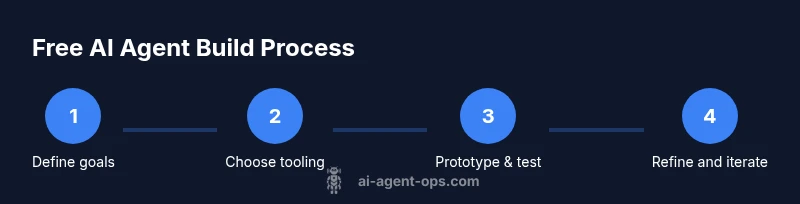
- 1
Define the agent’s goal
Articulate a concrete, measurable objective the agent should achieve. Describe success criteria and failure modes to guide design decisions.
Tip: Write a one-sentence objective and 2–3 acceptance criteria. - 2
Choose a base model and tooling
Select an open-source model and a minimal orchestration stack that fits a zero-cost MVP. Prioritize portability and local execution when possible.
Tip: Favor open-source options to avoid vendor lock-in and fees. - 3
Architect the agent’s flow
Map input -> prompt -> model -> action cycle. Decide where memory lives and how results influence subsequent prompts.
Tip: Keep the memory model simple and deterministic at first. - 4
Design modular prompts
Create reusable prompt templates for reasoning, memory access, and action triggers. Separate logic from data.
Tip: Test prompts in isolation before integrating with the flow. - 5
Test locally with mock data
Run end-to-end tests using synthetic data to validate behavior without cloud costs. Iterate on failures.
Tip: Log all interactions to identify failure patterns quickly.
Questions & Answers
What is an AI agent in this context?
An AI agent is a software component that autonomously performs tasks using AI models, prompts, and simple decision logic. It operates within defined goals and can take actions by calling tools or APIs.
An AI agent is software that acts on tasks using AI models and prompts, following a goal with some decision logic.
Can I deploy an AI agent without paid services?
Yes. You can prototype locally or on free tiers, validating concepts before committing to paid infrastructure. Production-grade needs may require upgrades.
You can prototype using free tools, but for production you may need paid services.
What are the trade-offs of free tools for AI agents?
Free tools often limit compute, latency, data privacy controls, and support. They’re great for learning and MVPs but not ideal for scale.
Free tools are great for learning and MVPs, but have limits in compute and support.
Do I need to code to build a free AI agent?
Some coding is usually required, but there are no-code options for tiny, simple agents. For anything non-trivial, code is typically needed.
You’ll likely code, though tiny tools exist that require less, or no coding for simple tasks.
How long does it take to build a basic AI agent?
A beginner can reach a basic working agent in a few hours to a couple of days, depending on scope and familiarity with the tools.
Expect a few hours to a couple of days for a basic agent, depending on scope.
What safety considerations should I prioritize?
Prioritize input validation, guardrails, logging, and monitoring to detect unsafe outputs. Ensure prompts don’t reveal sensitive data.
Guard rails, input checks, and monitoring help keep outputs safe.
Watch Video
Key Takeaways
- Define a clear MVP scope.
- Leverage open-source models to stay free.
- Test early with guardrails and logging.
- Plan a cost-aware upgrade path as you scale.