Run AI Agents Locally: A Practical Dev Guide
Learn how to run AI agents locally with offline models, sandboxed runtimes, and secure orchestration. This comprehensive how-to covers hardware, software choices, step-by-step setup, pitfalls, and real-world considerations for developers.


Yes. You can run AI agents locally by hosting autonomous agent runtimes, local language models, and orchestration tools on your own hardware or private cloud. It requires choosing a suitable LLM, an agent framework, and a sandboxed runtime, plus security considerations and offline operation goals. This article walks through options, prerequisites, and a practical setup.
Can you run AI agents locally? Why it matters
Can you run ai agents locally? The short answer is yes—and it’s increasingly practical for teams that value privacy, low latency, and offline operation. According to Ai Agent Ops, running AI agents locally is more accessible today thanks to smaller, efficient language models and mature agent runtimes. In this section we set the stage: what local execution means, who benefits, and what constraints you should expect. A local deployment means you host the model, the agent logic, and any memory or caches inside your own environment—on a developer laptop, a dedicated workstation, or a private data center. You gain control over data, network access, and update cycles, at the cost of higher hardware requirements and more maintenance. The goal of this guide is to help you evaluate when local execution makes sense and how to approach a safe, incremental rollout. This article includes practical steps, guardrails, and concrete examples to help you start small and scale confidently. Ai Agent Ops’s perspective underpins the guidance presented here, emphasizing practical, real-world applicability.
Local vs cloud: trade-offs you should evaluate
Choosing between local execution and cloud-based agents hinges on several factors. Latency, data privacy, and offline capability are the core benefits of local runs, while cloud deployments often offer broader model access, easier scaling, and centralized updates. If your workflows require immediate responses, sensitive data never leaving your premises, or operation without internet access, local execution is compelling. However, you’ll also face higher hardware costs, ongoing maintenance, and the need to manage model updates, embeddings, and memory. Ai Agent Ops analysis suggests that teams should weigh these dimensions against their goals, budgets, and risk tolerance. A practical approach is to prototype locally with a small model first, then decide whether to scale up or pivot to a hybrid model that keeps the most sensitive tasks offline while delegating others to the cloud.
Core components: hardware, software, and data
To run AI agents locally, you’ll assemble three interconnected layers: hardware, software, and data. Hardware determines what model sizes you can support, how fast you can respond, and whether you can run online training or just inference. Software includes the LLM runner, the agent framework, memory and belief management, and the sandbox or container environment that isolates agent actions. Data encompasses the prompts, tools, tool/evidence caches, and any local embeddings or vector stores. A balanced local setup starts with modest hardware, a clear security boundary, and a plan to monitor resource usage. Remember that local means you bear responsibility for updates, patches, and backups; plan for routine maintenance as part of your development lifecycle.
Local LLM options and agent frameworks
When you run AI agents locally, you’ll typically choose a local language model (offline-capable) and an agent framework that coordinates goals, plans, actions, and feedback. Local models range from smaller parameter families to quantized options designed for CPU/GPU constraints. The agent framework you pick should support planning, action execution, and memory management while running inside a sandboxed environment. It’s common to pair a local model with a modular agent stack that can be extended with custom tools or plugins. Consider hardware compatibility, licensing terms, offload options, and future scalability when selecting components. The key is to start with a minimal, well-documented configuration and incrementally add capabilities as you validate performance and safety.
Security, safety, and governance when operating offline
Security and governance are critical when running agents locally. Isolate the agent runtime from sensitive resources and use sandboxing to restrict file system and network access. Ensure encrypted storage for any embeddings or logs and implement strict data retention policies. Governance should cover model provenance, version control for agent policies, audit trails for actions, and clear rollback procedures. In offline scenarios, test failure modes (e.g., no internet, corrupted data) and implement graceful degradation. From a compliance standpoint, document the decision to go local, the data that remains on-premises, and how you handle user consent and data governance.
Step-by-step overview for a local setup
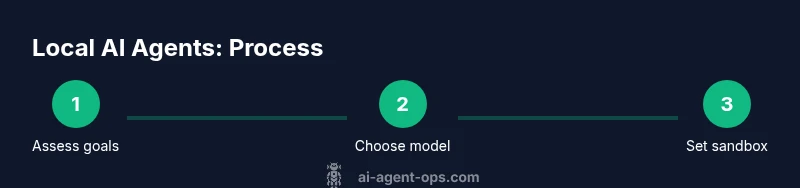
A local setup can be approached in a structured, incremental way. Start with an evaluation of your hardware and offline goals, then select a small local model and basic agent framework. Next, establish a sandboxed runtime and ensure data isolation. After that, configure offline operation and safety guards, and finally run a controlled test with logging and observability in place. This overview maps directly to the more detailed Step-by-Step guide that follows, helping you align expectations with practical actions and timelines. Ai Agent Ops emphasizes the value of incremental learning; begin with a minimal, well-scoped use case and expand once you have proven stability and safety.
Common pitfalls and how to fix them
Mistakes often include underestimating hardware needs, neglecting sandboxing, or overestimating the capabilities of a local model. Memory pressure and I/O bottlenecks are frequent culprits when embeddings or lookups scale. Another common pitfall is attempting to run online services without proper network isolation, which can expose sensitive data. Fixes include starting small with a known-good model, validating offline performance with realistic prompts, and implementing strict access controls. Establish a rollback plan and keep a changelog for model and policy updates to prevent drift. Finally, document failure modes and recovery procedures so your team can respond quickly when things don’t go as planned.
Real-world scenarios and case studies
In practice, teams use local AI agents across a spectrum of needs—from customer-support chatbots that must operate offline to edge devices controlling manufacturing processes with strict latency requirements. For privacy-conscious projects, local execution reduces data exposure and dependency on external services. In hybrid environments, organizations often run the core decision-making locally while delegating heavy, non-sensitive computation to the cloud. These patterns balance performance, governance, and cost, and they illustrate how a local-first approach can be adapted to different business contexts. Ai Agent Ops emphasizes tailoring configurations to specific use cases and iterating based on measurable outcomes.
Authority sources
- NIST AI RMF: https://www.nist.gov/topics/artificial-intelligence
- AI at Stanford: https://ai.stanford.edu/
- MIT CSAIL: https://csail.mit.edu/
- National Academy of Sciences AI Principles: https://www.nap.edu/topic/artificial-intelligence
Tools & Materials
- Hardware capable of hosting the local model(Aim for 16+ GB RAM for basic models; more RAM and GPU VRAM for larger models)
- Local language model (offline-capable)(Select a model that fits your hardware—smaller, quantized models are easier to run locally)
- Agent framework / orchestration library(Provides goal reasoning, action planning, and memory management)
- Container runtime or virtual environment(Docker/Podman or a secure Python virtual environment)
- Secure sandbox or isolation tool(Limit filesystem and network access to reduce risk)
- Data storage and embeddings cache (local)(Local disk or NVMe store for fast access)
- Networking controls (firewall, offline mode)(Enforce strict egress/ingress policies when needed)
- Monitoring and debugging tools(Logs, metrics, and traceability for troubleshooting)
Steps
Estimated time: 2-6 hours
- 1
Assess hardware and offline goals
Inventory your machine(s) and define which tasks must run offline. Benchmark memory and CPU/GPU capabilities to establish a baseline for model size and latency.
Tip: Start with a small model to validate the workflow before upgrading hardware. - 2
Install a local LLM and select an agent framework
Install a locally runnable language model compatible with your hardware. Choose an agent framework that supports goal planning, actions, and memory within a sandbox.
Tip: Document licensing and usage terms for the chosen models and frameworks. - 3
Set up a sandboxed runtime and data isolation
Configure containerization or virtualization to isolate the agent’s execution. Partition data so embeddings and logs stay within a defined boundary.
Tip: Test sandbox policies with a no-network test to verify isolation. - 4
Configure offline operation and safety guards
Enable offline prompts, caches, and deterministic responses. Implement safety rails, such as action whitelists and rollback procedures.
Tip: Keep a separate logging channel for safety incidents and policy violations. - 5
Run a controlled test and iterate
Execute a small, well-scoped task with clear prompts. Observe latency, memory usage, and correctness, then refine prompts and policies.
Tip: Automate a basic test suite to catch regressions. - 6
Scale gradually and monitor continuously
Increase model complexity and feature scope only after stable behavior. Set up dashboards to monitor health, latency, and resource consumption.
Tip: Introduce version control for models and policies to track changes.
Questions & Answers
Can I run any AI agent locally or only small, simple ones?
Local execution works best with models designed for on-device inference and modular agents. Very large models typically require server-grade hardware or hybrid approaches. Start with a small, offline-capable model and assess whether it meets your needs.
Local agents work best with smaller, offline-capable models. Start with a modest setup and evaluate performance before scaling.
What are the main benefits of running agents locally?
Local runs offer improved privacy, reduced data egress, lower latency for on-device tasks, and offline operation capabilities, which are valuable for sensitive or remote environments.
The main benefits are privacy, lower latency, and offline capability.
What are the main downsides or risks of local execution?
Hardware costs, ongoing maintenance, and complexity of managing models, tooling, and safety constraints on your own. There’s also a steeper learning curve for secure and reliable setups.
The downsides are higher hardware costs and more maintenance plus a steeper learning curve.
Do I need no-code tools to run AI agents locally?
No-code tools can simplify setup but aren’t required. For robust local deployments, you’ll likely need developer tooling to customize prompts, policies, and tool integrations.
No-code tools help, but you’ll likely need some development work for a robust local deployment.
How do I handle security and data governance locally?
Use sandboxing, strict access controls, encrypted storage for sensitive data, and clear data retention policies. Document model provenance and maintain an audit trail of agent actions.
Use sandboxing and strong access controls, and keep an audit trail of actions.
Is online access ever required for local agents?
Some workflows may still need online access for updates, live data, or tool integrations. A local setup typically focuses on offline capabilities, with a hybrid approach for non-critical tasks.
Some tasks may need online access; many goals can be handled offline with a hybrid approach.
Watch Video
Key Takeaways
- Start small, prove the concept locally
- Prioritize security and data isolation from day one
- Measure latency and resource usage to guide scaling
- Use a sandboxed runtime to limit agent actions
- Iterate with a clear rollback plan