Build AI Agent with LangChain: A Practical, Step-by-Step Guide
Learn how to build an AI agent with LangChain. This comprehensive guide covers setup, architecture, memory, tools, testing, deployment, and best practices for scalable agentic automation.


You will learn to build an AI agent with LangChain that can plan, act, and reason across tools and APIs. This guide covers setup, architecture, memory, tool integration, security, and testing to deliver a practical, reusable agent you can extend for real workflows with confidence.
LangChain and the case for AI agents
According to Ai Agent Ops, LangChain provides a modular foundation for building agentive AI that can plan, reason, and act. This article explains why LangChain has become a popular choice for developers seeking to deploy AI-powered workflows and how its components map to an agent's lifecycle. You’ll learn the difference between a simple prompt-driven bot and a true agent that can decide, select tools, and execute actions in real time. The goal is to give you a concrete blueprint you can adapt to your own domain, from internal automation to customer-facing assistants. By the end of this section you will understand the problem space and the high-level architecture that underpins a LangChain-based agent, including how memory, planning, and tool orchestration work together to sustain long conversations and multi-step tasks. Ai Agent Ops Analysis, 2026, emphasizes practical deployment patterns alongside theoretical guarantees to help teams ship reliably.
Core components of a LangChain-based agent
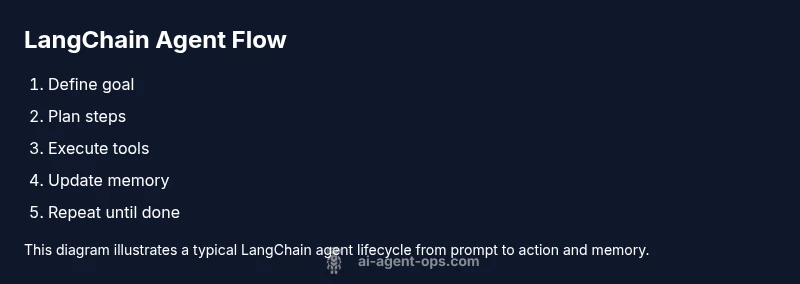
A LangChain-powered agent typically combines: (1) a planner or chain-of-thought module, (2) a memory layer to maintain context across interactions, (3) a tool executor to perform actions via APIs or scripts, and (4) a tool registry that lists available capabilities. The LangChain framework supports both Python and JavaScript/TypeScript ecosystems, enabling flexible deployment in cloud or on-device contexts. This section maps each component to a typical agent lifecycle: goal framing, planning, tool invocation, feedback incorporation, and memory update. You will see how a small, well-structured component set reduces brittleness and makes scaling easier for product teams building automation at speed.
Designing goals, memory, and identity for your agent
Define clear goals that the agent can pursue: what problem it solves, what the success looks like, and the constraints that apply (safety, latency, data handling). Memory choices—short-term vs long-term, episodic vs vector-based—determine how the agent leverages prior context and how it handles long-running tasks. Identity and prompt design influence behavior, including how the agent asks clarifying questions and when it defers to human input. Practical prompts and memory schemas are provided to support common tasks, along with patterns for balancing autonomy with human oversight. Ai Agent Ops Team notes that a thoughtful design phase saves countless debugging hours later by aligning capabilities with business goals.
Building a minimal agent pipeline: planner, executor, and memory
A practical LangChain agent requires a planner to generate intents, an executor to perform actions, and a memory layer to recall past interactions. We’ll present a minimal pipeline: (a) receive user instruction, (b) plan a sequence of steps, (c) execute each step via registered tools, (d) store outcomes in memory, and (e) loop until the goal is achieved. You’ll see concrete example code blocks and execution traces, plus guidance on handling partial failures and retries. The focus is on a maintainable architecture rather than a one-off prototype.
Connecting tools and APIs securely
Agents rely on external tools and APIs. You’ll learn how to register tools safely, manage API keys, handle rate limits, and implement fallback strategies. We’ll cover patterns for wrapping REST calls, using SDKs, and exposing tools with simple wrappers that LangChain can invoke. Security considerations include least-privilege access, secret management, and auditing of tool usage. The goal is to keep tools decoupled from the agent logic so you can swap providers without rewriting core flows.
Testing, debugging, and observability for agents
Test scenarios that mimic real user goals help surface edge cases. Use unit tests for individual tools and end-to-end tests for entire agent flows. Instrument traces, logs, and memory dumps to diagnose failures. We’ll share practical debugging tactics, such as simulating user inputs and replaying tool responses to reproduce errors. Observability at the tool level and the memory layer makes it easier to pinpoint where bottlenecks or drift are occurring, which is essential for durable automation solutions.
Deployment and scaling considerations
When you’re ready to deploy, choose a hosting model (serverless vs dedicated). Consider observability, auto-scaling, caching, and prompt versioning. LangChain agents can run in containers or serverless functions, and you can connect them to dashboards for monitoring task success rates and failure reasons. We’ll outline a simple CI/CD plan for changes and a lightweight rollout strategy to minimize risk while expanding user adoption.
Common pitfalls and how to avoid them
Be aware of prompt drift, tool misconfigurations, and brittle memory schemas. Start with a narrow scope and progressively expand capabilities. Regularly review tool permissions and monitor latency and reliability. This section highlights practical mistakes and how to prevent them in real projects, drawing on industry knowledge and real-world experience to keep teams productive and secure.
A quick starter project: a weather-lookup agent
To make the concepts concrete, we’ll walk through a tiny starter project: a weather-lookup agent that uses a weather API as a tool. It demonstrates goal setting, planning, and tool invocation, plus error handling and memory updates. You can adapt this skeleton to many other domains with minimal changes. The starter emphasizes safe API usage, rate-limiting strategies, and clear observability to help you iterate quickly in a team setting.
Next steps and learning paths
As you evolve your LangChain agent, explore advanced topics like memory optimization, multi-agent orchestration, and agent marketplaces. The Ai Agent Ops team recommends building a small portfolio of agents to showcase your automation capabilities and to validate approaches across different business contexts. This section points to practical resources, sample projects, and a roadmap for scaling from a single agent to an ecosystem of agent services.
AUTHORITY SOURCES
For further reading and verification, consult authoritative sources that underpin practical agent design: (1) National Institute of Standards and Technology (nist.gov) for security and reliability considerations, (2) Stanford University’s AI research discussions (cs.stanford.edu) for agent architectures and memory models, and (3) arXiv for open research discussions on agent planning and tool use. These sources help frame best practices and provide a foundation for rigorous implementation.
Tools & Materials
- Python 3.9+ or Node.js 18+(Choose Python or JS ecosystem based on preference)
- LangChain library(Install via pip install langchain or npm install langchain)
- OpenAI API key or alternative LLM(Acquire a valid API key; test with a small quota)
- Memory/Vector store(Chroma, FAISS, or similar for long-context memory)
- Tool registry and sample tools(Create or import mock tools for testing)
- Code editor / IDE(VS Code or JetBrains with Python/Node support)
- Version control (git)(Track code and configurations)
- Environment management (virtualenv/conda)(Isolate dependencies)
Steps
Estimated time: 4-6 hours
- 1
Prepare your development environment
Install Python, set up a virtual environment, and verify that LangChain imports cleanly. This creates a stable baseline for the rest of the project and avoids cross-project dependency conflicts.
Tip: Use a clean virtual environment to avoid dependency conflicts. - 2
Install LangChain and required packages
Create a project directory and install langchain, toolkits, and any LLM SDKs you need. Validate the installation by importing modules in a Python shell and running a tiny example.
Tip: Pin package versions to avoid breaking changes. - 3
Define agent goals and prompts
Draft clear goals and prompts for planning, including success criteria and safety constraints. Store them as reusable templates that can be swapped for different domains.
Tip: Start with a single objective and expand later. - 4
Create memory and a simple planner
Implement a memory class and a basic planner that returns a sequence of steps. Ensure the planner can handle failure and retries with a bounded loop.
Tip: Test planner with edge cases to ensure robustness. - 5
Register tools and implement executors
Define tools (APIs or scripts) and implement executors that call these tools via LangChain. Ensure error handling and timeouts.
Tip: Use wrappers to normalize tool interfaces. - 6
Wire tools into the agent loop
Connect the planner outputs to the tool executors and feed results back into memory. Repeat until the goal is achieved.
Tip: Add a maximum iteration limit to prevent infinite loops. - 7
Add security and rate-limit checks
Enforce API key safety, sensitive data handling, and rate limiting. Add basic auditing of tool usage.
Tip: Never log full API responses containing secrets. - 8
Test with real-world scenarios
Run test cases that resemble real user needs; verify outcomes and log discrepancies. Use mocks for external dependencies.
Tip: Create a small test suite with representative prompts. - 9
Evaluate performance and iterate
Measure latency, success rate, and failure reasons; tune prompts and memory schemas accordingly.
Tip: Iterate on the memory model for better context reuse. - 10
Prepare for deployment
Package code, add documentation, and set up a minimal deployment pipeline. Include runbooks and monitoring hooks.
Tip: Document how to extend tools and prompts for new tasks.
Questions & Answers
What is LangChain and how does it help build AI agents?
LangChain provides modular abstractions to build AI agents that can plan, execute tools, and maintain context. It helps you structure prompts, memory, and tool integration for reliable automation.
LangChain gives you modular pieces to build smarter agents that can plan and act using tools.
Do I need an OpenAI key to use LangChain effectively?
Not strictly required, but most examples use an LLM like OpenAI. You can also use local models or other providers supported by LangChain.
You can use LangChain with various language models, including local or cloud options.
How should memory be configured in a LangChain agent?
Memory can be short-term or long-term depending on the task. Start with a simple episodic memory and evolve to vector-based memory for longer context.
Start with simple memory, then upgrade to vector memory for longer tasks.
What are common security considerations when wiring tools?
Use least-privilege API keys, avoid logging secrets, and implement rate limits and auditing for tool calls.
Protect keys, limit access, and log carefully to avoid exposing secrets.
How do I test LangChain agents effectively?
Create scenario-based tests, mock tools, and end-to-end tests to validate goals and resilience.
Test with realistic scenarios and mocks to validate behavior.
What deployment options work well for LangChain agents?
Serverless functions or containers work well; consider observability and scaling needs.
Choose serverless or containers with monitoring in mind.
Can LangChain support multi-agent orchestration?
Yes, LangChain supports orchestration patterns, but add complexity gradually to avoid brittle systems.
LangChain can orchestrate multiple agents, but start simple.
Watch Video
Key Takeaways
- Define a clear goal for your agent.
- Wire memory and planner early.
- Test with realistic scenarios.
- Secure tools and API keys.
- Iterate on prompts for reliability.