Illustrated Guide to AI Agents: A Practical How-To
Explore an illustrated, practical guide to AI agents. Learn core concepts, workflows, and governance with visuals designed for developers, product teams, and leaders.


By the end, you will have an illustrated, practical guide to AI agents: a clear explanation of concepts, a step-by-step workflow for building agentic apps, and visuals that map data flows, decision points, and governance. This how-to covers fundamentals, design patterns, and safety considerations for developers, product teams, and leaders.
What are AI agents, and why they matter
AI agents are software entities that perceive their environment (data streams, sensors, user input), reason about options, and act to achieve goals. They can coordinate tools, services, and APIs to perform tasks without human intervention, or with only occasional oversight. In practice, AI agents combine machine learning components with symbolic reasoning, planning, and control loops to handle complex workflows. This illustrated guide to AI agents presents concepts visually, so developers and product teams can quickly grasp how components interact, what data flows look like, and where governance points belong. The core value is speed, scalability, and consistency: agents can process large volumes of information, make rapid decisions, and operate across multiple systems. Yet, successful deployment depends on clear objectives, measurable outcomes, and robust monitoring. The Ai Agent Ops team emphasizes that visuals reduce ambiguity, helping teams align on architecture, responsibilities, and success criteria. Readers will see diagrams showing inputs, internal state, and outputs, with annotations that map decision logic to concrete actions. According to Ai Agent Ops, visuals help align teams quickly and reduce misinterpretation.
Visual language: bridging theory and practice
Illustrations anchor abstract ideas like perception, memory, and decision-making. When you present an AI agent's architecture as a diagram, you help stakeholders understand how data enters, how models and rules influence choices, and how results are delivered to users or systems. An effective illustrated guide uses consistent notation, color schemes, and labeled arrows to differentiate processes such as sensing, planning, and acting. Visual narratives also support onboarding for new team members and accelerate cross-functional collaboration between data scientists, engineers, and product managers. In this template, each section uses a bold heading, short captions, and callouts for guardrails or safety checks. The goal is to produce visuals that can be reused across documents, training materials, and dashboards, so your organization speaks a common design language when talking about agentic workflows.
Core components of AI agents
An AI agent typically comprises goals, perception, reasoning, action, and governance. Goals define the objective; perception collects data from sensors or APIs; reasoning transforms data into plans; actions execute tasks or call services; governance handles monitoring, auditing, and safety constraints. Each component connects to the next through clearly labeled interfaces. By separating concerns, teams can evolve perception models, decision logic, and action handlers independently while preserving overall behavior. This modular view also helps in auditing and compliance, because you can trace inputs, intermediate states, and final outcomes to specific components. In practice, many agents blend machine learning models with rule based systems to balance adaptability and reliability. The illustrated guide highlights common patterns such as goal decomposition, plan generation, and fallback strategies when data is uncertain.
Design patterns for agentic workflows
Effective agent design often follows patterns that balance autonomy with controllability. Pattern one maps a simple one kind of task to a compact decision tree with a single tool. Pattern two adds modular plugins, enabling the agent to switch between tools or services as priorities change. Pattern three introduces human in the loop for high risk decisions, with watchful monitoring and explicit escalation paths. Pattern four emphasizes observability: extensive logging, state snapshots, and dashboards that reveal why the agent chose a given action. The illustrated guide uses diagrams to show how patterns scale, how data flows through the system, and where failures can propagate. When you present multiple patterns side by side, stakeholders can compare tradeoffs and select the best fit for a given domain.
Safety, ethics, and governance in agent design
Governance is not an afterthought. In an illustrated guide, you should document guardrails, privacy controls, and accountability mechanisms alongside the technical design. Key considerations include data minimization, transparent decision criteria, and auditable logs. Safety checks should be baked into the workflow, with human oversight for critical actions. Ethical design means avoiding bias, explaining decisions, and providing user controls for opt out or override. Regular reviews against evolving standards help keep agents aligned with policy and risk tolerance. The Ai Agent Ops team recommends recording governance decisions near the corresponding diagrams so readers understand why certain constraints exist and how they can be adjusted as requirements change. Visuals can also illustrate escalation paths and failure modes to prepare teams for real world operation.
Practical examples and case studies
Consider a customer support agent that triages tickets by classifying intent, retrieving relevant knowledge base articles, and curating responses for human review. Another example is an automation agent coordinating data pipelines: it monitors data quality, triggers transformations, and alerts stakeholders when anomalies arise. A third scenario shows an entrepreneurial team prototyping a sales assistant that schedules meetings, collects follow up information, and updates CRM records. Each example benefits from a consistent visual language: goals, inputs, decision points, and actions clear to engineers, product managers, and executives. The illustrated guide provides mini diagrams for each case, enabling teams to reuse components and avoid reinventing the wheel with every project.
Authoritative sources and further reading
For readers who want to dive deeper, consult these reputable sources. NIST's AI guidance outlines risk management considerations and best practices for trustworthy AI. Stanford's AI lab offers ethics and governance resources relevant to agent design. The AAAI provides research standards and practical perspectives on agent systems. These sources help anchor your illustrated guide in established principles while you customize visuals for your organization. https://www.nist.gov/topics/artificial-intelligence | https://hai.stanford.edu | https://aaai.org
Getting started: a practical path
To begin, define a small, concrete AI agent project and draft a basic set of visuals that capture goals, data inputs, decision points, and actions. Build a single diagram that shows how data flows through sensing, reasoning, and acting, then layer on guardrails and human oversight. Use consistent typography and color schemes to ensure your visuals can scale to additional scenarios. Schedule a short review with cross-functional stakeholders to validate the diagram against real workflows. As you iterate, store the diagrams as a reusable catalog so teams can reuse components rather than redraw from scratch. The Ai Agent Ops team recommends documenting decisions near each diagram, then testing with a pilot audience to surface confusion and improve clarity.
Tools & Materials
- Diagramming software (e.g., Figma, Lucidchart)(Vector-friendly diagrams for crisp visuals)
- Vector illustration tools (Adobe Illustrator, Inkscape)(Create reusable icons and assets)
- Mock data sets and sample workflows(Annotate visuals with realistic data flows)
- Quality display or printing setup(For print-ready handouts)
- Stock image assets library(Supplement visuals as needed)
Steps
Estimated time: 2-3 hours
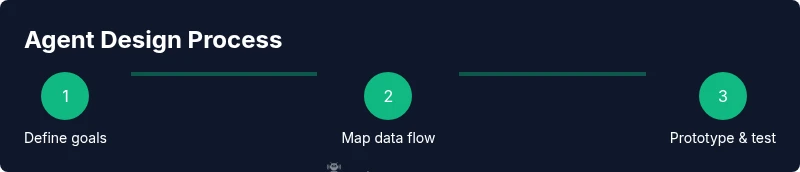
- 1
Define goals and success metrics
Identify the primary task the agent will perform and measurable success criteria. Clarify boundaries to avoid scope creep during development. Align with stakeholders on what constitutes a successful outcome and how it will be measured.
Tip: Start with 1-2 core goals and a simple extension path. - 2
Identify data inputs and decision points
Map where data comes from, what signals trigger decisions, and how results are formatted for actions. Include both external data sources and internal state that the agent needs to reason about.
Tip: Color-code data, decisions, and actions to reduce confusion. - 3
Choose a minimal agent architecture
Select a lightweight setup that can demonstrate core behaviors without overcomplication. Outline where learning, rules, and templates fit, plus how you will extend later.
Tip: Avoid premature optimization; validate the core loop first. - 4
Draft visuals and diagrams
Create a simple diagram showing goals, data inputs, decision logic, and outcomes. Use consistent icons and labels so readers can quickly understand.
Tip: Keep diagrams modular for reuse in future projects. - 5
Build a small prototype and test
Implement a minimal version of the agent in a controlled environment. Collect feedback from testers to identify gaps in the visuals or logic.
Tip: Document discrepancies between planned and actual flows. - 6
Review governance and iterate
Add guardrails, logging, and human oversight points. Iterate visuals based on feedback and prepare for broader rollout.
Tip: Establish an ongoing review cadence to keep visuals up to date.
Questions & Answers
What is an AI agent?
An AI agent is a software entity that perceives its environment, reasons about options, and takes actions to achieve specified goals. It may coordinate tools and services to automate tasks.
An AI agent is a software that acts to achieve goals by perceiving its environment and using tools.
Why use visuals in AI-agent guides?
Visuals help readers understand complex flows, data paths, and decision points more quickly than text alone.
Images help people grasp AI-agent concepts faster.
What are common pitfalls in agent design?
Ambitious scopes, vague goals, missing governance, and inadequate monitoring are typical pitfalls to avoid.
Watch for scope creep and safety gaps.
What tools are best for creating illustrated guides?
Use diagramming and vector-graphics tools, plus a process for reviewing visuals with stakeholders.
Choose clear diagrams and accessible visuals.
How can safety be incorporated?
Define guardrails, logging, and human oversight; test edge cases and failure modes.
Always include governance and audit trails.
Where can I learn more?
Consult AI ethics and governance literature, plus official AI guidance from trusted sources.
Check reputable AI ethics resources.
Watch Video
Key Takeaways
- Define actionable goals first
- Use visuals to map data and decisions
- Incorporate governance from day one
- Iterate with real data and users
- Leverage standardized diagrams for cross-team consistency