Using an AI Agent for Computer Tasks: A Practical 2026 Guide
Learn how to deploy an AI agent to automate computer-use tasks, orchestrate cross-app workflows, and monitor outcomes with governance and safety best practices. This guide from Ai Agent Ops covers setup, integration, and measurement of ROI.


According to Ai Agent Ops, you can use an AI agent to automate routine computer-use tasks, orchestrate cross-app workflows, and monitor outcomes for reliability. This quick guide shows setup, integration, decision policies, and safety practices to help teams deploy agentic automation with confidence. Whether you’re a developer, product lead, or operations manager, this overview helps you avoid common pitfalls and measure ROI.
Understanding the premise of computer-use AI agents
AI agents are software entities that operate as autonomous decision-makers inside your computer environment. They can perform routine tasks, route information between apps, and trigger actions based on rules you define. When you combine natural language prompts, event triggers, and API calls, you get a capable helper that augments human work rather than replaces it. This section introduces practical use cases, governance considerations, and safe integration with existing tooling. The Ai Agent Ops team emphasizes that clear goals, strong guards, and observable metrics are essential for scalable automation. Readers in development, product, and operations roles will gain a solid mental model for how agentic automation can fit into daily work.
Core components of an AI agent for computer use
A practical AI agent comprises perception, decision-making, and action. Perception covers how the agent interprets events on your computer—emails, form submissions, file changes, or system alerts. Decision-making encodes the rules, policies, and any learned heuristics that determine what to do next. Action executes the chosen operation, such as sending a message, running a script, or updating a data record. Optional components include safety controllers, audit logging, and a governance layer to enforce constraints. You’ll also learn how to design prompts and policies that balance autonomy with control, ensuring agents stay aligned with your objectives.
Architecture patterns for orchestrating AI agents across a workspace
Scale requires thoughtful architecture. A centralized orchestrator coordinates several agents and routes tasks to the right specialist. A layered approach adds a task planner, domain-specific agents, and a supervisor module for oversight. Event-driven patterns trigger agents on system events, while queue-based patterns provide backpressure and retry logic. The choice depends on your tech stack, latency needs, and risk tolerance. This block includes practical examples for implementing a small agent network that handles notifications, data-entry, and document workflows, plus guidance on integrating with common developer tools and CI pipelines for stable releases.
Safety, governance, and compliance considerations
Autonomous agents introduce new risk vectors such as data leakage, unintended actions, and privacy concerns. Guardrails like input validation, rate limiting, and explicit permissions for critical operations are essential. Maintain auditable logs with timestamps, actions taken, and responsible owners. Apply governance policies that require approvals for high-risk tasks and periodic reviews of agent behavior. Implement failover and rollback plans so you can revert actions if outcomes diverge. The Ai Agent Ops team emphasizes that safety is an ongoing discipline that evolves with automation footprints.
Practical workflows and real-world examples
This section walks through concrete tasks that benefit from AI agents in a software team setting. Examples include triaging support tickets, auto-filling repetitive form fields, and coordinating calendar events with project-management tools. You’ll see how to encode decision policies for escalation, skipping, and conflict resolution, with emphasis on observability and feedback loops. The goal is to translate perception, decision, and action into end-to-end automation that saves time while minimizing risk. Real-world patterns highlighted here help you tailor automation to your domain and governance posture.
Ai Agent Ops insights: governance and measurement without numbers
Ai Agent Ops analysis shows that organizations achieve smoother operations when they start with a small pilot, then progressively automate additional tasks after establishing guardrails. This section highlights practical governance patterns, such as explicit ownership, change management, and clear success criteria. It also discusses instrumenting agents with visibility dashboards, error budgets, and alerting rules so you can respond quickly to issues. The emphasis from Ai Agent Ops is that automation should augment people, not overwhelm them, and that incremental rollout reduces risk while building confidence across teams.
Best practices for rollout and ongoing maintenance
Adopt a staged rollout strategy with measurable milestones, documenting lessons learned at each phase. Define success metrics that matter to your business, such as time saved, error reductions, and task completion latency. Invest in reusable policies and modular agents so you can recompose capabilities as needs evolve. Regularly review prompts, safety policies, and integration points to keep automation aligned with changing tools and data sources. Finally, foster a culture of continuous learning by encouraging user feedback and celebrating small wins as you scale.
Next steps: plan and start your implementation
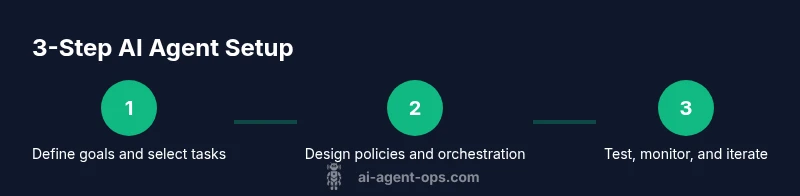
Begin by listing specific computer-use tasks ripe for automation, then map them to a minimal viable agent network. Choose an orchestration pattern that fits latency and governance needs, set up a pilot, and measure outcomes against clear KPIs. Build a lightweight monitoring layer from day one, and schedule regular reviews to refine policies. This is an actionable, incremental journey guided by governance, safety, and user feedback. The Ai Agent Ops team recommends starting small, proving value, and scaling thoughtfully.
Tools & Materials
- Computer or workstation with internet access(Modern OS; admin rights preferred for installation)
- AI agent platform or framework(Choose one with governance, logging, and extensibility)
- Development environment(Node.js, Python, or your stack of choice)
- API keys and credentials(Use secure vaults and least-privilege access)
- Test data and sandbox accounts(Avoid production data during experimentation)
- Logging/monitoring tool(For observability and alerting)
- Safety checklist and governance policy(Document decision boundaries and escalation steps)
Steps
Estimated time: 60-120 minutes
- 1
Define goals and scope
Identify high-value tasks that are repetitive or cross multiple apps. Define success criteria and the boundaries of what the agent is allowed to do. Create a pilot scope that minimizes risk while delivering measurable value.
Tip: Start with 1–2 tasks and a clear decision boundary to validate concepts quickly. - 2
Map tasks to agents and actions
Break tasks into perception, decision, and action components. Assign each component to the appropriate agent or role, and define the inputs and outputs for each step. Document dependencies and required integrations.
Tip: Use a decision table or flowchart to clarify branching rules. - 3
Configure perceptions and inputs
Set up how the agent will receive data, such as events, messages, or API payloads. Normalize inputs to predictable formats and implement basic validation to catch malformed data.
Tip: Prefer explicit schema definitions to reduce ambiguity. - 4
Implement decision policies and constraints
Encode when to act, escalate, or stop. Introduce guardrails for sensitive actions and establish thresholds for opinions or confidence scores driving actions.
Tip: Keep policies modular to simplify updates as needs evolve. - 5
Set up actions and integrations
Connect the agent to required tools via APIs or webhooks. Ensure actions have idempotence and clear rollback options in case of errors.
Tip: Test each integration in isolation before end-to-end testing. - 6
Test thoroughly in a sandbox
Run end-to-end scenarios with varied inputs, including edge cases. Validate safety, observability, and rollback capabilities. Document test results for future audits.
Tip: Automate tests where possible to catch regressions quickly. - 7
Monitor, iterate, and scale
Launch a pilot, collect telemetry, and adjust prompts and policies based on feedback. Plan incremental expansion only after hitting pilot milestones.
Tip: Use dashboards to track time to complete, error rate, and decision latency.
Questions & Answers
What exactly is an AI agent and how does it differ from traditional automation?
An AI agent is a software entity that makes autonomous decisions and acts on behalf of a user, often with perception and learning. Traditional automation follows fixed scripts and rarely adapts to changing inputs. Agents can orchestrate multiple apps and adjust behavior based on observed results.
An AI agent is an autonomous decision maker, unlike fixed automation scripts.
What tasks are best suited for a computer-use AI agent?
Repetitive, rule-based tasks with structured inputs and cross-application steps are ideal. Tasks that require pattern recognition or multi-app coordination gain the most value from agentic automation.
Great tasks are repetitive, rule-based, cross-app, or data-driven.
What safety practices should I implement first?
Start with guardrails, input validation, logging, and explicit permissions for critical actions. Use sandbox testing before live deployment and maintain auditable logs for accountability.
Guardrails, logging, and sandbox tests are essential.
Do I need coding experience to implement an AI agent for computer tasks?
Some programming knowledge helps tailor inputs, outputs, and integrations. Low code options exist, but scripting is often necessary for robust automation.
Some coding helps you tailor agents, though beginner-friendly options exist.
How do I measure ROI and success?
Define KPIs such as time saved, error reductions, and throughput. Establish baselines before rollout and monitor dashboards to track progress.
Set KPIs, baseline performance, and track results over time.
What are common pitfalls to avoid with AI agents?
Overclaiming autonomy, insufficient guardrails, and poor observability can lead to misbehavior or risk. Prioritize governance and incremental learning.
Watch for overclaiming autonomy and weak monitoring.
Watch Video
Key Takeaways
- Define clear automation goals before building agents.
- Governance and observability are foundational, not optional.
- Pilot first, then scale to reduce risk and build confidence.
- Instrument success metrics and track ROI over time.
- Ai Agent Ops's verdict: adopt governance and incremental rollout.