Beginners Guide to AI Agents: From Concepts to Practical Workflows
A comprehensive, step-by-step beginners guide to AI agents. Learn core concepts, build a starter workflow, and scale with safe, auditable practices for smarter automation.


This guide helps beginners learn how to build and use AI agents to automate routine tasks. You’ll start with core concepts, then set up a simple agent workflow using prompts, tools, and orchestration. Expect practical steps, common pitfalls, and example projects you can replicate. By the end you’ll have a starter blueprint for an agent that handles a small, repeatable task in your chosen domain.
What is an AI agent?
According to Ai Agent Ops, an AI agent is a software entity that can autonomously complete tasks by using prompts, tools, and decision logic. In practice, agents blend natural language understanding, action execution, and a lightweight form of reasoning to choose what to do next. For teams new to automation, a clear mental model helps avoid scope creep and misaligned expectations. This article serves as a beginners guide to ai agents by walking through core concepts, common architectures, and a simple blueprint you can adapt. An AI agent differs from a static bot because it can decide when and how to use different tools, such as a calendar API, a data query, or a message composer. As you read, imagine an agent that can read an inbox, summarize requests, check your calendar, and draft replies—then hand off the final output to a human when needed.
Core building blocks: prompts, tools, and orchestrators
The power of AI agents comes from three foundational elements:
- Prompts: Structured instructions that steer the agent’s behavior, tone, and decision criteria.
- Tools: APIs or services the agent can call to fetch data, update systems, or generate outputs.
- Orchestrator: The control loop that sequences prompts and tool calls, handles errors, and maintains context across steps.
Optional but important components include memory/state management to track what has been done and governance controls to keep behavior aligned with policy. A minimal setup often starts with a single task, a single tool, and a simple prompt template.
Pro tip: Start with a small, well-scoped task to validate the decision flow before expanding to multiple tools or tasks.
Starting with a simple use case
A practical starting point is inbox triage: the agent reads new messages, extracts intent, decides which messages need human review, drafts replies, and can create calendar tasks. Define the inputs (email content, sender, date), the outputs (tagged messages, suggested replies, task creation), and the decision criteria (priority, keywords, sentiment). Draft example prompts and a minimal tool set (e.g., data lookup and draft generation). Keeping scope tight—one task, one data source, one tool—reduces risk and yields solid lessons you can scale later. This approach also demonstrates how prompts, tools, and orchestration come together in a real-world workflow.
Choosing a runtime: local vs cloud
Run the agent where it makes sense for your organization. Local runtimes offer privacy and offline capability but require more setup and maintenance; cloud deployments simplify scaling and sharing but introduce hosting costs and data-transfer considerations. When starting, favor a cloud-based sandbox with clear authentication and access controls to learn the mechanics. As you mature, you can prototype locally for privacy-sensitive tasks and move to production-grade environments with proper monitoring and security controls.
Designing an agent blueprint
A practical blueprint captures the task description, success criteria, prompts, tool registry, error handling, and monitoring. Create a one-page diagram that maps input → prompt → tool call → result → output. Include sample prompts for common paths and a simple decision tree for fallback actions. Version the blueprint and annotate changes so you can reproduce results and track improvements over time. The blueprint acts as your reference during development, testing, and deployment.
Safety, governance, and reliability
Address data privacy, user consent, and logging from day one. Define guardrails such as restricted tool usage, maximum recursive calls, and explicit human handoff when confidence is low. Maintain an auditable trail of decisions and outputs. Start with dry runs using synthetic data before touching real information, and continuously monitor for drift or unexpected behavior. Build a simple escalation flow to ensure critical tasks always receive human oversight when needed.
From prototype to production: migration tips
Plan a careful path from prototype to production. Establish a staging environment, perform security reviews, and implement monitoring dashboards and error budgets. Use feature flags to control rollout and enable quick rollback if anomalies appear. Document incidents and resolutions to improve future iterations. A disciplined approach helps you deliver reliable agents that scale with minimal chaos.
Examples of starter projects
- Email triage assistant: read new messages, categorize by urgency, draft canned replies, and hand off complex cases to humans.
- Support routing assistant: classify tickets, suggest routing lanes, fetch customer data, and generate resolution notes.
- Meeting assistant: pull calendar availability, draft summaries, and schedule follow-ups based on meeting notes.
Each example starts small, uses a single tool, and can be extended with additional prompts and data sources as you gain confidence. See the next section for authority sources and further reading.
Authority sources
- https://www.nist.gov/topics/artificial-intelligence
- https://plato.stanford.edu/entries/artificial-intelligence/
- https://arxiv.org/
These sources provide foundational and peer-reviewed context around AI, ethics, and safety practices that inform responsible agent design.
Tools & Materials
- A computer with internet access(For development, testing, and access to tools and prompts.)
- Prompt design notebook or digital document(Document prompts, variations, and decision logic.)
- A no-code/low-code or lightweight scripting environment(Kickstart prototyping without heavy DevOps.)
- Access to an AI services sandbox or API(Use a generic AI service provider for prompts and outputs.)
- A tool registry or catalog(Catalog of supported tools and their capabilities.)
- Logging and monitoring setup(Start with simple logs; expand to dashboards as needed.)
Steps
Estimated time: 90-120 minutes
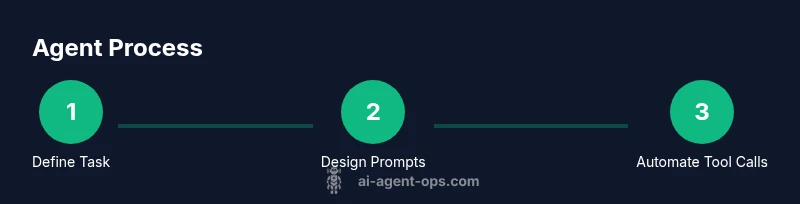
- 1
Define task and success criteria
Choose a small, repeatable task and specify what a successful outcome looks like. Draft a minimal prompt and list the tools you will use. This step creates the foundation for your agent’s behavior and evaluation.
Tip: Keep it concrete: input, transformation, and output should be unambiguous. - 2
List prompts and tools
Catalog prompts that cover typical scenarios and map each to a tool. Include fallback prompts for uncertainty and error-handling prompts for retries.
Tip: Document variations to test later and save time on future iterations. - 3
Sketch the agent blueprint
Create a simple diagram showing input → prompt → tool call → result → output. Include decision points for escalation to a human if needed.
Tip: Use a one-page diagram to keep the design comprehensible. - 4
Prototype with a minimal setup
Implement a basic version using a no-code or lightweight script and a single tool. Run dry tests with synthetic data to verify flow.
Tip: Avoid real data at this stage to minimize risk. - 5
Run a controlled test
Execute the prototype with defined inputs, measure outcomes against success criteria, and collect edge cases for refinement.
Tip: Log all decisions for auditing and learning. - 6
Evaluate and iterate
Review results, adjust prompts and tools, and re-test. Prepare a plan to scale once the pilot is stable.
Tip: Iterate in small, bounded cycles to maintain control.
Questions & Answers
What is an AI agent and how does it differ from a simple bot?
An AI agent is a software entity that can autonomously decide how to act, using prompts and tools to achieve a goal. A basic bot follows fixed rules without adaptive decision-making. Agents can select apps, fetch data, and handle multi-step tasks with human handoffs when needed.
An AI agent can decide what to do next and choose tools to get there, unlike a fixed-rule bot.
Do I need to code to start using AI agents?
You can start with no-code or low-code platforms to prototype a simple agent. As you scale, incremental coding (for prompts, tooling, and integration) becomes valuable for reliability and customization.
You can start without heavy coding, then add code as you scale.
How should I choose prompts and tools for an initial agent?
Begin with a tight scope and document a minimal prompt set and one reliable tool. Expand thoughtfully by adding one tool or prompt at a time after validating outcomes.
Start small, document your prompts, and add one tool at a time.
What are the main safety considerations for AI agents?
Protect data privacy, establish clear guardrails, and implement human handoff for high-risk decisions. Maintain an auditable log of decisions and outputs.
Guard data, set guardrails, and have a human in the loop for risky tasks.
What is a practical timeline to move from prototype to production?
Expect a staged process: prototype validation, security review, staging deployment, and monitored rollout. Plan for iterations based on feedback and incidents.
Prototype, test securely, stage, then roll out with monitoring.
Where should I look for reliable guidance on AI ethics and safety?
Consult authoritative sources such as government AI guidelines and academic overviews to shape responsible design.
Check government and academic AI safety guidelines for best practices.
Can AI agents scale to multiple tasks over time?
Yes, but scale incrementally: start with a single task, then expand prompts, tools, and governance as you validate reliability.
Yes, but scale gradually and keep governance strong.
Watch Video
Key Takeaways
- Define a clear, small task to start.
- Prompts, tools, and an orchestrator are core building blocks.
- Prototype with synthetic data before real data.
- Guardrails and auditing are essential from day one.
- Plan a measured path from prototype to production.