AI Agent Zapier: Practical Guide to Agentic Automation
Learn how to integrate AI agents with Zapier to automate complex processes, orchestrate tasks across apps, and scale automation with agentic AI. A practical guide for developers and product teams.


According to Ai Agent Ops, ai agent zapier enables automated, decision-driven workflows by pairing AI agents with Zapier's event-driven platform. This quick guide shows how to design agent-backed automations, choose models, orchestrate prompts, and monitor outcomes across apps. You’ll learn patterns for scalable, auditable automation that product teams can implement with confidence.
The landscape: AI agents meet Zapier
The integration of AI agents within Zapier expands automation from static triggers to dynamic decision-making across apps. An AI agent can interpret inputs, fetch data from multiple sources, reason about options, and decide which actions to take. In practice, this pattern reduces manual handoffs between systems and accelerates complex workflows. According to Ai Agent Ops, this combination enables teams to design auditable, retryable processes that can adapt as data changes and new apps are added. The Zapier platform provides connectors to CRM, email, messaging, and data stores, making cross-app orchestration practical without extensive coding.
In many teams, the first step is to map the decision points—what the agent should decide, what data it needs, and what constitutes a successful outcome. You should also specify guardrails such as data privacy rules, escalation paths for uncertain results, and when to hand off to a human. The goal is to move from a brittle, handwritten script to a resilient automation fabric that can scale with business needs.
Tools & Materials
- Zapier account with editor access(Ensure multi-step and premium app access if needed to connect multiple services.)
- OpenAI API key or alternative LM provider(Configure in Zapier or via a custom action to enable AI reasoning.)
- Connected apps in Zapier(CRM, email, chat, or data stores; ensure proper permissions.)
- Prompts library or template repository(Helps standardize prompts across workflows.)
- Secrets vault or secure storage(Protect API keys and sensitive data.)
- Testing dataset(Sample records to validate prompts and routing.)
- Monitoring and logging setup(Track performance, latency, and handoffs.)
- Documentation templates(For knowledge transfer and versioning.)
Steps
Estimated time: 60-120 minutes
- 1
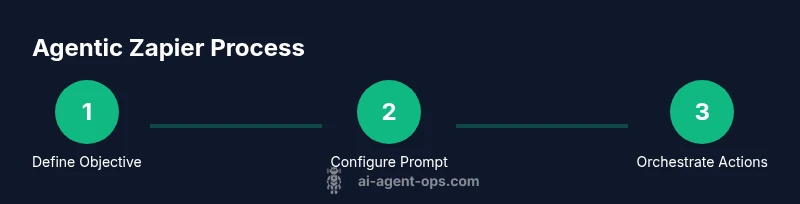
Define the objective
Start with a clear business goal for the agent. Define what decision the agent should make, what data it must see, and what outcomes qualify as success. Align this with governance and privacy constraints from the outset.
Tip: Write one measurable success criterion and one hard failure condition. - 2
Select an AI model and input format
Choose an AI model appropriate for the task (classification, extraction, reasoning) and define the input schema. Decide whether to pass structured data or free text and determine how the model will be invoked within Zapier.
Tip: Prefer models with good reasoning and a clear fallback path. - 3
Map data sources and triggers
Identify the triggers in Zapier that will start the agent workflow and map downstream actions. Create a data flow diagram showing how data moves between apps and the agent.
Tip: Keep data minimal to reduce risk and latency. - 4
Design the decision prompt
Craft a prompt that frames the task, constraints, and desired actions. Include examples if possible to improve reliability and reduce ambiguity.
Tip: Test prompts with edge cases to improve robustness. - 5
Configure actions and paths in Zapier
Set up the Zap with multiple steps and conditional paths. Ensure the agent can trigger alternate routes based on confidence or data quality.
Tip: Use clear branching to prevent runaway automation. - 6
Add fallback and guardrails
Implement escalation to a human when the agent is uncertain or when data quality is low. Include error handling and retry policies.
Tip: Document escalation criteria and SLAs. - 7
Test with representative data
Run end-to-end tests using realistic data. Verify each decision point, data transformation, and resulting actions.
Tip: Log test outcomes and capture failure modes. - 8
Enable logging and auditing
Capture prompts, model outputs, decision rationales, and actions for compliance and debugging. Store logs in a secure, searchable format.
Tip: Rotate logs and respect retention policies. - 9
Go live and monitor
Launch the workflow with a small cohort, monitor performance, and iterate on prompts and routing rules based on observed results.
Tip: Set alerting for key performance indicators.
Questions & Answers
What is an AI agent in Zapier?
An AI agent in Zapier is a component that uses an AI model to interpret inputs, reason over data, and decide what actions to take within a Zapier workflow. It enables decision-driven automation rather than simple trigger-action sequences.
An AI agent in Zapier is a smart part of a workflow that decides what to do next based on data and AI reasoning.
Do I need to code to build these workflows?
No-code and low-code options in Zapier allow building agent-driven automations. Some prompts and custom actions may require basic configuration, but extensive coding is usually not necessary.
You can build these without heavy coding; Zapier provides no-code building blocks.
Is this approach secure for sensitive data?
Security depends on proper use of secrets, access controls, and data minimization. Use Zapier's secret storage and follow your organization’s governance policies.
Security matters; use vaults and enforce strict access controls.
What metrics matter when evaluating agent performance?
Track accuracy of decisions, latency, rate of human handoffs, and overall throughput. Establish governance checks and revision cycles for prompts and models.
Measure accuracy, speed, and how often humans need to step in.
What are common pitfalls when using AI agents in Zapier?
Ambiguity in prompts, data leakage, and over-automation without safeguards. Start with clear prompts, minimize data exposure, and build robust fallback paths.
Watch out for unclear prompts and data leaks; use guardrails.
How can I extend this to multiple apps?
Use Zapier's multi-step paths and app connectors to orchestrate across services. Plan data handoffs and ensure consistent data schemas across apps.
You can connect several apps; plan the data flow carefully.
Watch Video
Key Takeaways
- Define objective before building
- Agentic automation scales workflows
- Governance and security are essential
- Test early, iterate, and monitor continuously