ai agent google pdf: automating PDF insights with AI agents
Explore how ai agents read, summarize, and extract insights from Google PDFs. This analytical guide covers architecture, governance, data handling, patterns, and practical tips for ai agent google pdf workflows.


AI agents can autonomously extract, summarize, and answer questions from Google PDFs by connecting a PDF parser and the Google Drive/Docs API to an agent framework. This enables automated data extraction, indexing, and Q&A workflows for teams. In this guide, we examine practical patterns, data considerations, and implementation tips for ai agent google pdf.
Why ai agent google pdf matters
AI-enabled workflows for reading and extracting from Google PDFs unlock faster decision-making in product, engineering, and content teams. According to Ai Agent Ops, automating the ingestion and querying of PDF documents reduces manual data gathering and speeds up insight generation. The combination of PDF parsing, natural language understanding, and agent orchestration makes it possible to turn static documents into interactive knowledge sources. When you connect a PDF parser to Google Drive and a capable agent framework, you gain a repeatable pattern for data extraction, quality checks, and governance. For teams exploring the ai agent google pdf pattern, the payoff is measurable: faster insights, higher accuracy, and better traceability across document-heavy workflows.
This section sets the stage for practical implementation. You’ll see how to scope the project, align on success metrics, and design a robust pipeline that treats Google PDFs as dynamic data sources rather than static assets. The goal is not just automation for its own sake, but repeatable, auditable processes that scale with your organization’s needs.
Architecting a robust ai agent google pdf workflow
A solid architecture starts with three layers: data ingestion, cognitive processing, and orchestration. On ingestion, a PDF parser (and OCR for scanned pages) converts pages into text while preserving structure (tables, headings, columns). Next, embeddings and a vector store enable semantic search across documents, while a retrieval-augmented generation (RAG) component drives accurate QA and summaries. Finally, an agent orchestrates tasks—fetching new PDFs from Google Drive, triggering parsing, validating results, and routing outputs to dashboards or downstream systems. Security and access control are non-negotiable: OAuth scopes, least-privilege service accounts, and audit logs protect sensitive content. A practical pattern is to tokenize PDFs into modular chunks (sections, tables, figures) to improve retrieval accuracy and latency. For reliability, incorporate retries, idempotent operations, and content-versioning so updated PDFs don’t produce stale results. In practice, you should design prompts and system messages that guide the agent to respect document provenance and attribution, especially for regulated industries.
The Ai Agent Ops team found that a modular design—separating ingestion, embedding, and reasoning—greatly improves maintainability. This separation also makes it easier to swap out parsers or vector stores as needs evolve while maintaining a consistent user experience.
Practical patterns: extract, summarize, and QA across PDFs
- Data extraction patterns: pull structured data from tables, captions, and footnotes; normalize fields (dates, currencies, units); attach metadata (PDF title, author, date).
- Summarization workflows: generate executive summaries, section highlights, or issue briefs tailored to stakeholder needs.
- Question-answering across a PDF corpus: aggregate answers from multiple documents, with provenance trails showing which PDFs supplied each fact.
- Cross-document analysis: compare definitions, terms, or requirements across PDFs to surface inconsistencies.
- Automated reviewing: run governance checks (version, access, sensitivity) before publishing outputs to teams.
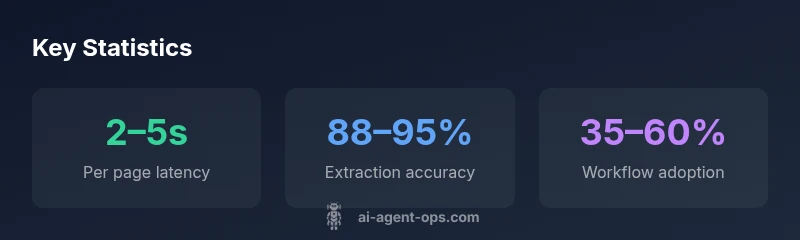
Real-world best practices include validating outputs with human-in-the-loop checks for high-stakes content, maintaining a changelog of outputs, and instrumenting metrics (latency, accuracy, and user satisfaction) to guide ongoing improvements.
Data governance, privacy, and compliance considerations
When processing Google PDFs, governance is essential. Enforce data access policies that align with your organization’s data classification framework. Use short-lived credentials, rotate service accounts regularly, and log all access events for auditing. Implement content redaction for sensitive fields (PII, confidential business information) before external sharing, and establish retention policies for parsed data versus original documents. Consider retention and deletion workflows for PDFs stored in Google Drive, and ensure that your AI pipeline honors data ownership and licensing terms. For regulated domains, adopt a model-card approach that documents data sources, processing steps, and the boundaries of what the agent can infer. Finally, provide a clear rollback path if model outputs need correction—re-parsing and re-indexing should be straightforward and auditable.
Implementation roadmap: from prototype to scale
Start with a small pilot: a single data source (a subset of PDFs), a simple parser, and a basic retrieval QA loop. Define success metrics—time-to-insight, accuracy, user adoption—and set up a feedback channel. As you scale, replace ad-hoc prompts with structured templates, add error-handling guards, and integrate with existing pipelines (CRMs, BI tools, knowledge bases). Invest in monitoring dashboards that reveal latency, error rates, and user satisfaction. Don’t skip security reviews or data-privacy checks; include a privacy impact assessment as you broaden access. Finally, plan for governance: versioning, provenance, and repeatable deployment patterns to ensure you can reproduce results in production environments.
Performance optimization and common pitfalls
- Latency vs. accuracy trade-offs: larger context windows improve accuracy but raise latency; tune chunk size and retrieval settings accordingly.
- OCR pitfalls: misread fonts or scanned images can corrupt data; validate OCR quality with confidence scores and fallback to higher-fidelity parsers when needed.
- Embeddings strategy: use domain-specific embeddings for better retrieval on technical PDFs; periodically refresh embeddings to reflect updated content.
- Dependency management: pin library versions and maintain reproducible environments to prevent drift.
- Monitoring: collect end-user feedback and automate alerts for failures, outages, or data drift; implement a rollback mechanism for outputs.
Conclusion and next steps
This article provided a practical framework for building and operating ai agent google pdf workflows. While the approach is powerful, success hinges on clear scoping, robust governance, and disciplined monitoring. The next steps include selecting a stack that fits your team's skills, piloting with representative PDFs, and iterating based on measured outcomes. The Ai Agent Ops team recommends starting with a small, well-defined use case and expanding as you validate value, governance, and user acceptance.
Common patterns for ai agent google pdf workflows
| Pattern/Feature | What it does | Best practices | Potential Pitfalls |
|---|---|---|---|
| PDF parsing pipeline | Extracts text and layout from PDFs using a robust parser and OCR when needed | Use reliable parsers; test with embedded fonts; normalize tables | Parsing errors; OCR inaccuracies; layout drift |
| Indexing and retrieval | Stores extracted content for fast semantic search across PDFs | Use embeddings and a stable vector store; tag with metadata | Indexing errors; drift in content; stale metadata |
| QA and summarization | Generates answers and concise summaries from document content | Define QA templates; validate with human review | Hallucinations; inconsistent summaries; misattribution |
Questions & Answers
What is ai agent google pdf?
ai agent google pdf refers to using AI agents to process, extract, and analyze content from PDFs stored in Google Drive. This enables automated data extraction, search, and QA workflows across large document sets.
ai agent google pdf lets AI agents read pdfs in Google Drive, extract data, and answer questions automatically.
How do I connect Google Drive to my AI agent workflow?
Connect Drive via OAuth credentials and service accounts, then use the Drive API to fetch new PDFs. Pair this with a PDF parser and an agent orchestration layer to trigger parsing and indexing when new documents appear.
Connect Google Drive with OAuth, fetch PDFs, and trigger parsing and indexing in your AI agent workflow.
What about data privacy and security when processing PDFs?
Apply least-privilege access, encrypt data at rest and in transit, and implement auditing. Use redaction for sensitive fields and maintain a clear data retention policy.
Ensure least-privilege access, encryption, and auditing; redact sensitive data and set retention rules.
Which tools are recommended for parsing PDFs and embeddings?
Choose a robust PDF parser that handles tables and fonts, and pair it with a vector store for embeddings. Validate compatibility with your stack and plan for OCR when needed.
Pick a strong PDF parser and vector store for embeddings, with OCR support when needed.
Can this handle scanned or image-only PDFs?
Yes, with OCR enabled. Scanned PDFs require OCR quality checks and possibly post-OCR correction to ensure accurate extraction.
Yes, but ensure OCR quality checks and possible corrections for accuracy.
How should I measure ROI for ai agent google pdf projects?
Track time-to-insight, error rates, and user adoption. Compare pre- and post-automation metrics to quantify time savings and decision velocity.
Measure time saved, accuracy improvements, and adoption to quantify ROI.
“AI agents unlock automated, on-demand access to document content, turning static PDFs into interactive knowledge sources.”
Key Takeaways
- Start with a well-scoped pilot to learn value quickly
- Design for governance and data privacy from day one
- Use modular ingestion, embedding, and reasoning layers
- Measure latency, accuracy, and user satisfaction regularly
- Plan for scale with repeatable deployment patterns