VSCode AI Agent vs Cursor: A Practical Developer Comparison
An analytical, practical comparison of VSCode AI agent workflows versus cursor-driven code editing, exploring use cases, trade-offs, integration, and best practices for building effective agentic AI inside VSCode.


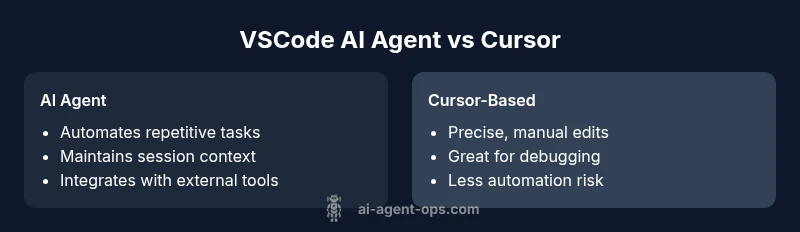
In the VSCode ecosystem, the VSCode AI agent vs cursor debate centers on automation versus explicit control. AI agents excel at automating repetitive tasks, orchestrating tools, and sustaining context across sessions, while a cursor-driven workflow preserves precise, step-by-step edits. For many development teams, a hybrid approach—using AI agents for routine tasks and cursors for nuance—offers speed with necessary oversight.
Context and definitions: what we mean by a VSCode AI agent and a cursor
The phrase vscode ai agent vs cursor refers to two complementary modalities inside Visual Studio Code. An AI agent in this context is a software component or extension that can autonomously plan and execute sequences of editor actions, API calls, and external tool interactions based on a defined policy or prompt. The cursor-based workflow, by contrast, is the traditional approach where developers drive editing through keyboard and mouse inputs, prompting tools only as needed. This block clarifies terminology, sets expectations, and frames the analytical lens we bring to use-case evaluation. Throughout this article, consider how agent-oriented automation interacts with editor state, workspace context, and governance constraints. The Ai Agent Ops team emphasizes that choosing between these modes is not binary; it’s about orchestrating capabilities to fit the task while maintaining safety, transparency, and maintainability.
Core capabilities: what adds value in VSCode when using an AI agent vs a cursor
AI agents in VSCode bring several core capabilities that distinguish them from cursor-based work. They can (1) plan a sequence of editor actions and tool invocations, (2) maintain session context to reuse decisions across related tasks, (3) automate repetitive, well-defined workflows, such as scaffolding files, refactoring, test generation, and code formatting, and (4) integrate with external APIs or AI services to fetch data, generate code, or analyze results without manual prompts for every step. A cursor-driven workflow remains essential for granular edits, surgical changes, and situations requiring nuanced judgment, visual verification, and real-time debugging. Effective practice blends AI-driven automation with human-in-the-loop verification at critical junctures, ensuring quality and safety.
Use-case driven differences: when to lean on AI agents and when to rely on the cursor
Certain tasks scale well with AI agents: boilerplate generation, large-scale refactoring guided by policies, consistent code style enforcement across a project, and rapid prototyping where repeatable steps can be defined as a policy. Tasks that benefit from the cursor include complex debugging sessions, exploratory coding, and scenarios where context is highly dynamic or unexpected. In practice, teams should map repetitive tasks to agent policies and reserve the cursor for edge cases, ad-hoc experimentation, and scenarios requiring precise, per-command control. A hybrid approach typically yields the best results by balancing speed with oversight.
Architecture, extensions, and integration patterns in VSCode
A practical VSCode AI agent ecosystem rests on clean integration patterns. Agents usually interact with VSCode APIs, the terminal, file system, and external services through secured channels. Extensions that enable agents should expose deterministic interfaces, offer observability (logging, tracing, and audit trails), and support safe fallbacks if a step fails. From an architectural standpoint, design agents to operate on clearly defined policies, fail gracefully, and provide rollback mechanisms. The editor’s state, such as open editors, selected text, and workspace configuration, should inform decision making to avoid surprises. The cursor remains essential as the verifier and instructor that steers agent actions when edge cases arise.
Performance, reliability, and governance considerations
Performance in an agent-driven workflow hinges on response latency from AI services, the efficiency of the agent’s decision logic, and robust caching of results. Reliability requires deterministic behavior, comprehensive logging, and robust error handling with explicit rollbacks. Governance considerations include access control, audit trails, and policy enforcement to prevent unsafe actions. For teams, define guardrails such as action eligibility criteria, approval thresholds for automated edits, and clear ownership of automated tasks. A well-governed setup reduces risk while preserving the productivity gains from automation.
Security, privacy, and data handling in agent-based VSCode workflows
Security matters more in automated editor workflows because the agent may access code bases, credentials, and sensitive configuration data. Limit scope with least-privilege policies, isolate agent execution environments, and encrypt sensitive material in transit and at rest. Privacy concerns relate to what the AI service can see and log. Implement data minimization strategies, anonymize or redact sensitive information where possible, and provide visibility into what data is shared with third-party AI providers. Transparent data handling builds trust and supports compliance with organizational policies.
Migration, adoption, and team workflows for a smooth transition
Adopting AI agents in VSCode requires a staged approach. Start with a pilot project that maps a narrow set of repetitive tasks to agent policies, then expand as confidence grows. Provide hands-on training, reference implementations, and clear governance rules. Establish a feedback loop to refine policies based on real-world outcomes, metrics, and incident reviews. Finally, create playbooks and runbooks that document how to augment or revert agent actions during critical phases to minimize risk and accelerate learning.
Practical setup: building a safe, effective VSCode AI agent workflow
A practical setup begins with identifying repeatable tasks suitable for automation, defining precise policies, and selecting technology components (agent framework, AI model, extension API). Implement observability from day one: log decisions, outcomes, and errors; set up alerting for failures; and enable quick manual intervention. Test thoroughly with unit tests for individual actions and end-to-end simulations to capture the behavior under typical project conditions. Finally, document the policy, rollout plan, and governance framework so teams can scale the approach confidently.
Comparison
| Feature | VSCode AI Agent | Cursor-based Workflow |
|---|---|---|
| Autonomy for tasks and tool orchestration | High autonomy within defined policy; can chain actions and API calls | Low autonomy; requires explicit prompts and manual actions |
| Context handling across tasks | Maintains session-wide context and reuses decisions where appropriate | Context confined to current view/command; requires re-establishing state |
| Editor integration and reach | Tight integration via VSCode APIs and extensions; can operate across files | Primarily editor-driven via keystrokes/mouse; deeper automation is manual |
| Learning and adaptation | Policy-driven adaptation; improvements come from updates to policies and prompts | Static behavior unless explicitly scripted or recorded by macros |
| Error handling and rollback | Built-in guardrails, logs, and rollback options for automated steps | Error diagnosis is manual; rollbacks require user intervention |
| Governance and auditability | Auditable actions with traceable decisions and policy checks | Actions are user-driven with manual traceability via history |
| Best use scenario | Repeatable, rule-based workflows; large-scale scaffolding | Ad-hoc editing, debugging, exploratory coding, and quick fixes |
Positives
- Significant speed gains on repetitive tasks
- Improved consistency across codebases and projects
- Reduced cognitive load for developers and teams
- Scalable automation across multiple files and runs
What's Bad
- Learning curve for policy design and safety constraints
- Risk of over-automation without proper guardrails
- Debugging agent decisions can be challenging
- Dependency on external AI services may introduce latency or outages
Hybrid approach yields best results: use AI agents for repeatable tasks, with cursors for precise control and validation.
AI agents excel at automating structured workflows in VSCode, while cursors remain essential for nuanced edits and debugging. A team that balances both approaches gains speed without sacrificing accuracy or safety.
Questions & Answers
What is a VSCode AI agent?
A VSCode AI agent is a software component or extension that autonomously plans and executes a sequence of editor actions and tool calls based on predefined policies. It aims to automate repetitive tasks, reduce context switching, and integrate external AI services where appropriate.
A VSCode AI agent is an automation-enabled extension that plans and runs editor actions, helping you automate repetitive tasks while you guide it with policies.
How does an AI agent compare to a cursor-based workflow?
AI agents offer automation and context retention, enabling rapid execution of predefined tasks. Cursor-based workflows provide explicit control and precision for unique or debugging tasks. The choice often hinges on task pattern, risk tolerance, and team governance.
AI agents automate recurring steps and keep context, while cursors give you exact control for special cases.
Which is better for debugging and exploration?
Cursor-based workflows generally excel in debugging and exploration due to precise, on-demand control. AI agents can assist by setting up test scaffolds or running predefined checks, but human judgment remains critical during debugging.
For debugging, use cursor-based methods for precision; let AI assist with setup and checks when appropriate.
Can you combine AI agents with cursor workflows?
Yes. The strongest setups blend AI agents for repetitive, safe tasks with cursor-driven control for edge cases, validation, and exploratory work. This hybrid approach maximizes speed while preserving safety and oversight.
Absolutely—combine AI automation for repetitive tasks with cursors for precise, manual work.
What are common pitfalls when adopting VSCode AI agents?
Common pitfalls include over-automation without guardrails, insufficient observability, and poorly defined policies that cause unexpected edits. Start small, implement rollback capabilities, and iterate policies with real feedback.
Watch out for over-automation, skip guardrails, and poor observability; start small and iterate.
Key Takeaways
- Map repetitive tasks to agent policies for speed
- Maintain strong governance and auditability of automated actions
- Keep humans in the loop for high-risk edits
- Design with observability from day one
- Iterate policies based on real-world feedback