How to Use AI Agents for Coding: A Practical Guide
Learn how to use AI agents for coding to accelerate development, automate repetitive tasks, and build smarter workflows. Step-by-step guidance, tools, and best practices for developers and teams.


According to Ai Agent Ops, you can accelerate software delivery by using AI agents for coding to draft, test, and refactor code with human oversight. This guide outlines a practical, step-by-step approach to designing agent-driven workflows, selecting tools, and measuring outcomes. You’ll learn how to define roles, manage prompts, and monitor safety to keep quality high while reducing toil.
Why AI agents for coding matter
In modern development, AI agents for coding act as copilots that can draft boilerplate, propose refactors, generate tests, and surface likely bugs. They’re not a replacement for skilled programmers; rather, they extend your team's capabilities, helping you move faster while keeping quality under human oversight. According to Ai Agent Ops, the most successful teams treat agents as collaborators that augment decision-making, not autonomous code producers. When used thoughtfully, agent-driven workflows reduce repetitive toil, standardize practices, and free engineers to focus on higher-leverage work. This section explores why these agents matter and how they fit into contemporary development pipelines.
- Accelerate boilerplate generation and repetitive tasks
- Improve consistency with shared prompts and guardrails
- Surface potential issues early for human review
- Integrate seamlessly with existing tooling and workflows
Core concepts: agent roles and agentic workflows
To effectively use AI agents for coding, you need to understand the core concepts that power agentic AI workflows. An agent is a software entity that can perform tasks, reason about inputs, and call tools or services. A coordinator or orchestrator manages multiple agents, assigns tasks, and tracks progress. Prompts guide behavior, while policies constrain actions and ensure safety. Memorable state (or memory) helps retain context across steps, so agents don’t reinvent the wheel with every request. Observability—logs, metrics, and human-in-the-loop checks—lets teams evaluate output quality and improve prompts over time.
- Agents perform code-related tasks (generate, test, refactor)
- A coordinator orchestrates multiple agents and tasks
- Prompts vs policies balance creativity and safety
- Observability enables governance and continuous improvement
Practical benefits and trade-offs
Agent-driven coding can dramatically reduce cycle times for routine tasks such as scaffolding, formatting, and test generation. It also enables rapid exploration of alternative implementations and early detection of defects through automated checks. However, there are trade-offs: reliance on models can introduce hallucinations, misinterpretations, or security risks if prompts aren’t carefully designed and reviewed. The best practice is to mix automated outputs with human validation and clear guardrails, ensuring accountability and quality control.
- Faster iteration on design and implementation
- Consistent coding standards through shared prompts
- Increased cognitive load if guardrails are ignored
- Necessity of human review for critical components
Building blocks: prompts, policies, and interfaces
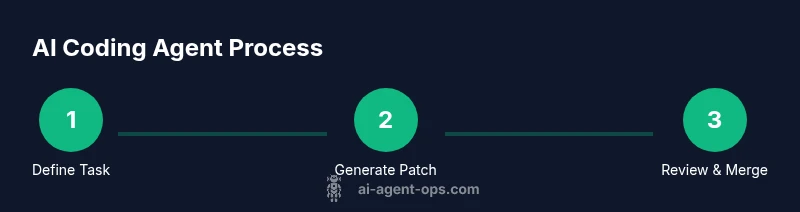
Effective AI coding agents rely on a well-structured trio: prompts, policies, and interfaces. Prompts set the agent’s goals and tone (system prompts), while user prompts specify tasks. Policies constrain actions (e.g., only accessing certain APIs, requiring tests before merges). Interfaces connect agents to your toolchain—version control, issue trackers, and test runners. A simple architecture might route a coding task from a PR to an agent, which then returns a patch and a rationale for reviewer approval.
- Use layered prompts: system, task, and feedback prompts
- Implement robust policies for data access, security, and testing
- Connect agents to CI/CD, test suites, and version control
- Maintain clear provenance and explainability for outputs
Setting up a simple coder agent: a minimal example
A minimal coder agent typically follows a loop: receive a task, consult a knowledge base, draft code, run tests, and report results. Start with a small scope—generate a function or module with tests, rather than a full application. Define success criteria (pass all tests, adhere to style guidelines), then iterate prompts and tests to improve reliability. Document decisions and maintain a changelog for traceability.
- Define a compact task scope (single function or module)
- Establish success criteria and test coverage
- Create a small, auditable patch with a rationale
- Iterate on prompts based on feedback
Integrating AI agents into the development workflow
Integrating AI agents requires aligning them with your existing development lifecycle. Trigger agents from code reviews or CI pipelines, ensure outputs are reviewed by humans, and enforce automatic rollback if tests fail. Use version-controlled prompts and guardrails, and create a feedback loop where reviewer decisions refine agent behavior. This integration helps teams scale automation without compromising governance or accountability.
- Trigger agents via PRs or CI events
- Enforce human review for critical changes
- Version-control prompts and guardrails
- Monitor outcomes and adjust prompts over time
Real-world use cases of AI agents in coding
Real-world use cases include generating boilerplate and tests, proposing refactoring options,enriching code with documentation stubs, and triaging bugs. Agents can help with dependency updates, API compatibility checks, and generating migration notes for upgrades. By pairing agents with human reviews, teams can maintain control while benefiting from rapid iteration and consistent coding practices.
- Boilerplate and test generation
- Refactoring recommendations with rationale
- Documentation and examples generation
- Bug triage and regression checks
Evaluation, guardrails, governance, and safety
To keep AI agents safe and reliable, implement guardrails, logging, and continuous monitoring. Define metrics for output quality, reliance on human review, and time saved. Establish governance policies around data access, security, and compliance. Regular audits and retraining of prompts help keep agents aligned with your coding standards and organizational values. This approach supports sustainable adoption across teams.
- Guardrails for data access and security
- Continuous monitoring of outputs and prompts
- Regular audits and prompt retraining
- Governance aligned with organizational policies
Authority sources
- https://www.nist.gov
- https://www.nsf.gov
- https://mit.edu
These sources provide foundational guidance on standards, research, and best practices relevant to AI, software development, and governance.
Tools & Materials
- Integrated development environment (IDE) with AI-assisted features(Ensure it supports code completion, linting, and plugins for AI integration)
- AI agent platform/framework(Abstract, vendor-neutral option is acceptable; avoid SKU references)
- Prompt library or template set(Include system, task, and feedback prompts)
- Version control system (Git) and repository access(For patch generation, reviews, and rollback)
- API keys or credentials for AI services(Store securely with least-privilege access)
- Testing harness and test data(Optional but recommended for automated validation)
- Documentation and coding style guides(Helps align outputs with team standards)
- Security and access controls(Guard sensitive data and restrict agent actions)
Steps
Estimated time: 3-5 hours
- 1
Define goals and roles
Clarify what problems the AI agents will solve (e.g., boilerplate generation, test creation, refactoring suggestions) and assign roles to human reviewers. Establish success metrics and boundaries for what outputs require human approval.
Tip: Document a 1-page plan with task types, acceptance criteria, and reviewer responsibilities. - 2
Choose tools and architecture
Select an AI platform, IDE plugins, and CI/CD integration points. Sketch a high-level architecture showing how the agent communicates with the repo, test runner, and reviewer tools.
Tip: Prefer modular components to swap or upgrade AI vendors without overhauling the pipeline. - 3
Design prompts and safety policies
Create layered prompts (system, task, feedback) and define policies that limit data access, ensure testing, and require reviews for critical changes.
Tip: Store prompts in version control and review changes via pull requests. - 4
Build a minimal coder agent
Implement a small agent that can generate a function or module, produce tests, and report results. Validate with a focused test suite before expanding scope.
Tip: Start with a single, well-scoped task to validate the workflow. - 5
Integrate into CI/CD and code reviews
Add PR hooks to trigger the agent, enforce reviewer checks, and automate rollback on failures. Align outputs with your code review process.
Tip: Automate traceability: attach reasoning and patch notes with each output. - 6
Measure, learn, and iterate
Collect metrics on time saved, defect rate, and reviewer effort. Refine prompts, policies, and tooling based on feedback.
Tip: Hold quarterly retrospectives to update guardrails and guidelines.
Questions & Answers
What are AI agents for coding?
AI agents for coding are software entities that generate, test, and refine code under prompts and policies, typically with human oversight. They act as copilots to accelerate development and reduce repetitive tasks while maintaining quality through reviews and guardrails.
AI coding agents act as copilots that draft and test code, but humans review and approve outputs to ensure quality and safety.
How do you evaluate an AI coding agent's output?
Evaluation combines automated tests, style checks, and reviewer feedback. Output should pass test suites, adhere to guidelines, and include a justification for decisions when needed.
You evaluate by running tests, checking style, and getting reviewer feedback on the rationale.
What tools are recommended to get started?
Begin with an IDE that supports AI-assisted features, a modular AI agent framework, and a version control workflow. Use a prompt library and solid guardrails to keep outputs safe and reviewable.
Start with a capable IDE, a modular AI framework, and a version-controlled prompt library.
Is it safe to deploy AI-generated code in production?
Only after thorough human review, automated testing, and secure deployment practices. Treat AI-generated changes as suggested patches requiring validation.
Only after strong human review and testing; AI outputs are suggestions, not final authority.
How can I measure return on investment (ROI)?
Track time saved, defect rate reductions, and reviewer effort before and after adoption. Use these metrics to justify expansion and guide governance.
Look at time saved and fewer defects to gauge ROI and guide governance.
Watch Video
Key Takeaways
- Define clear goals and guardrails before building agents
- Use a layered prompts approach for reliability
- Keep human oversight central to safety and quality
- Integrate agents into CI/CD with traceable outputs