AI Agent Using LangFlow: Practical How-To for Teams
Learn to build and deploy an ai agent using langflow with step-by-step instructions, best practices, and real-world workflows. Aimed at developers, product teams, and leaders exploring agentic AI workflows.


Learn to build an ai agent using langflow to orchestrate prompts, tools, and data sources. This guide covers setup, design patterns, and best practices for reliable automation, with practical steps you can implement today. According to Ai Agent Ops, LangFlow enables rapid prototyping and safer agent orchestration for teams. This approach scales across domains and use cases.
What is LangFlow and why use it for AI agents
LangFlow is a low-code, visual workflow designer that helps teams assemble prompts, tools, and data sources into coherent AI agent behavior. When you’re building an ai agent using langflow, you compose flows that describe how the agent should think, act, and respond, while abstracting away much of the boilerplate code. LangFlow integrates with large language models (LLMs) and external tools via adapters, enabling end-to-end automation without writing every API call by hand. According to Ai Agent Ops, LangFlow accelerates prototyping and reduces operational friction, making it a practical choice for developers and product teams exploring agentic AI workflows. By mapping tasks to specific tools and memory, LangFlow helps you observe, test, and evolve agent behavior quickly. The goal is to produce repeatable, auditable agent actions that you can validate against real-world scenarios. In this section we’ll cover the core idea of using LangFlow to orchestrate an ai agent using langflow and why it matters for automation projects.
Core concepts: agents, flows, tools, and prompts
To build an ai agent using langflow effectively, you’ll need to grasp four core concepts:
- Agents: The decision-makers that decide which tool or data source to invoke next.
- Flows: The orchestrations that define the sequence of steps, prompts, and tool calls.
- Tools: External capabilities the agent can use, such as APIs, databases, or web services.
- Prompts and templates: Reusable instructions that guide model behavior and tool invocation.
LangFlow lets you model these elements visually, then connect them into repeatable workflows. This modular approach helps you experiment with different prompts and tool sets without rewriting code. Ai Agent Ops Team emphasizes that clarity in flow design reduces debugging time and helps teams audit decisions later.
Prerequisites and environment setup
Before you start building an ai agent using langflow, prepare a baseline environment and credentials. You will typically need a LangFlow account (web or local deployment), an LLM provider API key (for example, OpenAI, and at least one compatible model), and a hosting environment for running the agent (local server, container, or cloud VM). You should also have access to the tools you plan to integrate (HTTP endpoints, databases, or custom APIs) and a secure way to manage tokens and secrets. As Ai Agent Ops notes, starting with a minimal, well-scoped project helps you learn LangFlow’s flow-building patterns without overwhelming complexity. Finally, set up a simple test dataset to validate prompts and tool calls before expanding scope.
Architecture of an ai agent using langflow
A robust ai agent using langflow typically comprises four layers:
- Language model layer: The LLM(s) that interpret prompts and generate actions.
- Orchestration layer (LangFlow): The flows that sequence prompts, decisions, and tool invocations.
- Tool layer: APIs, databases, or services the agent calls to fetch data or perform actions.
- Memory/context layer: A store for conversation history, results, and state to maintain continuity across rounds.
This architecture enables clear separation of concerns: prompts stay consistent, tools are modular, and the memory layer captures essential context for subsequent interactions. The LangFlow flows act as the glue, translating user intent into concrete tool calls while preserving auditability and reproducibility. The architecture supports iterative improvement by allowing you to swap tools or adjust prompts without re-architecting the entire system.
Designing an ai agent using langflow: a concrete workflow
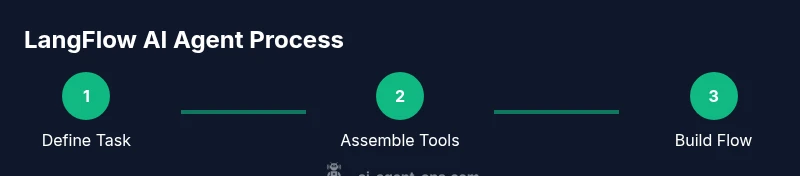
Start by defining the task the agent should perform (e.g., answer customer questions using a knowledge base and perform actions via an API). Then identify the tools the agent will need and how flows will decide when to call each tool. Create prompt templates for each decision point and assemble a base flow in LangFlow that ties prompts to tool calls. Add a memory component to retain user context and previous results. This design helps ensure consistent behavior across sessions and simplifies debugging. Remember to validate each flow step with a representative test prompt, as small changes in a prompt can alter tool usage dramatically. ai agent using langflow benefits from a clear mapping between user intent, prompts, and tools.
Building the flow: a concrete walkthrough
In this walkthrough you’ll implement a starter flow for a simple information retrieval agent. First, define the task: fetch the latest product details from a REST API and return a concise answer. Then create a tool wrapper for the API, craft a concise prompt that asks for the needed fields, and connect the prompt to the tool within the LangFlow canvas. Add a memory node to store the last user query and the API response. Finally, wire in a sentiment or confidence check to decide when to escalate to human support. This approach reduces friction when expanding the agent’s toolset later on.
Deployment and iteration: testing and monitoring
Once the basic flow works, deploy to a staging environment and test with real-world prompts. Use synthetic prompts to probe edge cases, measure latency, and verify outputs against expected results. LangFlow’s visual debugging tools help identify where prompts or tool calls diverge from expectations. Ai Agent Ops recommends establishing a lightweight monitoring dashboard that tracks success rate, average response time, and error rates. Use this feedback to refine prompts, adjust tool parameters, and prune unnecessary steps. Regularly review flow histories for accountability and governance.
Common pitfalls and how Ai Agent Ops recommends avoiding them
A frequent pitfall is overloading a single flow with too many tools or overly long prompts, which increases latency and error surfaces. Start with a minimal viable flow and gradually add capabilities. Another common issue is leaking secrets through logs or responses; always use secure storage and avoid echoing keys in prompts. Finally, neglecting memory can cause context loss; implement a persistent context store to maintain continuity across sessions. Ai Agent Ops emphasizes documenting decision points in each flow so future teams can audit actions and improve reliability.
Security, governance, and compliance considerations
Security is critical when deploying LangFlow agents. Protect API keys with environment variables or a secrets manager, log only non-sensitive data, and apply strict access controls to the LangFlow project. Implement rate limiting and input validation to prevent abuse of tools. Establish governance practices that require code reviews for flows and maintain an audit trail of tool invocations. Compliance considerations include data minimization, user consent for data collection, and clear escalation paths for sensitive inquiries. By adhering to these practices, teams can minimize risk while still delivering automation benefits.
Real-world use-case: customer-support automation with LangFlow
Consider a customer-support agent that assists users with order lookups, returns, and knowledge-base queries. The LangFlow flow could take a user query, decide whether the request needs a knowledge-base lookup or a direct API call, invoke the appropriate tool, and craft a succinct response. Memory stores recent interactions to keep context, while a confidence check determines whether to escalate to a human agent for complex cases. This example illustrates how LangFlow enables rapid prototyping, reusability of prompts, and incremental improvements without heavy development cycles.
Tools & Materials
- LangFlow account (web or local deployment)(Sign up for LangFlow Cloud or install locally if preferred)
- LLM provider API key (e.g., OpenAI, Cohere, or Anthropic)(Have at least one API key ready for testing)
- Hosting environment for the agent (local server or cloud VM)(Node, Python, or container-based runtime; ensure network access to tools)
- Testing client (curl or Postman)(For validating prompts and tool calls during development)
- Secret management (env vars, vault, or config)(Use secure storage for API keys and tokens)
Steps
Estimated time: 2-3 hours
- 1
Define the task and required tools
Clearly articulate the agent’s objective and identify the tools it will need to achieve that objective. This establishes scope and reduces scope creep in later steps.
Tip: Write a one-sentence task verdict to anchor the flow. - 2
Create prompts and templates
Develop concise, reusable prompts for each decision point. Use placeholders for dynamic data so you can reuse prompts across tasks without rewriting.
Tip: Test prompts with diverse inputs to reveal edge cases. - 3
Configure tool integrations
Wrap external APIs or services as LangFlow tools. Ensure consistent input/output formats to simplify flow wiring.
Tip: Document each tool’s required fields and error codes. - 4
Build the LangFlow flow
Assemble prompts, tool calls, and memory nodes into a cohesive sequence. Keep the flow modular to support future extensions.
Tip: Use sub-flows for complex tasks to keep the main flow readable. - 5
Add memory and context
Store essential context from user interactions and tool results to maintain continuity across turns.
Tip: Use a lightweight in-flow memory first; move to persistent storage when needed. - 6
Test with sample prompts
Run representative prompts to verify correct tool invocation and output formatting. Check for errors and misrouting.
Tip: Log outputs at each step for quick debugging. - 7
Deploy to staging and monitor
Push the flow to a staging environment and observe behavior under realistic conditions. Collect metrics on accuracy and latency.
Tip: Set up alerts for failures or unusually long response times. - 8
Iterate and scale
Refine prompts and add tools gradually based on real-world feedback. Plan for governance and versioning.
Tip: Version-control flows and document changes for team adoption.
Questions & Answers
What is LangFlow and what can it do for AI agents?
LangFlow is a visual workflow designer that lets you build AI agents by orchestrating prompts, tools, and data sources without writing extensive code. It enables rapid prototyping and clear flow logic for agents.
LangFlow is a visual tool for building AI agent workflows without heavy coding, which helps you prototype quickly.
Can LangFlow be used with non-OpenAI LLMs?
Yes. LangFlow supports multiple LLM providers through adapters or connectors; you can swap providers or test alternatives without rebuilding your flows.
Yes, LangFlow works with multiple LLM providers via adapters.
How do I test LangFlow-based agents safely?
Test prompts and tool calls in a staging environment with synthetic data. Validate outputs against expected results and monitor for edge cases before production deployment.
Test prompts and tools in staging with synthetic data to catch issues early.
What are common pitfalls when integrating LangFlow?
Overly complex flows, poor memory management, and leaking secrets. Start small, modularize, and always secure credentials.
Common issues include complex flows and secret exposure—keep things small and secure.
How do I deploy LangFlow agents in production?
After thorough testing, deploy to a controlled environment with monitoring and alerting. Establish governance and versioning to manage updates safely.
Deploy in stages with monitoring and governance in place.
Watch Video
Key Takeaways
- Define task clearly and map to specific tools
- Leverage LangFlow for rapid prototyping
- Test iteratively before production
- Secure keys and govern access
- Monitor performance and adjust flows over time