AI Agent for Test Generation: A Practical How-To
A practical guide to designing and deploying an AI agent that generates tests from requirements and code, with prompts, data strategy, QA, and CI/CD integration.


Learn how to design and deploy an AI agent for test generation. This guide covers scoping, prompts, data strategy, evaluation metrics, and CI/CD integration so your agent can autonomously generate unit and integration tests from requirements and code. By following this approach, teams can improve coverage while managing risk with governance.
The case for AI agents in test generation
Software testing is evolving as teams strive to keep up with rapid development cycles. An AI agent for test generation can analyze requirements, code, and existing test suites to propose new tests, generate test inputs, and even refactor flaky tests. According to Ai Agent Ops, this approach helps teams scale coverage without burning through manual tester hours, while maintaining traceability and governance. By framing testing as an agentic workflow, organizations can shift repetitive drafting tasks to automated reasoning, freeing engineers to focus on complex scenarios and risk-based exploration.
Key benefits include faster test generation, more diverse input coverage, and the ability to continuously adapt tests as the codebase evolves. This is not a magic bullet; it requires clear boundaries, robust evaluation loops, and disciplined data governance. The agent should operate within an explicit scope (e.g., a single service, a shared library, or a feature set) and respect project conventions for test structure, naming, and runtimes. When designed well, AI-driven test generation complements human testers by handling routine cases, generating edge-case probes, and surfacing gaps in coverage that might not be obvious from manual review.
Core capabilities of an AI agent for test generation
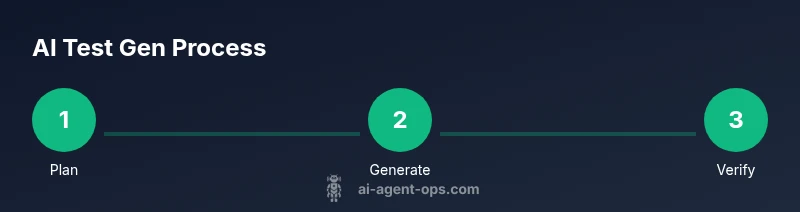
An effective AI agent for test generation combines planning, generation, and verification in a loop. It can (1) interpret requirements and code to identify testing goals, (2) propose test scenarios and data inputs that exercise critical paths, and (3) generate concrete test code, including assertions and edge-case cases. It should also (4) monitor test results, adapt prompts as the project evolves, and (5) surface gaps in coverage that human testers may overlook. A well-designed agent supports both unit and integration testing, and can extend to property-based and mutation-style tests to broaden coverage while maintaining speed. In practice, you’ll want a lightweight orchestration layer that coordinates the planner, the test generator, and the verifier, with clear interfaces for inputs and outputs.
Designing the agent: roles, prompts, and data sources
Define distinct roles for the agent: a planner (sets objectives and scope), a generator (produces test code and inputs), and a verifier (validates correctness and quality). Use prompt templates that separate planning from generation, and include context such as coding standards, test naming conventions, and runtime constraints. Data sources should include requirements documents, API specifications, existing test suites, code comments, and historical test results. Keep prompts modular and versioned, so you can reuse, audit, and adjust behavior without affecting other parts of the system.
Data strategy: inputs, outputs, and provenance
Inputs include requirements, code metadata, API docs, and any prior test results or coverage reports. Outputs are generated tests (unit and integration), parameterized cases, and test data sets suitable for your framework. Preserve provenance by versioning prompts, templates, and generated tests, and store them alongside the codebase. Implement a lightweight audit trail so you can trace why a test was created, what inputs produced it, and how it behaves in CI.
Evaluation and quality: metrics that matter
Key metrics help you gauge the agent’s value and safety. Track coverage gain (lines/functions exercised), mutation score improvements, and the rate of flaky tests, distinguishing between genuine regressions and nondeterministic failures. Measure generation time, test readability, and maintainability scores (via code reviews or linters). Maintain a feedback loop where humans review a sample of generated tests and adjust prompts or constraints accordingly. Use automated evaluation harnesses to run generated tests against a known baseline to confirm correctness.
Integration into development workflows
Embed the AI agent into your existing development pipeline. Use a PR-based workflow to add generated tests, run the test suite in CI, and report results back to developers. Create a lightweight dashboard showing coverage trends, flaky-test metrics, and generated-test quality. Establish guardrails so that generated tests comply with project conventions, naming schemes, and security requirements. Schedule periodic retraining or prompt updates as the codebase evolves to keep tests relevant.
Safety, governance, and risk management
Guardrails are essential for reliable test generation. Enforce prompts that limit actions to safe, deterministic outputs and require human sign-off for high-impact tests. Maintain an auditable log of decisions, provide reproducible seeds for any randomness, and protect sensitive data in prompts and test fixtures. Ensure privacy policies and licenses are respected when using external AI services, and implement access controls so only authorized team members can modify prompts or test-generation pipelines.
Practical example: a sample workflow
Assume you’re working on a REST service. The agent receives the requirements doc and a small code snippet. It drafts a plan to cover authentication, input validation, and error handling. It then generates unit tests with clear assertions and a few integration tests that spin up a lightweight service mock. Finally, it runs the tests in a controlled environment, reports failures, and suggests test improvements. This loop demonstrates how an agent can transform textual requirements into concrete, maintainable tests.
Common pitfalls and how to avoid them
- Over-reliance on generated tests without human review can hide gaps; always dedicate time for manual QA. - Ambiguous requirements lead to poor prompts; seek precise acceptance criteria. - Tests that are too brittle slow down the feedback loop; prefer robust, well-scoped tests. - Inadequate data governance can expose sensitive information; enforce data masking and access controls. - Failing to integrate tests into CI means you lose velocity; automate execution and reporting.
Tools & Materials
- Codebase access(Source repository with tests and documentation)
- Test framework(Unit/integration test framework used by the project)
- LLM platform(Access to a large language model provider; evaluate safety compliance)
- Prompt templates(Reusable prompts for planning, generation, verification)
- Test data generator(Internal or integrated data generators for inputs)
- CI/CD integration(Hooks to run tests and report results)
- Metrics dashboards(Optional for monitoring progress)
- Eval harness(A lightweight evaluation harness for generated tests)
Steps
Estimated time: 4-6 weeks for full rollout; 2-3 weeks for a pilot
- 1
Define scope and success criteria
Clarify which services or components the agent will cover and outline concrete success criteria (coverage goals, acceptable flaky rate, and integration depth). Establish acceptance criteria and how you will measure progress.
Tip: Document explicit goals and a success metric before coding the agent. - 2
Assemble inputs and data sources
Collect requirements, API docs, architecture diagrams, existing tests, and any historical coverage reports. Normalize data formats to simplify ingestion by the agent.
Tip: Create a central, versioned data map so prompts have stable context. - 3
Design agent roles and prompts
Define Planner, Generator, and Verifier roles. Build modular prompts for planning, test generation, and validation; include coding standards and naming conventions.
Tip: Version prompts and tie each version to a release in your repo. - 4
Implement the generation pipeline
Set up the orchestration layer that coordinates planning, generation, and verification. Ensure interfaces between components are well-defined.
Tip: Keep the pipeline stateless where possible to simplify testing. - 5
Define evaluation framework
Establish metrics for coverage, mutation, flakiness, and maintainability. Create an automated harness to run generated tests against baselines.
Tip: Automate feedback loops so prompts improve over iterations. - 6
Integrate with CI/CD and test runners
Hook the agent into the existing CI pipeline and test runners. Ensure results flow back to developers with clear signals.
Tip: Use PR-based integration to maintain velocity while preserving code quality. - 7
Pilot, collect feedback, iterate
Run a focused pilot on one service. Gather qualitative and quantitative feedback, then refine prompts and constraints.
Tip: Treat pilot results as the basis for governance decisions. - 8
Governance, monitoring, and expansion
Establish governance around prompts, data usage, and access. Plan for wider rollout with monitoring and ongoing improvement.
Tip: Schedule regular prompt audits and security reviews.
Questions & Answers
What is an AI agent for test generation?
An AI agent for test generation is a software agent that analyzes requirements and code to automatically create unit, integration, and property-based tests, then validates and refines the suite through an evaluation loop.
An AI agent analyzes requirements and code to auto-create tests, then validates and refines them through evaluation.
How do you measure the quality of generated tests?
Quality is measured by coverage gains, mutation score, test readability, and flakiness rate. Use a baseline for comparison and include human validation for important paths.
Measure coverage and mutation gains, plus readability and stability, with human validation for critical paths.
What are common risks with AI-generated tests?
Risks include false positives, brittle tests, data leakage, and over-reliance on automation. Mitigate with guardrails, audits, and regular human reviews.
Risks include brittle tests and data issues; guardrails and reviews help prevent problems.
Can this approach scale across multiple services?
Yes, by using modular prompts, shared evaluation standards, and a governance model that applies uniformly across services. Start with a pilot and expand gradually.
Yes—start with a pilot, then scale with standardized prompts and governance.
How should this integrate with existing CI/CD pipelines?
Integrate the agent to generate tests during PRs, run tests in CI, and report results back to developers. Maintain compatibility with current test runners and tooling.
Integrate tests into PRs and CI, keeping current toolchains intact.
What governance practices are recommended?
Maintain auditable prompts, versioned templates, and access controls. Regularly review outputs and ensure compliance with privacy and licensing policies.
Keep prompts versioned, reviewed, and auditable; restrict access and comply with policies.
Watch Video
Key Takeaways
- Define clear test generation scope and success metrics.
- Use modular prompts with versioning for reproducibility.
- Integrate the agent into CI/CD for rapid feedback.
- Governance and guardrails are essential for safe, scalable adoption.