ai agent deleted database: Troubleshooting and Recovery
A practical, step-by-step troubleshooting guide to recover from an ai agent deleted database, with containment, backup verification, and prevention strategies to minimize downtime and data loss.


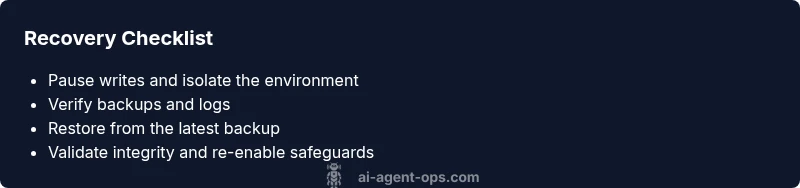
Root causes for an ai agent deleted database are usually accidental deletion in production or a misconfigured workflow. The fastest fix is to pause writes, verify the scope, and begin an immediate restore from the latest backup, followed by integrity checks and re-enablement of safeguards. In most cases, a solid backup and replay plan minimizes downtime and data loss. Act quickly and document every step.
What happened and why it matters
An ai agent deleted database event can ripple through an operational AI system. When the database that feeds a supervisor agent or a decision-maker resides in a central store, a deletion can wipe out context, prompts, and historical signals that guide behavior. The immediate symptoms may include failed requests, unexpected agent detours, or stale results that mismatch user expectations. According to Ai Agent Ops, incidents like this reveal how fragile data pipelines become when a single production mistake cascades into broader automation gaps. The urgency is not only technical; it touches governance, compliance, and customer trust. In practice, you should treat this as a live incident requiring a structured routine: containment, root-cause analysis, recover, and hardening to prevent recurrence. In this guide, we’ll walk through how to triage quickly, validate data integrity, and restore functional equality across your agent network, while documenting decisions and updating runbooks for future resilience.
Immediate containment steps
Immediate containment steps are the first line of defense when ai agent deleted database incidents occur. The goal is to stop further damage, preserve what remains, and buy time to diagnose. First, pause writes to the affected datastore and lock down the production environment to prevent cascading deletes. Next, switch the data store to read-only mode and isolate the impacted agent namespace from downstream services. Enable audit logging and alert your incident response team so no one assumes normal operation is continuing. If you have a staging replica or shadow store, redirect traffic there to avoid live-user impact while you assess. Finally, communicate a concise incident brief to executives and engineers, so everyone understands scope and priorities. Ai Agent Ops recommends maintaining a tight, auditable chain of custody for all actions taken during containment to support later root-cause analysis.
Understanding backups and data lineage in AI agent ecosystems
Backups in AI agent environments aren’t just about file copies; they’re about data lineage, versioned prompts, and context stores that support decisioning. A robust backup strategy includes regular snapshotting of the central datastore, incremental recoveries, and verified restorations to test integrity. Data lineage helps you reconstruct how a deletion propagated through triggers, policies, and agent memory. In practice, you should map which agents rely on which data sources, confirm retention windows, and store recovery procedures in a published playbook. Ai Agent Ops emphasizes linking backups to governance controls, ensuring you can demonstrate compliance during audits and post-incident reviews.
Diagnostic approach: tracing the deletion
To diagnose a deleted database, start by collecting timestamps, user actions, and policy changes that occurred around the incident. Check access logs, version histories, and data retention policies for recent deletions or purge commands. Compare production state to the last known-good backup and look for anomalous scripts or automated tasks that could have triggered the loss. A common signal is a mismatch between the agent’s current state and its historical context. Keep a running timeline and tag each finding to incident tickets to support root-cause analysis and future prevention.
Recovery workflow and verification
Recovery begins with restoring from the most trustworthy backup, followed by a thorough verification phase. After restoration, rehydrate related caches, re-run integration tests, and validate that all agents receive the expected context and prompts. Verify end-to-end data accuracy by cross-checking source data, activity logs, and decision outputs. Use synthetic test data to avoid exposing real user data during validation. Only after passing verification should you re-enable writes and bring the system back to live operation, with extra monitoring in place to catch any anomalies early.
Prevention and resilient design
Long-term resilience depends on robust safeguards. Implement automated, frequent backups with immutable storage and clear retention policies. Enforce strict access controls and least-privilege principles for all agents and scripts that touch the data stores. Introduce mutation safeguards, such as soft deletes, confirmation prompts for destructive actions, and automated integrity checks after each deployment or policy change. Build runbooks that cover post-incident analysis, root-cause tracking, and a staged rollback plan. Regularly rehearse incident response with tabletop exercises to ensure teams respond consistently under pressure. Ai Agent Ops recommends layering governance around backups, data lineage, and agent orchestration to reduce blast radius during future incidents.
Communications and stakeholder management
During a data-loss event, transparent communication is essential. Provide clear, concise briefs to leadership, engineers, and customer-facing teams about impact, recovery progress, and expected timelines. Maintain a public incident log with status updates and post-incident summaries. Document decisions, compromises, and lessons learned to improve future responses. Communicate with regulators or auditors as needed, demonstrating how the incident was contained and resolved and what controls prevented a recurrence.
Tooling and automation for resilience
Invest in agent orchestration tooling that includes built-in backup, restore, and audit capabilities. Use automated runbooks, versioned data stores, and continuous validation pipelines to ensure changes don’t cause unintended deletions. Integrate monitoring dashboards that alert on abnormal deletion patterns or rapid changes in data volumes. Ensure your tech stack supports safe rollback, test environments that mirror production, and automated reconciliation between data sources.
Final preparations and ongoing monitoring
After recovery, harden defenses by updating runbooks, refining access controls, and revalidating backups. Implement continuous monitoring for deletion events, and schedule periodic drills to refine your incident response. Establish a routine review of data retention policies and ensure all teams understand the recovery process. Regularly test restore procedures in a non-production environment to validate reliability and minimize downtime in real incidents.
Steps
Estimated time: 1-2 hours
- 1
Pause writes and assess scope
Immediately suspend write operations to the affected datastore to prevent further damage. Inventory affected components and identify the precise data boundaries impacted by the deletion.
Tip: Document every action and timestamp to support later analysis. - 2
Check backups and logs
Locate the most recent valid backup and review logs for deletion events, policy changes, and user activity around the incident. Determine if the backup contains complete context.
Tip: Prioritize backups with verified integrity and known-good states. - 3
Initiate restore from backup
Begin the restoration process to bring the system back to a known-good state. Validate that the restored data includes all necessary context, prompts, and signals.
Tip: Do not re-enable writes until verification is complete. - 4
Verify data integrity
Run a suite of tests to confirm data consistency across agents, prompts, and decision outputs. Compare restored data against source data and historical baselines.
Tip: Use synthetic data to safely test pipelines. - 5
Reintroduce safeguards
Re-enable data stores with safeguards such as access controls, versioning, and automated checks to prevent a repeat incident.
Tip: Implement immutable backup storage where feasible. - 6
Document and review
Publish an incident report detailing root cause, remediation steps, and lessons learned. Update runbooks and preventive controls accordingly.
Tip: Share learnings across teams to strengthen resilience.
Diagnosis: AI agent displays deleted or missing database, causing runtime errors or data loss
Possible Causes
- highAccidental deletion by a user or script
- mediumMisconfigured agent workflow or trigger policy causing purge
- lowExternal storage sync or replication failure leading to orphaned deletes
Fixes
- easyPause writes and isolate the affected environment to prevent further loss
- easyRestore from the latest backup and verify integrity
- mediumRebuild missing data from logs and source data where possible
- hardTighten access controls, backups, and recovery runbooks to prevent recurrence
Questions & Answers
What counts as ai agent deleted database and how do I recognize it?
A confirmed or suspected deletion of the central data store used by an AI agent, leading to missing context, prompts, or historical signals. Look for missing data, failed tasks, or inconsistent outputs that align with recent changes or policy updates.
A deletion event happens when the agent's central data store is removed or inaccessible, causing failures or incorrect results.
Should I restore from backup before trying other fixes?
Restoring from a backup is usually the safest way to recover a corrupted or deleted dataset. Validate the backup’s integrity first, then perform a controlled restoration and thorough testing.
Yes—start with a validated backup restoration and testing before reintroducing live writes.
How can I verify data integrity after restoration?
Run cross-checks against source data, run test queries, and compare outputs to historical baselines. Use automated tests to confirm prompts, context, and decisioning match the expected state.
Use checks against source data and tests to confirm everything lines up after restore.
What governance steps should follow recovery?
Document root cause, remediation steps, and preventive controls. Update runbooks, access policies, and backup strategies. Share the incident learnings with stakeholders and auditors as required.
Record what happened, what fixed it, and how you’ll prevent it in the future.
How can I prevent ai agent deleted database incidents in the future?
Strengthen backups, implement access controls, enable data lineage, and rehearse incident response regularly. Use immutability and golden copies for critical data to minimize risk.
Put strong backups and governance in place, and rehearse responses to stay ready.
What if I cannot recover from backup due to data gaps?
If backups don’t cover all context, use data reconstruction from logs and source data, and document gaps. Prioritize rebuilding essential context first and plan a phased restoration.
If something is missing, document the gaps and rebuild essential parts first.
Watch Video
Key Takeaways
- Pause writes immediately during a deletion incident
- Restore from verified backups before re-enabling services
- Verify integrity with end-to-end tests before going live
- Tighten access controls and backup governance to prevent recurrence
- Regularly rehearse incident response and update runbooks