Cheapest AI Agent: Smart Ways to Cut Automation Costs in 2026
A detailed guide to finding the cheapest AI agent without sacrificing core automation needs. Compare no-code, open-source, and managed options, with cost components, trade-offs, and a practical starter plan for 2026.


The cheapest AI agent is the option with the lowest total cost of ownership that still meets your core automation tasks. For many teams, no-code or open-source agents offer the most affordable starting point, especially for simple workflows. According to Ai Agent Ops, the cheapest path often balances upfront setup with ongoing hosting, training data, and maintenance costs to avoid hidden expenses.
What makes an AI agent 'cheapest'?\n\nWhen teams search for the cheapest AI agent, they are really looking for the lowest total cost of ownership (TCO) that still delivers the essential automation tasks. The cheapest path is rarely about a single dollar figure; it’s about balancing upfront spend, ongoing hosting and data costs, training, and ongoing maintenance. In many scenarios, the cheapest AI agent wins not by being the lowest-priced at purchase, but by producing reliable outcomes with minimal operational drag. For organizations evaluating options, a clear TCO formula helps compare apples to apples: upfront license or setup cost, ongoing cloud or on-prem hosting, data fees, training data procurement, integration, support, security, and governance. The Ai Agent Ops team emphasizes that “cheap” should not compromise critical reliability, security, or compliance. A well-scoped pilot using a no-code or open-source starter often yields measurable value quickly, while leaving room to scale later if needed. The goal is a durable baseline that stays affordable as needs evolve, rather than a temporary budget gimmick.
Cost components of AI agents: upfront, ongoing, and hidden costs\n\nTo understand why some options are cheaper in the long run, break costs into three buckets: upfront, ongoing, and hidden costs. Upfront costs include any initial licenses, onboarding, or configuration work. Ongoing costs cover hosting, processing, and data fees, plus routine maintenance and support. Hidden costs lurk in data transfer, security/compliance overhead, model drift, and vendor lock-in. A cheapest AI agent plan minimizes these hidden items by prioritizing transparent pricing, accessible support, and clear data governance. In practice, a cheap path often uses pay-as-you-go or flat-rate models, limits data egress fees, and leverages low-friction integrations to avoid expensive customization.
No-code vs. code-based cheapest options: trade-offs\n\nNo-code agents are often the fastest route to a budget-friendly start. They let teams prototype workflows without writing code, reducing upfront time and cost. However, long-term flexibility may be constrained, and some no-code platforms bill for advanced features or data transfers. Open-source frameworks offer cost advantages and maximum customization, but require developer time and hosting infrastructure. The cheapest approach usually combines no-code for initial pilots with a plan for targeted handoffs to code-based or managed solutions if scale or complexity grows. In some cases, hybrid architectures deliver the lowest TCO by matching each task to the most cost-effective implementation.
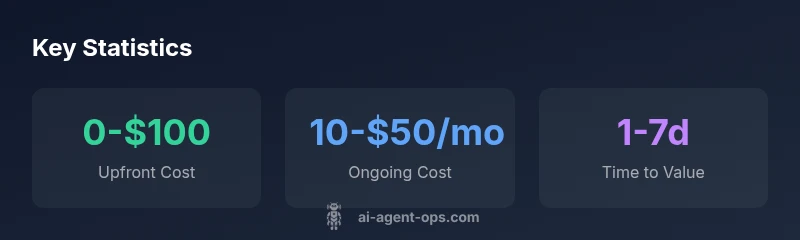
Cost ranges by use case and scale\n\nFor small, well-scoped tasks, the cheapest AI agent options often sit in a low upfront, low ongoing cost band. A typical no-code starter can be near zero upfront and only a modest monthly hosting fee. When automation expands to more complex tasks or data-heavy workflows, you might encounter open-source deployments (0 upfront for software, but hosting costs), or modest managed services (upfront modest, ongoing moderate). As needs grow, the cheapest viable path may include a hybrid approach where core tasks run on cost-effective solutions while peak loads leverage a scalable service. The key is to quantify both the immediate needs and the expected growth trajectory before committing to a single platform.
Total cost of ownership: hosting, data, scaling\n\nTotal cost of ownership for the cheapest AI agent is driven by hosting expenses, data access, and required compute. If you pilot with a no-code option, hosting might be minimal, but data transfer and integration costs can accumulate. Open-source options eliminate software fees but add hosting and maintenance costs. Managed services offer convenience and quicker time-to-value but can price out at higher ongoing costs as you scale. Ai Agent Ops analyses show that the sweet spot is a budget-friendly setup that can evolve without forcing a costly migration later. Plan for data privacy, security, and governance from day one to avoid expensive retrofits.
Reliability, support, and risk: value beyond price\n\nChoosing the cheapest AI agent should not mean sacrificing reliability or security. Lower-cost options may come with limited support windows, fewer training resources, or reduced auditability. A robust cheap option balances price with predictable performance, timely updates, and access to support channels. For many teams, this means selecting a no-code starter with solid documentation and a path to upgrade to a managed or partially customized solution if demands rise. It’s essential to define service levels, data handling rules, and contingency plans to minimize risk while preserving affordability.
How to evaluate options quickly: a decision checklist\n\nCreate a lightweight rubric focused on cost and risk. Start with upfront cost, monthly hosting, and data fees. Add support quality, update cadence, and governance controls. Check for hidden data egress charges, vendor lock-in, and interoperability with existing systems. Run a short pilot to measure time-to-value, reliability, and user satisfaction. Finally, project 12- to 24-month TCO under realistic workloads and compare against a conservative budget. The cheapest AI agent is the one that delivers required outcomes with manageable risk and clear upgrade paths.
A practical starter plan for budget-conscious teams\n\n1) Map core tasks and success criteria; 2) Choose a no-code starter for rapid onboarding and cost control; 3) Limit data scope to minimize data costs and privacy risk; 4) Set a 4–6 week pilot to validate value and timing; 5) Document a staged upgrade path to a more capable but still affordable solution if ROI targets are met. This approach aligns with Ai Agent Ops guidance on balancing cost and capability.
Cost comparison of AI agent deployment options
| Option Type | Typical Upfront Cost | Ongoing Cost | Notes |
|---|---|---|---|
| No-code starter | 0-$100 | 10-$50/mo | Best for simple tasks and quick pilots |
| Open-source framework | 0-$50 | 5-$40/mo hosting | Requires technical skills; flexible customization |
| Managed AI agent service | 50-$300 | 40-$150/mo | Balanced control vs simplicity |
| Custom-built agent (enterprise) | 100-$1000+ | 100-$500+/mo | Highest flexibility; highest cost |
Questions & Answers
What counts as cheap when evaluating AI agents?
Cheap means low total cost of ownership while meeting essential automation needs. It includes upfront setup, ongoing hosting, data costs, and maintenance. It should also consider reliability and governance against the price tag.
Cheap means low lifetime cost plus reliable performance. Look at upfront setup, ongoing hosting, data costs, and maintenance, not just the ticket price.
Can the cheapest option still scale effectively?
Yes, but it depends on design choices. Start with a budget-friendly baseline and plan a staged upgrade to more capable tools as requirements grow. Ensure the path preserves interoperability and avoids lock-in.
It can, if you design for modular upgrades and avoid vendor lock-in. Start small and scale with a clear upgrade path.
What hidden costs should I watch for?
Hidden costs include data transfer fees, storage, frequent API calls, security/compliance overhead, and migrations. These can erode savings if not planned for in the initial evaluation.
Watch out for data fees, storage, and compliance costs that can sneak up as you scale.
How do I compare prices across providers?
Create a side-by-side feature and price matrix, including upfront fees, monthly costs, data usage, and support. Run a 4–6 week pilot to verify TCO against your use cases.
Build a simple comparison grid and test with a short pilot to see real costs.
Are open-source options always cheaper?
Not always. Open-source avoids license fees but shifts costs to hosting, maintenance, and in-house expertise. The cheapest path often blends open-source with managed services for scale.
Open-source isn’t always cheaper—hosting and maintenance matter too.
How long does deployment take for the cheapest route?
For budget-friendly routes, deployment can be several days to a couple of weeks, depending on scope and integrations. A no-code starter typically deploys fastest, with longer timelines for custom work.
Expect days to a couple of weeks for a budget-friendly start; faster with no-code.
“Value in AI agents comes from choosing a solution that meets critical tasks at the lowest lifecycle cost, not simply the lowest sticker price.”
Key Takeaways
- Define cheapest as total cost of ownership over time.
- Start with no-code or open-source options for budget pilots.
- Balance upfront savings against ongoing hosting and maintenance.
- Validate ROI with a clear, use-case-driven plan.
- Avoid hidden costs by planning data, privacy, and support.