AI Agent for Web Applications: A Practical How-To Guide
Discover how to use an AI agent to test web applications. This guide covers setup, test design, execution, and result analysis to deliver reliable, scalable QA automation for modern web apps.


You can use an AI agent to test web applications by orchestrating automated test design, execution, and evaluation. This guide outlines the key steps, required tooling, and best practices to implement agent-driven testing that scales with your app and adapts to changing requirements.
What is an AI agent for web app testing?
An AI agent for web app testing is a software entity that can autonomously explore a web interface, execute test actions, validate outcomes, and report results. It combines task planning, environment sensing, and feedback learning to expand test coverage beyond static scripts. For developers and QA teams, this means automated exploration, dynamic test generation, and faster feedback loops. According to Ai Agent Ops, AI-driven testing helps teams shift from brittle, pre-scripted checks to adaptable evaluation that adapts to UI changes and new features. This section defines core terms and sets a baseline understanding of how agents operate within web test workflows.
- Agent: a software component that can plan actions and execute them against a system under test.
- Test scenarios: requested goals or problem statements the agent aims to verify.
- Outcome: pass/fail signals, logs, and evidence like screenshots or console traces.
The goal is to create repeatable, inspectable tests that improve coverage over time without requiring a human to author every test case.
Why AI agents improve web testing
AI agents address several limitations of traditional scripted testing. They can generate new test ideas rather than strictly following predefined flows, identify flaky patterns, and adapt to minor UI changes without manual rework. Ai Agent Ops analysis highlights benefits such as broader test coverage, accelerated test design, and more consistent validation across builds. While not a replacement for human testers, AI agents augment QA by handling repetitive tasks, surfacing edge cases, and surfacing smart signals that guide manual exploration. This blend of automation and human-in-the-loop QA leads to faster, more reliable releases.
Key benefits include:
- Dynamic test generation that expands as the app evolves
- Faster feedback with automated result summaries
- Improved reproducibility through standardized evidence capture
- Beneficial for regression cycles and continuous delivery pipelines
Architecture overview: components and data flows
A typical AI agent testing stack includes a test planner, an environment interface (browser automation), a result validator, and a learning loop. The agent observes the app state, plans actions (like navigation or input), executes steps, and validates outcomes against acceptance criteria. Results are logged, analyzed, and used to refine future plans. The data flow looks like: state -> plan -> action -> observe -> validate -> report -> learn. In practice, teams compose these components using modular agents, harnessing LLMs for planning, a browser driver for UI interactions, and a validation layer for assertions.
- State capture: DOM snapshot, network traces, performance metrics
- Planner: decision logic, goal decomposition, constraint handling
- Action executor: clicks, typing, waits, and form submissions
- Validator: checks for expected text, element visibility, error messages
- Reporter: generates concise test reports and evidence sets
- Learner: improves future plans based on outcomes
This modular approach helps teams evolve testing capabilities without sacrificing control or traceability.
Tools & Materials
- Node.js or Python runtime(Ensure your environment supports your agent framework and test runners.)
- AI agent framework(Use a modular, well-documented platform that supports planning, action execution, and validation.)
- Browser automation driver(Common options include headless browsers or Selenium-like drivers compatible with your stack.)
- Web application URL or staging environment(Use a dedicated test environment with representative data.)
- Test data set (dummy or scrubbed production data)(Helps validate forms, validation rules, and workflows.)
- Authentication credentials or test tokens(Only in secure, isolated test environments.)
- Logging and observability tooling(Collector for traces, screenshots, and console logs.)
- Security and privacy policy reference(Ensure tests don’t expose sensitive data.)
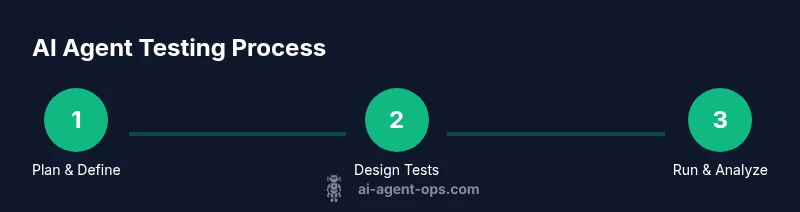
Steps
Estimated time: 2-4 hours
- 1
Define testing goals and acceptance criteria
Clarify what success looks like: which pages, what actions, which validations. Break goals into measurable criteria and map them to the app’s user journeys. This ensures the agent targets relevant paths and produces actionable evidence.
Tip: Write criteria in testable terms (e.g., element X is visible within Y seconds). - 2
Choose AI agent architecture and tooling
Select an agent framework that supports planning, action execution, and validation. Ensure it integrates with your browser driver and logging system. This choice will shape how you design prompts and rewards for the agent.
Tip: Prefer a modular stack so you can swap components (planner, executor) without rewriting everything. - 3
Prepare test environment and data
Set up a staging environment that mirrors production and load representative data. Ensure the environment is isolated to prevent data leakage and unintended side effects.
Tip: Keep test data scrubbed and maintain data refresh cadence for realism. - 4
Design initial agent-driven test scripts
Create prompts and rules that guide the agent’s exploration. Start with core flows (login, search, checkout) and expand to edge cases.
Tip: Incorporate validation steps as early as possible to catch failures fast. - 5
Run tests and collect evidence
Execute planned actions, capture results, and store artifacts (screenshots, logs, traces). Ensure timeouts and retries are sensible to avoid long-running hangs.
Tip: Use short, deterministic waits to reduce flakiness. - 6
Analyze results and refine
Review failures, identify root causes, and adjust test plans or UI elements. Use the agent’s feedback to improve future coverage and reduce repetitive failures.
Tip: Document changes and rationale for future audits.
Questions & Answers
What is an AI agent in the context of web testing?
An AI agent in web testing is a software entity that plans, executes, and evaluates testing actions against a web app, using intelligent reasoning to expand coverage beyond hand-authored scripts.
An AI agent plans, runs tests, and evaluates results to broaden coverage beyond manual scripts.
How long does it take to set up AI agent testing?
Setup time varies with scope, but a typical initial configuration can take a few hours to assemble the environment, define goals, and create the first agent-driven tests.
Initial setup often takes a few hours depending on scope and tooling.
Can AI agents replace manual QA entirely?
AI agents enhance QA by handling repetitive tasks and surfacing edge cases, but human QA remains essential for nuanced testing, usability feedback, and risk assessment.
AI agents augment QA, not replace human testers.
How do you prevent flaky tests with AI agents?
Mitigate flakiness by stabilizing waits, validating deterministic outcomes, and including robust error-handling and retries within the agent’s decision logic.
Reduce flaky tests by stabilizing waits and adding reliable checks.
What data should agents collect for debugging?
Collect DOM snapshots, network traces, performance metrics, and logs with timestamps to support root-cause analysis and reproducibility.
Collect logs, traces, and performance data for debugging.
Is AI agent testing expensive?
Costs depend on compute usage and data volume. Plan budgets around agent steps, caching, and reuse of test plans to control expenses.
Costs vary; plan and optimize to stay within budget.
How do you integrate AI testing into CI/CD?
Integrate agent tests as part of your pipeline, trigger runs on builds, and publish automated reports to stakeholders for rapid feedback.
Add agent tests to your CI/CD pipeline for rapid feedback.
What skills does my team need to implement this?
Teams should know testing concepts, basic scripting, and how to design prompts and validation logic for AI-driven workflows.
Ensure your team understands QA basics and AI tooling.
Watch Video
Key Takeaways
- Define clear testing goals before automation
- Choose modular AI tooling for flexibility
- Design prompts that drive stable exploration
- Capture rich evidence for fast triage
- Iterate tests based on real feedback from results