How to Build a Simple AI Agent in n8n
Learn to create a simple AI agent in n8n using no-code workflows, AI service calls, and secure prompts. A practical, end-to-end guide for developers and product teams exploring AI agents.


You will build a simple AI agent in n8n by wiring an AI service (OpenAI or similar) through an HTTP Request or Code node, creating a reusable workflow, and testing prompts. Key requirements include an API key, a basic prompt, and a trigger. This quick guide helps you set up a practical agent and observe outcomes in real time.
What is a simple AI agent in n8n?
A simple AI agent in n8n sits at the intersection of no-code automation and agentic AI. It is a lightweight workflow that uses an AI service to generate responses, decide on next actions, and trigger downstream tasks, all without writing substantial code. For teams exploring automation, this pattern lets you prototype capabilities quickly and scale later. According to Ai Agent Ops, the no-code approach to AI agents on platforms like n8n accelerates experimentation and reduces friction for product teams. A typical use case is a support bot that answers inquiries by calling an AI service and routing results to messaging channels or APIs. In this guide, you’ll learn how to build such a simple ai agent in n8n and repeat the pattern for new tasks while keeping governance in mind. You’ll also see how context and prompts drive behavior, with a clear separation between data gathering, AI reasoning, and action.
Scope, goals, and prerequisites
This guide focuses on a minimal viable AI agent in n8n: a workflow that receives an input, queries an AI service, and performs a single downstream action. It is designed for developers, product teams, and business leaders who want a runnable prototype rather than a full-scale production system. By the end, you should be able to reuse the pattern for additional prompts and tasks. Prerequisites include an active n8n instance (self-hosted or cloud), a valid API key for an AI service (OpenAI or compatible), and basic knowledge of creating credentials in n8n. You’ll also want a safe way to store prompts and a plan for handling user data in line with your security policies. Lastly, ensure you have time to test and iterate; AI prompts often require tuning for accuracy and usefulness.
Architecture: data flow in a simple AI agent workflow
A simple ai agent in n8n uses a straightforward data flow: an input trigger funnels user data into an AI service call, which returns a structured response; a set of logic nodes formats or filters the result; and an action node delivers the outcome to a user or system. This pattern keeps the logic compact while enabling branching and context management. At a high level, you’ll connect a Trigger (Webhook or Manual), an AI Service node (OpenAI, Cohere, etc.), a small transformation step (Function or Set), and an Output step (Slack, Email, HTTP). The essential principle is to separate data collection, AI reasoning, and action in discrete steps for easier testing and reuse. This approach also supports stateful prompts by appending prior context to future queries.
Set up your n8n environment
Begin by deploying or launching your n8n instance. If you’re using Docker, pull the official image and run it with appropriate ports and volumes. Create a dedicated workspace for AI agent experiments to avoid mixing with production automations. In the UI, navigate to Credentials and add an API key credential for your chosen AI service (for example, an OpenAI API key). Store sensitive keys in environment variables or the platform’s secret store rather than in plain text. Finally, verify that you can create a basic workflow and trigger it locally to confirm connectivity to your AI service before adding logic.
Connect an AI service securely
Security belongs at the start. In n8n, you typically connect to an AI service via a credentials object (API key or OAuth). Use a dedicated credential type and limit access to the credentials with appropriate permissions. When selecting an AI service, consider latency, cost, and data privacy. OpenAI-like services can be accessed via an HTTP Request or a prebuilt OpenAI node if available; other providers offer similar REST APIs. In your workflow, avoid sending sensitive customer data raw; implement redaction steps or use tokenized inputs. Log-level controls and audit trails help maintain governance while you test different prompts.
Build the minimal workflow: trigger, AI call, and action
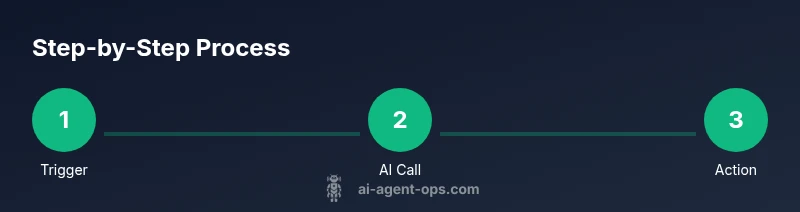
Create a simple workflow with three core parts. First, add a Trigger node: a Webhook or Manual Trigger to start the agent with input data. Next, insert an AI service node and configure the prompt structure; pass the user input and any needed context. Then, add an Action node to deliver the AI output—this could be posting to Slack, replying via chat, or hitting a downstream API. Use a Set or Function node to format the prompt and parse the AI response. This minimal setup demonstrates the core capabilities of a simple ai agent in n8n and serves as a template for future expansions.
Manage context, state, and data flow
To preserve state across interactions, maintain a lightweight context object and append it to prompts or store it in a small datastore. In n8n, you can use a Set node to hold the current context and a Function node to serialize history into an indexable string. When prompting, include relevant context such as user id, previous question, and prior results. Be mindful of token limits and privacy—do not echo entire transcripts unless necessary. For longer-term projects, consider external storage (e.g., a simple database) to retain context across sessions while controlling access.
Testing, debugging, and iteration
Testing begins with unit tests for individual nodes and ends with end-to-end runs of the entire workflow. Use the Run-Node feature to execute in isolation and inspect inputs, prompts, and AI outputs. Keep prompts deterministic by fixing seed phrases and removing randomness where possible. If the AI response is not actionable, refine the prompt, add examples, or adjust the formatting. Leverage logs and error messages to identify bottlenecks, rate limits, or data issues, then iterate on your prompt design. Document changes and track performance metrics to measure improvement over time.
Security, governance, and best practices
When building a simple ai agent in n8n, governance matters as much as speed. Use least-privilege credentials, rotate API keys, and audit access to workflows. Never send unmasked PII to AI services; implement redaction or anonymization where required. Consider consent and data residency requirements, especially if prompts involve user data. Use version control for workflows and maintain a changelog. Finally, design prompts that are safe and consistent across conversations, and establish a review process for new prompts and integrations.
Examples: practical prompts and templates
Here are practical prompt templates you can reuse in your simple ai agent in n8n:
- Summary: 'Summarize the user’s request and list 3 actionable steps.'
- Answer: 'Provide a concise answer suitable for a chat channel, with one follow-up question.'
- Actionable: 'Extract key entities (name, date, product) and return a JSON payload for downstream API calls.'
Adapt prompts to your domain and data privacy requirements. Start with a minimal prompt and iterate based on user feedback.
Tools & Materials
- n8n instance (self-hosted or cloud)(Ensure network access to your AI service and a dedicated workspace for experiments)
- AI service API key (e.g., OpenAI or alternative)(Store securely as an environment variable or secret in n8n)
- n8n credentials setup (HTTP Request or OpenAI node)(Create a credentials object with restricted scope)
- Sample input data (JSON)(Use for testing prompts and flows)
- Prompts repository (text or JSON templates)(Helps reuse and standardize prompts across workflows)
Steps
Estimated time: 60-90 minutes
- 1
Prepare your environment
Install or start your n8n instance and create a dedicated workspace for AI agent experiments. Verify you can access the UI and create credentials. This step ensures you have a clean foundation for building the simple ai agent in n8n.
Tip: Use a separate project or workspace to avoid mixing production automations with experimental agents. - 2
Create AI service credentials
In n8n, add a credentials entry for your chosen AI service (for example, an OpenAI API key). Keep the key secret using the platform's secret store. Test the credential by performing a quick, non-destructive API call.
Tip: Limit the credential scope to the minimum required for your workflow. - 3
Add a trigger to start the workflow
Configure a Trigger node (Webhook or Manual) to supply input data to the agent. The trigger should capture the user query and any context you intend to reuse.
Tip: If you plan to test locally, use a simple payload structure like {"userId":"A1","query":"What's the weather?"}. - 4
Add the AI service node
Insert an AI service node (e.g., OpenAI) and connect it to your credential. Define a base prompt structure and map the trigger input to the prompt. Ensure you handle the response structure consistently.
Tip: Use a template prompt with placeholders for dynamic input to simplify iteration. - 5
Create a prompt formatter
Add a Set or Function node to format the prompt with any necessary context. Include user identifiers, prior results, and desired output format. This makes prompts predictable and easier to test.
Tip: Keep prompts short and clear; verbose prompts can introduce noise. - 6
Add a routing or action step
Include an IF/Switch node to route the AI output to a downstream action, such as a message channel or an API call. Configure the path based on the AI response content.
Tip: Define a default path to handle unexpected outputs gracefully. - 7
Test with representative inputs
Run the workflow with representative test data. Inspect inputs, prompts, outputs, and any errors. Note how the AI response aligns with the expected action.
Tip: Test edge cases and prompt variations to validate robustness. - 8
Iterate and refine prompts
Based on test results, adjust the prompt design, add examples, or modify formatting to improve accuracy and usefulness.
Tip: Keep a changelog of prompt changes and observed outcomes. - 9
Add simple context handling
Implement a minimal context model (e.g., userId + lastQuery) to improve continuity across interactions without overcomplicating the workflow.
Tip: Be mindful of token limits when including history in prompts. - 10
Review security and governance
Audit credentials, monitor access, and ensure data handling complies with policies. Document decisions and maintain versioned workflows.
Tip: Design prompts with safe defaults and implement data minimization.
Questions & Answers
What is a simple AI agent in n8n?
A simple AI agent in n8n is a lightweight workflow that uses an AI service to generate responses and trigger downstream actions without writing extensive code. It demonstrates how to combine no-code automation with AI reasoning in a reusable pattern.
A simple AI agent in n8n is a no-code workflow that uses AI to respond and act, without heavy coding.
Do I need to code to build it?
No, you can build a basic AI agent in n8n using built-in nodes like HTTP Request or the OpenAI node, plus simple Set and IF nodes. Some advanced features may require light scripting, but a minimal version is no-code.
You can build a basic AI agent in n8n using no-code nodes; code is optional for advanced features.
Which AI services work with n8n?
OpenAI is a common option, but other AI service APIs with REST endpoints can be used. Choose based on latency, cost, and data privacy considerations for your use case.
OpenAI and other AI service APIs work with n8n; pick based on latency, cost, and privacy needs.
How should I secure API keys in the workflow?
Store API keys in n8n credentials, not in prompts. Use environment variables or the platform’s secret store and restrict access to sensitive workflows.
Keep API keys in credentials, not prompts, and restrict access to sensitive workflows.
What are common pitfalls to avoid?
Common issues include prompt drift, rate limits, and leaking data. Start simple, test with representative inputs, and maintain governance with versioned prompts.
Watch out for drift, rate limits, and data leaks; test often and govern prompts properly.
Watch Video
Key Takeaways
- Define a clear three-part data flow: trigger, AI call, action.
- Use no-code credentials to manage AI keys securely.
- Iterate prompts based on real feedback and logs.
- Maintain minimal context to avoid token bloat and privacy issues.
- Ai Agent Ops's guidance favors quick experimentation with governance.