AI Agent YouTube Automation: A Practical Guide for Teams
Learn to design and deploy AI agent workflows that automate YouTube tasks—from metadata optimization to publishing—with governance, testing, and measurable outcomes. A step-by-step, practitioner-focused guide by Ai Agent Ops.


This guide shows how to implement ai agent youtube automation by designing goal-driven AI agents, connecting YouTube APIs, and orchestrating tasks like metadata updates, thumbnail selection, and publishing in a safe, observable loop. You’ll learn architectures, prompts, tool integrations, and governance to build scalable, reliable automation for YouTube workflows. According to Ai Agent Ops, adopting agentic AI for YouTube can accelerate content operations and improve consistency across channels.
What is ai agent youtube automation?
ai agent youtube automation refers to using autonomous AI agents to perform, monitor, and optimize YouTube-related tasks without manual, step-by-step intervention. An AI agent blends natural language understanding, decision-making, and tool integration to execute actions such as updating video metadata, scheduling releases, generating thumbnails, and responding to performance signals. This approach aligns with agentic AI concepts, where multiple specialized tools are orchestrated by a central controller to accomplish larger goals. For developers and product teams, this means moving from static scripts to dynamic workflows that reason about outcomes and adapt over time. In practice, you’ll design goals, select tools, implement prompts, and establish guardrails so the agent operates safely and transparently.
How AI agents improve YouTube workflows
AI agents can handle repetitive, data-driven tasks with speed and consistency, freeing humans to focus on strategy and experimentation. They enable rapid A/B testing of titles, thumbnails, and descriptions, automatically analyze engagement signals, and adjust publishing windows based on audience patterns. The result is a more responsive content operation that can scale across multiple channels. When designed well, agents also surface explainable decisions, which helps teams audit why a video received a certain click-through rate or watch time. This is especially valuable for teams pursuing continuous optimization in a data-driven culture.
Core components of an AI agent for YouTube
A production-ready AI agent for YouTube typically includes four layers:
- A goal and policy layer that defines objectives (e.g., maximize CTR within a 7-day window)
- A memory and context layer to retain channel history, audience signals, and prior experiment results
- A tool layer that wraps YouTube Data API calls, analytics endpoints, and content generation utilities
- A prompting and reasoning layer that routes decisions to the right tools and handles failure modes. Together, these layers create a coherent, auditable automation platform that can evolve as YouTube’s ecosystem changes.
Typical use cases and workflows you can automate
- Metadata optimization: generate and test titles, descriptions, tags, and timestamps; adjust metadata in response to performance signals.
- Thumbnail and asset generation: produce multiple thumbnail variants using prompts and select winners via A/B tests.
- Publishing automation: schedule video releases, set premiere times, and coordinate cross-posting on connected channels.
- Comment and community management: flag spam, summarize top comments for creator response, and automate routine replies within policy guidelines.
- Performance analytics: collect weekly metrics, compute trends, and trigger re-optimization prompts when engagement dips.
- Compliance and governance: log actions, apply guardrails, and alert when a task could violate platform rules or policy.
These workflows can be combined into end-to-end pipelines that run with minimal human intervention, while remaining auditable and adjustable.
Governance, safety, and compliance considerations
Automation on public platforms comes with policy and safety responsibilities. Always enforce rate limits, respect copyright rules, and avoid deceptive optimization practices. Implement access controls, ensure transparent decision logs, and provide easy options to halt automation if a task behaves unexpectedly. Design prompts and memory with privacy in mind, so sensitive data isn’t stored or exposed unintentionally. Finally, establish a human-in-the-loop fallback for high-risk actions (e.g., monetization settings or policy-sensitive changes).
Getting started: prerequisites and a small pilot project
Begin with a narrow pilot: choose one repeatable task (e.g., metadata refresh within a fixed template) and a single YouTube channel. Define clear success criteria (such as a target CTR increase or a reduction in manual edits) and set guardrails. Build a minimal agent that can perform the chosen task, validate its outputs with humans, and iterate. As you expand, you’ll add more tasks and channels, but a strong foundation built from a focused pilot pays dividends in reliability and learnability.
Observability, metrics, and continuous improvement
Track core metrics such as view duration, CTR, engagement rate, and publish-latency. Instrument your agent to emit structured logs and a simple dashboard that highlights trend lines and anomalies. Use these insights to tune prompts, adjust tool wrappers, and refine decision policies. A disciplined feedback loop—measure, analyze, iterate—drives steady improvement and reduces the risk of drift as algorithms and platform features evolve.
What to measure to prove value
Measure both efficiency and impact. Efficiency metrics include task completion time, automation coverage (percentage of tasks automated), and error rate. Impact metrics include changes in engagement, subscriber growth, and consistency of posting cadence. Present these in a regular rhythm (weekly or bi-weekly) to stakeholders and use short-form dashboards that highlight top performers and areas needing attention. This clear, data-driven narrative helps justify continued investment in ai agent youtube automation.
Tools & Materials
- YouTube Data API access(API key with OAuth 2.0 credentials; ensure quota for experiment load)
- LLM capability(Access to a capable language model (e.g., GPT-style) for drafting prompts and reasoning)
- Automation environment(Node.js or Python environment, or a no-code automation platform with API access)
- Prompt templates and tool wrappers(Pre-built prompts for metadata, thumbnails, and posting decisions; wrappers around YouTube API calls)
- Monitoring and logging tooling(Structured logging, metrics dashboards, and alerting for failures or policy violations)
- Test videos and a staging channel(Use safe test assets to validate prompts and flows before production)
Steps
Estimated time: 4-6 weeks
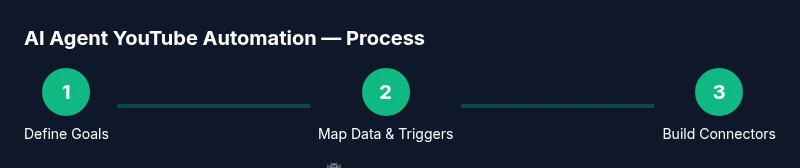
- 1
Define automation goals
Articulate 1-2 primary objectives for the agent (e.g., improve metadata quality and publish cadence). Specify measurable success criteria and a safe boundary for automation. This step establishes scope and aligns stakeholders before any coding begins.
Tip: Document expected outcomes and constraints to prevent scope creep. - 2
Identify compliance and policy constraints
Review YouTube policies, copyright considerations, and platform rules that affect automated actions. Create a policy checklist that the agent must satisfy before performing any task in production.
Tip: Create a rapid stop mechanism so humans can override automation at any time. - 3
Map required data and triggers
List data sources (audience analytics, competing videos, historical performance) and triggers (time-based, performance-based) the agent will monitor. Map each trigger to the appropriate tool (API call, prompt, or action).
Tip: Prioritize triggers that have clear, observable impact on KPIs. - 4
Design agent architecture and tool wrappers
Outline the agent’s reasoning flow, decide where memory comes from, and wrap YouTube API calls with safe, idempotent functions. Define error handling, retries, and logging behavior.
Tip: Keep tool wrappers small and well-documented for easier debugging. - 5
Create prompts and memory strategies
Develop prompts for title/description generation, thumbnail options, and publishing decisions. Implement a lightweight memory layer to remember channel context and prior experiments.
Tip: Test prompts with edge cases to reduce bias and drift. - 6
Implement YouTube API connectors
Code API wrappers for metadata updates, thumbnail uploads, and publish actions. Ensure authentication, quota handling, and error recovery are robust.
Tip: Use feature flags to enable/disable actions without redeploying. - 7
Build testing harness and run dry-runs
Create a sandbox environment or staging channel and run the agent against non-public content. Validate outputs against ground truth and human review before production.
Tip: Start with a narrow scope and gradually expand automation coverage. - 8
Launch a controlled pilot and iterate
Deploy to a real channel with restricted scope, monitor results closely, and gather feedback. Iterate prompts, guards, and tool wrappers based on observed performance.
Tip: Schedule regular review cadences to keep the system aligned with goals.
Questions & Answers
What is AI agent YouTube automation?
AI agent YouTube automation uses autonomous AI agents to perform routine YouTube tasks—like metadata optimization, publishing, and analytics—by orchestrating tools and prompts. It emphasizes safety, observability, and continuous improvement.
AI agent YouTube automation uses autonomous AI to handle routine channel tasks, while keeping logs and guardrails for safe operation.
Do I need a large budget to start?
You can start small with a modest setup: an affordable LLM, basic YouTube API access, and a simple automation environment. As you prove value, you can scale with higher quotas, more channels, and advanced prompts.
Start small with a modest setup and scale only after you demonstrate value.
What tasks are safest to automate first?
Begin with non-destructive tasks like metadata draft generation and scheduled publishing prompts using staging channels or drafts. Avoid actions that alter revenue settings or monetization without human review.
Begin with safe tasks like metadata drafts and scheduled publishing in a staging environment.
How do I measure success?
Track efficiency (time saved, tasks automated) and impact (CTR, watch time, engagement). Use a simple dashboard and weekly reviews to adjust prompts and guardrails.
Measure both efficiency and impact with a simple dashboard and regular reviews.
What are common pitfalls?
Over-automation without guardrails, poor logging, and ignoring platform policies are common pitfalls. Start with a narrow scope and build safety checks into every step.
Pitfalls include skipping guardrails and ignoring policy rules; start small and secure.
Can this work across multiple channels?
Yes, once a stable pattern is established, you can extend the same agent framework to additional channels by adjusting data sources and publishing flows.
Yes, adapt the same framework for other channels with proper data sources and publishing flows.
What datasets should I keep for learning?
Maintain a history of prompts, decisions, outcomes, and failed runs. This enables continual improvement and audits for governance.
Keep prompts, outcomes, and failure logs to improve and audit the system.
Watch Video
Key Takeaways
- Define clear, measurable goals before building.
- Use guardrails and human-in-the-loop for critical actions.
- Pilot on a small scale and iterate based on data.
- Instrument observations with structured logs and dashboards.
- Always align automation with platform policies and creator intent.