How to Use an AI Agent to Post on Instagram
Learn how to design and deploy an AI agent to post on Instagram, covering objectives, data inputs, media handling, safety checks, and scalable automation for consistent social media growth.


Goal: Automate Instagram posting with an AI agent to post on Instagram. Define objectives (content themes, posting cadence), data inputs (images, captions, hashtags), and safety rules (brand voice, compliance). Build a lightweight agent that selects media, generates captions, schedules posts, and monitors outcomes. You’ll need an IG-connected automation runner and a compliant posting workflow.
Why AI agents for Instagram posting matter
In today’s fast-moving social media landscape, an ai agent to post on instagram can dramatically improve cadence, consistency, and experimentation at scale. When teams delegate repetitive tasks to an AI-driven workflow, they gain time for strategy, creative refinement, and community engagement. According to Ai Agent Ops, the most successful implementations separate planning from execution and establish guardrails that protect brand integrity while enabling rapid iteration. This separation makes it feasible to manage multiple accounts or campaigns with tight deadlines. A well-designed agent can curate media, draft captions, and select hashtags aligned with audience signals like engagement patterns and optimal posting times. The result is a repeatable, auditable process that reduces manual bottlenecks without sacrificing quality or authenticity.
Defining success for your AI Instagram posting workflow
Success starts with clear objectives. Decide the primary goals for each post (brand awareness, product launch, community engagement) and set a cadence that matches your audience’s behavior. Establish measurable signals such as engagement rate, saves, shares, comment sentiment, and follower growth. Use a lightweight governance layer to prevent overposting and to enforce brand voice and legal compliance. In practice, this means outlining prompts, guardrails, and human-in-the-loop checks for edge cases. Ai Agent Ops emphasizes building a feedback loop where post-level performance informs future creative decisions, not just metrics that accumulate in a dashboard.
Data inputs and media handling for AI-generated posts
A successful ai agent to post on instagram relies on well-structured inputs: media assets (images/videos), captions, hashtags, and metadata (location, audience segment). Design a media library with tagging for themes, tones, and campaigns. Caption templates with placeholders enable dynamic personalization while maintaining voice. Hashtag pools should be curated, grouped by relevance and performance, and rotated to avoid repetitive patterns. Ensure media quality standards (resolution, aspect ratio, alt text) and copyright compliance. The agent should verify that each post aligns with brand guidelines and community standards before scheduling.
Tech architecture and toolchain for an Instagram posting AI agent
Think in terms of three layers: planning, execution, and monitoring. The planning layer selects content and writes captions; the execution layer handles API calls, scheduling, and error handling; the monitoring layer collects feedback signals to refine future posts. A modular stack works best: a lightweight planner (LLM or rules-based), adapters to the Instagram Graph API, a media management system, and a dashboard for governance. Ai Agent Ops notes that adopting a modular, observable architecture makes it easier to swap components, test new prompts, and scale across brands or accounts. Start with a minimal viable pipeline and iterate.
Safety, brand voice, and policy compliance for social automation
Automation should respect platform policies and brand standards. Create a formal content policy that governs topics, language, imagery, and user interaction. Implement guardrails to block disallowed content and to enforce consent for user-generated media. Regularly audit captions for safety, sensitivity, and inclusivity. Maintain a changelog for policy updates and post-approval flows for items flagged by the human-in-the-loop. This discipline prevents brand damage and regulatory risk while preserving the speed benefits of automation.
End-to-end workflow patterns and data feedback loops
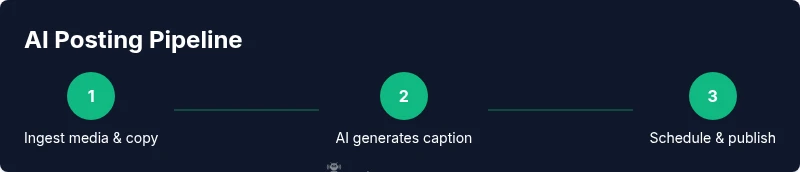
A robust workflow follows ingestion → planning → generation → validation → scheduling → publish → feedback. Data from post performance feeds back into the planning stage to improve prompts, caption quality, and media selection. Use simple yet effective features like engagement rate, saves, comments sentiment, and reach to guide future content. Include a warm-up period for new campaigns to gather baseline data before aggressive automation. With proper observability, you can rapidly diagnose failures and adjust thresholds to maintain quality.
Testing, QA, and governance for scalable automation
Test in a staging or draft mode to ensure no unintended posts go live. Validate media formats, caption length, and hashtag counts against IG requirements. Implement rollbacks for failed jobs and designate a human reviewer for edge cases. Establish governance on posting windows, rate limits, and permissions to protect brand integrity. Regularly review logs and metrics to spot anomalies, and schedule quarterly governance reviews to adapt to platform policy changes.
Practical patterns and heuristics for reliable automation
Start with a conservative cadence and gradually increase volume as the system proves reliable. Use content templates with parameterized prompts to maintain consistency while allowing creative variation. Leverage a content calendar to align with campaigns, holidays, and product launches. Maintain a safety net: a human-in-the-loop review for posts flagged by the system or when uncertain about policy. This pragmatic approach balances speed with control and reduces risky automation.
Extending to multi-account and future improvements
Once the baseline is solid, scale to multiple brands or accounts by replicating pipelines with account-specific configurations and access controls. Centralize logging, monitoring, and policy enforcement to ensure uniform governance. Explore AI-driven moderation for comments, advanced analytics dashboards, and cross-platform posting strategies to extend automation beyond Instagram. The long-term payoff is sustainable, scalable social media operations powered by agentic AI.
Tools & Materials
- IG business account with API access(Ensure the account is connected to Facebook/Meta for API access and suitable permissions to publish content.)
- OAuth credentials / API keys(Store securely using a secrets manager; rotate credentials regularly.)
- Automation platform or custom runner(Examples: Zapier, Make, or a lightweight in-house orchestrator capable of scheduling and API calls.)
- AI language model access(Choose models with content safety features and prompt customization options.)
- Media assets library(Organize images/videos with metadata like theme, campaign, and quality metrics.)
- Caption & hashtag repository(Maintain reusable templates and up-to-date hashtag pools aligned with campaigns.)
- Content calendar(Helpful for cadence planning and aligning with marketing calendars.)
- Monitoring dashboard(Optional for analytics, anomaly detection, and alerting.)
Steps
Estimated time: 2-4 hours
- 1
Define objectives & cadence
Clarify what the AI agent should post, the target audience, and how often. Align with brand goals and content themes. Document success metrics and approval thresholds to guide automation.
Tip: Create a one-page objectives brief that the team can reference during setup. - 2
Gather media assets & copy templates
Assemble media into a categorized library and prepare caption templates with placeholders for dynamic data. Include hashtag pools and locale variations if needed.
Tip: Tag assets by campaign, mood, and audience to speed up retrieval. - 3
Configure the AI agent architecture
Choose a modular stack: planner, executor (API calls), and monitor. Define prompts, safety rules, and validation checks before enabling live posting.
Tip: Keep components loosely coupled to simplify updates and testing. - 4
Implement safety & brand-voice checks
Enforce a brand voice, content policies, and copyright checks. Implement human-in-the-loop review for edge cases or new campaigns.
Tip: Automate a post-review step for posts with high risk indicators. - 5
Schedule posts & publish
Connect the automation runner to IG publishing endpoints and set posting windows. Validate time zones and cadence to avoid bursts that trigger platform flags.
Tip: Use staggered posting and rate-limit monitoring to stay within guidelines. - 6
Monitor performance & respond to feedback
Collect engagement signals and content quality metrics. Feed results back into prompts to improve future captions and media choices.
Tip: Set up dashboards for at-a-glance health metrics and anomaly alerts. - 7
Iterate, scale, and governance
Refine prompts, add more accounts, and strengthen governance with a centralized policy repository. Plan periodic reviews and update cycles.
Tip: Document changes and communicate updates to stakeholders.
Questions & Answers
What are the prerequisites to use an AI agent for Instagram posting?
You need a business Instagram account with API access, a supported automation platform, and a compliant AI model for content generation. Set up secure credential storage and establish clear posting policies before going live.
Start with a business IG account, connect an automation tool, and have a safe AI model ready.
Is Instagram's API required for posting via an AI agent?
Yes. Posting typically relies on the Meta Graph API or approved automation adapters with necessary permissions. Ensure compliance with rate limits and platform terms.
Yes — you usually need IG API access through Meta's Graph API.
How can I ensure the AI maintains a consistent brand voice?
Create a brand style guide, define prompts aligned with the voice, and implement human checks for edge cases to preserve tone and policy compliance.
Use a brand voice guide and human checks for sensitive posts.
What are common pitfalls when automating Instagram posting?
Overposting, copyright or licensing issues, low-quality media, inappropriate hashtags, and ignoring platform rules can harm reach and trust.
Watch for policy compliance and avoid spammy patterns.
Can this system scale to multiple accounts or brands?
With a modular architecture and centralized governance, you can reuse pipelines for multiple accounts, but monitor rate limits and compliance per account.
Yes, but scale with careful governance and controls.
How do I test the AI agent before going live?
Use a staging environment or drafts, validate media formats and captions, and perform policy checks before publishing publicly.
Test in a sandbox or draft mode first.
Watch Video
Key Takeaways
- Define clear posting goals and measurable success signals.
- Separate planning, execution, and monitoring for reliability.
- Guardrails and human-in-the-loop checks protect brand integrity.
- Iterate based on data to improve captions and media choices.
- Scale carefully with governance and centralized controls.