AI Agent HuggingFace: Build, Test, and Deploy Agents
Learn to build AI agents with Hugging Face, covering model selection, agent patterns, prompts, and deployment best practices for scalable automation.


You will learn how to set up and run an AI agent using Hugging Face tools and libraries. By the end you'll be able to pick a Hugging Face model hub, author agent workflows, and run them in a simple orchestrator. Key requirements include Python 3.8+, pip, and basic familiarity with transformers. This guide emphasizes reproducibility, safety, and scalable agent orchestration.
What is an AI agent on Hugging Face?
In the realm of modern AI engineering, an AI agent is a system that can perceive input, reason about possible actions, and execute those actions to achieve a goal. When you pair this concept with Hugging Face, you gain access to a vast model hub, adapters, tooling, and orchestration patterns that enable end-to-end agent workflows. This article centers on ai agent huggingface as a practical approach to building deployable agents using Hugging Face transformers and related utilities. According to Ai Agent Ops, the Hugging Face ecosystem lowers the barrier for experimentation by providing ready-made components and a clear path from prototype to production. You will learn how to select base models, structure agent logic, and connect prompts to actions in a maintainable, auditable way.
Key terms to know include the model hub, agents, prompts, adapters, and orchestration layers. As you read, you will see how each component fits into an agent lifecycle—from ideation to deployment. The goal is to empower developers, product teams, and business leaders to create agentic AI workflows that scale and remain controllable. The phrase ai agent huggingface will recur as you explore concrete patterns and demos.
This section sets the stage for practical, hands-on guidance that you can apply in real projects, whether you are prototyping a customer-support agent or automating back-office decisions.
-1
Tools & Materials
- Python 3.8+(Use a virtual environment (venv or conda) to isolate dependencies.)
- pip(Ensure you have the latest pip for installing packages.)
- Git(Clone sample repos or fork starter projects.)
- Hugging Face Hub access token(Required for pulling private models or pushing artifacts.)
- Transformer libraries (transformers, diffusers as needed)(Install via pip: pip install transformers[torch] ruff setuptools.)
- Code editor (e.g., VS Code)(Optional but helpful for larger workflows.)
Steps
Estimated time: 1-2 hours
- 1
Install prerequisites
Set up Python 3.8+, create a virtual environment, and install core libraries such as transformers. This ensures a clean, reproducible workspace for AI agent development.
Tip: Use python -m venv venv && source venv/bin/activate on macOS/Linux, or venv\Scripts\activate on Windows. - 2
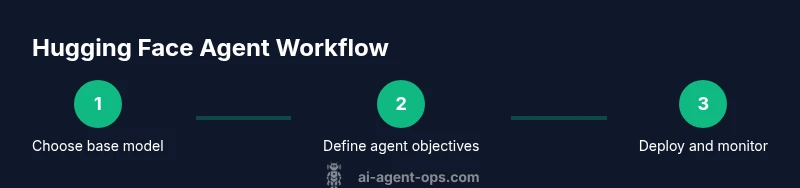
Choose a base model from the Hugging Face Hub
Browse the Hub to select a model that fits your task (e.g., instruction-tuned LMs for planning, or chat models for dialogue). Consider licensing, size, and latency.
Tip: Filter by license and hardware requirements to avoid surprises in production. - 3
Install agent-oriented tooling
Install required libraries such as transformers and any agent framework wrappers you plan to use (e.g., LangChain, Haystack, or custom orchestrators).
Tip: Pin exact versions to preserve reproducibility. - 4
Define agent objective and prompts
Draft a clear agent objective and design prompts that steer the model toward the desired behavior while handling edge cases.
Tip: Create multiple prompt variants and plan fallback responses. - 5
Implement a simple agent workflow
Write a script that loads the model, defines the agent’s action loop, and executes a basic task (e.g., answering questions, fetching data).
Tip: Keep the loop lean to facilitate quick iterations. - 6
Run locally and observe outputs
Execute the workflow in a local environment, log responses, and inspect failures or unexpected behavior.
Tip: Enable verbose logging and capture input/output pairs for analysis. - 7
Iterate on prompts and safety checks
Refine prompts, add guardrails, and implement input validation to reduce harmful or erroneous outputs.
Tip: Test with diverse prompts and edge cases. - 8
Prepare for deployment
Package the agent, create a minimal API or endpoint, and document configuration for production use.
Tip: Include health checks and simple observability.
Questions & Answers
What is an AI agent in the Hugging Face ecosystem?
An AI agent in Hugging Face combines a capable language model with orchestration logic to perform tasks. It uses prompts, models, and tooling from the Hugging Face ecosystem to perceive, decide, and act.
An AI agent uses a language model together with orchestration tools to perceive, decide, and act on tasks.
Do I need to pay to access Hugging Face models for agents?
Many models are freely accessible for experimentation, but some high-quality or private models require a paid plan. Licensing varies by model.
Most models are free to try, but there are paid options for private or enterprise models.
How should I evaluate an agent’s performance?
Use objective metrics (accuracy, latency, throughput) and qualitative reviews of responses. Maintain a test suite with diverse prompts and track improvements over iterations.
Evaluate with metrics and diverse prompts, then compare results across iterations.
Can I deploy Hugging Face agents to production endpoints?
Yes. You can expose agents via hosted endpoints or lightweight APIs, with monitoring and rollback strategies in place.
You can deploy to endpoints or APIs, with monitoring to keep things safe.
What are common pitfalls when building Hugging Face agents?
Underestimating prompt design, skimping on data governance, and neglecting monitoring can lead to brittle agents. Start with small, well-defined tasks.
Watch out for prompt brittleness, governance gaps, and lack of monitoring.
Watch Video
Key Takeaways
- Choose the right base model for the task
- Design clear agent objectives and prompts
- Test iteratively with logging for reproducibility
- Leverage Hugging Face tooling for scalable agents