AI Agents in Customer Support: A Practical Guide for 2026
Explore how AI agents transform customer support by automating routine inquiries, routing tickets, and assisting agents across channels. A practical guide for design, deployment, governance, and measurement.


AI agents in customer support blend large language models, knowledge bases, and automation to handle inquiries, triage tickets, and assist human agents. How can ai agents be used in customer support? They augment agents, enable self-service, and scale operations across chat, email, voice, and social channels. They provide consistent responses, faster turnarounds, and data-driven insights, while preserving human oversight for nuanced cases.
What are AI agents in customer support?
AI agents in customer support blend large language models, knowledge bases, and automated workflows to handle inquiries, triage tickets, and assist human agents. How can ai agents be used in customer support? The short answer is that they augment agents, empower self-service, and scale operations across channels. These agents operate across chat, email, voice, and social media, drawing on structured data, policy rules, and real-time context to generate accurate responses. In practice, an AI agent may function as a conversational interface for FAQs, a proactive assistant suggesting next steps, or a decision-maker that escalates when human intervention is needed. The central challenge is balancing automation with empathy, ensuring responses reflect brand voice, and preserving human oversight for nuance and complex cases.
Benefits of AI agents in customer support
Bringing AI agents into customer support yields multiple advantages. They provide 24/7 availability, ensuring customers receive timely replies outside business hours. They can deliver consistent information by applying the same knowledge base rules across all interactions, reducing variance. With faster first responses and guided self-service, they can significantly shorten handling times and improve agent productivity. AI agents also enable scalable support, handling surges during promotions or outages without sacrificing quality. They collect context from each interaction, supporting better personalization and enabling richer analytics for product teams. Far from replacing people, well-designed AI agents augment human agents by handling repetitive tasks and surfacing relevant data, freeing humans to resolve complex issues with higher empathy and expertise. Finally, orchestrated AI agents can improve multilingual support, routing customers to the most capable resource, whether it’s an agent or the right knowledge article.
Use cases by channel
AI agents shine across several channels:
- Chat: Real-time FAQ handling, guided product tours, and proactive suggestions.
- Email: Auto-generated draft responses and intelligent triage to intent-driven folders.
- Voice: IVR simplification with natural language understanding and context retention.
- Social: Quick responses and escalation cues for public-facing inquiries.
- In-app: Context-aware help prompts and unified support experiences across apps.
Architecture and components
A practical AI-agent stack includes an orchestration layer, a memory store for conversation context, a policy engine for decision rules, and integrations with core systems like CRMs, knowledge bases, and ticketing platforms. The memory layer preserves context across turns and sessions, enabling personalized responses. The policy engine governs escalation rules, compliance checks, and sentiment-aware routing. Data governance, security controls, and access management must be embedded from day one to reduce risk. Finally, continuous monitoring and feedback loops ensure models stay aligned with brand voice and regulatory requirements.
Implementation roadmap
A phased approach helps reduce risk and accelerate learning. Start with a narrow use case, establish governance, and implement an iterative loop for testing and improvement. Early success comes from clear escalation paths, robust data sources, and tight integration with existing tools. As confidence grows, expand coverage to more channels and use cases, always prioritizing quality, privacy, and user trust.
Risks, governance, and risk management
Deploying AI agents introduces risks around data privacy, bias, and over-automation. Establish guardrails, access controls, and data minimization policies. Implement monitoring for model drift and unintended behavior, plus a clear escalation protocol to human agents for edge cases. Regular audits and adherence to regulatory requirements are essential to maintain trust with customers and stakeholders.
Measuring success and ROI
Use a mix of qualitative and quantitative metrics to gauge impact. Track first response time, resolution rate, deflection rate, CSAT, NPS, and agent satisfaction. Measure the quality of self-service through completion rates and task success. Pair these with cost metrics and time-to-value analyses to illustrate ROI, while continuing to adjust goals as the program matures.
Authority sources
To deepen your understanding, consult reputable sources:
- Ai Agent Ops Analysis resources and guidance on agent orchestration and governance.
- AI governance and safety best practices from university and government-affiliated sources.
- Industry publications offering case studies and best-practice frameworks.
Tools & Materials
- Cloud or on-prem compute for AI workloads(Sufficient CPU/GPU capacity and autoscaling)
- AI language model platform(Access to LLMs and retrieval-augmented generation)
- Knowledge base and product docs(Source data for accurate responses)
- CRM/ticketing system integration(Contextual customer data and ticket routing)
- NLP/NLU tooling(Intent detection, sentiment analysis, entity extraction)
- Data governance and privacy policy(Policies for data handling, retention, and consent)
- Monitoring and analytics platform(Real-time dashboards and anomaly detection)
- Security controls(RBAC, audit trails, encryption at rest/in transit)
- Cross-functional approvals(Stakeholder sign-off for governance and risk)
Steps
Estimated time: 6-12 weeks
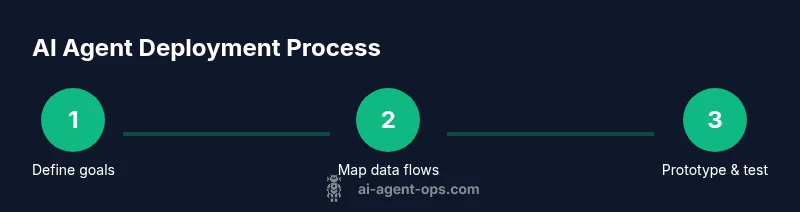
- 1
Define goals and success metrics
Identify specific customer-support outcomes you want to influence (e.g., faster response times, higher self-service completion, improved CSAT). Align metrics with business objectives and establish baseline measurements before any change.
Tip: Document target KPIs and a clear escalation policy to prevent over-automation. - 2
Map conversations and data flows
Chart typical support journeys, data inputs, and required integrations. Identify where AI can add value and where human intervention remains essential.
Tip: Create a data map that highlights sensitive data and access controls. - 3
Choose tech stack and integration points
Select an AI platform, determine channels, and plan how the agent will access knowledge sources, tickets, and customer context.
Tip: Prefer modular, testable components to simplify future expansion. - 4
Prototype with a focused scope
Build a minimal viable AI agent for a single channel or use case. Validate responses against a gold standard and gather human feedback.
Tip: Limit scope to reduce risk and accelerate learning. - 5
Train, validate, and tune responses
Iteratively train with representative data, calibrate for brand voice, and implement safety filters to handle edge cases.
Tip: Regularly refresh data and review edge-case outcomes. - 6
Deploy with escalation policies and monitoring
Roll out in staged pilots, maintain clear handoffs to humans, and monitor performance across channels with dashboards.
Tip: Set automatic warnings for unusual escalation patterns.
Questions & Answers
What is an AI agent in customer support?
An AI agent is software that uses AI to understand customer inquiries, generate responses, and decide when to involve a human agent. It can operate across channels and learn from interactions.
An AI agent understands questions, suggests responses, and decides when a human should take over.
How do AI agents improve CSAT?
AI agents speed up responses, provide consistent information, and guide customers to self-service when possible. Accurate routing and helpful interactions contribute to higher satisfaction.
They respond faster, stay consistent, and guide customers to helpful self-service.
What data is needed to train AI agents?
You need representative customer inquiries, approved knowledge sources, and structured data about products and policies. Ensure data privacy and remove sensitive details before use.
You need representative data and approved knowledge sources, with privacy protections.
Are there privacy concerns when using AI agents?
Yes. Implement data minimization, access controls, and clear privacy policies. Regular audits help ensure compliance with regulations and customer trust.
Yes. Use privacy controls and audits to protect customer data.
How do you measure ROI from AI agents?
Analyze changes in handling time, deflection rates, CSAT, and ticket volume. Compare total cost of ownership before and after deployment to estimate savings.
Track time, quality, and costs to estimate savings and value.
What are common pitfalls when deploying AI agents?
Over-automation, poor data quality, and unclear escalation policies lead to customer frustration. Start small, maintain human oversight, and continuously test responses.
Avoid over-automation; keep humans involved for tough cases and test often.
Watch Video
Key Takeaways
- Automate routine tasks to free agents for higher-value work.
- Establish governance and escalation policies from day one.
- Measure multiple outcomes to prove value and guide iterations.
- Balance speed with accuracy and brand voice.
- Iterate with safe, staged deployments and continuous monitoring.