Browser-based AI Agents: How to Use in a Browser
A practical guide to using browser-based AI agents for automating web tasks, covering prerequisites, architecture, workflows, security, and best practices for reliable browser automation.


The guide explains how to enable browser use ai agent to automate web tasks using a browser-based AI agent workflow. You will need a modern browser, reliable internet, and access to an AI agent platform. By following the steps, you can design, test, and deploy a browser-driven agent that handles repetitive tasks with minimal human input.
What is browser use ai agent?
The phrase "browser use ai agent" describes running an AI agent inside a browser environment to automate web interactions. In practice, these agents blend a language model's reasoning with browser-control capabilities to perform tasks such as clicking links, filling forms, extracting data, and navigating dynamic pages. This approach differs from traditional automation scripts because the agent can adapt to layout changes, reason about pages, and decide next actions based on live context. For developers, product teams, and business leaders, designing a browser-based AI agent requires clear objectives, data boundaries, and guardrails. From a practical standpoint, you are pairing a decision-making component (the AI) with a browser automation layer (the controller). The result is a system that can perform complex flows with minimal human input while keeping user intent transparent and auditable. In the Ai Agent Ops view, success comes from modular design, testable prompts, and rigorous monitoring.
Because everything runs in a browser environment, you can prototype quickly with developer tools, extension APIs, and lightweight runtimes. Key benefits include portability across devices, easier collaboration with stakeholders, and improved observability through in-browser telemetry. Common use cases include customer support automations that fetch order details, web-scraping with consent, form autofill for internal processes, and test automation across multiple sites. However, browser use ai agent also raises concerns about privacy, security, and compliance. To mitigate risk, establish explicit permission scopes, data minimization rules, and clear escalation paths when the agent encounters a security-sensitive page.
Core components and architecture
A browser-based AI agent typically comprises several interacting parts: an agent core (LLM, planner, memory), a browser controller (DOM access, navigation strategies), a skill library (actions like 'click', 'extract', 'type'), an orchestrator (state machine, retries, timeouts), data policy and credentials management, and observability tooling (logs, metrics, prompts). The agent core handles reasoning and decision making; the browser controller translates decisions into concrete page actions. Together they create a loop: observe page, decide, execute, verify, log. For reliability, implement modular skills that can be swapped or extended, and centralize prompts with versioning. Observability should capture success rates, average decision latency, and failure modes. When designing for scale, separate policy (what the agent can do) from implementation (how it does it), and store policy decisions in an auditable log. In practice, you might run the agent in a sandboxed frame or extension context to limit scope. Ai Agent Ops emphasizes a balanced architecture that supports governance, reproducibility, and safe experimentation.
Getting started: prerequisites and setup
To begin with browser use ai agent, you need a few foundations. First, a modern browser (Chrome or Edge) with appropriate extension or runtime support. Second, an account on an AI agent platform that provides an API or SDK for browser control. Third, a secure credentials store or vault to protect tokens and secrets. Fourth, a minimal testing site or sandboxed page to prototype interactions. Fifth, baseline data policies and privacy considerations defined with your legal team. Start with a tiny workflow, such as navigating to a page, extracting a title, and returning the text to your console. Keep your testing data isolated from production data. Finally, set up basic monitoring to capture actions performed and decisions made by the agent. This initial setup helps ensure you avoid common pitfalls and provides a stable foundation for iterative improvements.
Designing robust browser-driven workflows
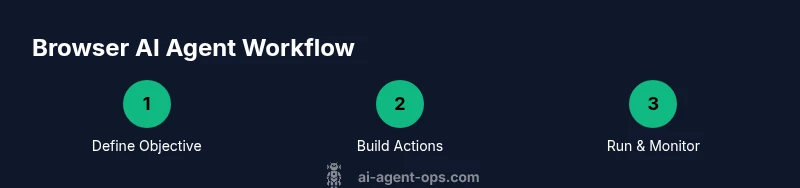
A robust workflow combines clear objectives, resilient actions, and guardrails. Begin by articulating the user goal and success criteria: what must the agent achieve, and how will you measure it? Next, map out the required actions as atomic skills: open URL, click element, wait for selector, extract data, fill a form, submit, handle pagination. Create decision prompts that handle page variety, such as dynamic loading and layout changes. Implement retries with backoff, timeouts, and fallback paths if an element is missing. Use semantic selectors where possible and maintain a catalog of selectors per site to survive redesigns. Add logging at each decision point to support auditing. Finally, test with real-world but controlled scenarios, and continuously refine prompts, skills, and error handling to improve reliability. In interviews and podcasts you’ll find that successful browser-based agents blend human-in-the-loop checks with automated checks. The goal is to maximize automation while preserving safety and accountability.
Security, governance, and ethics
Security and governance are not afterthoughts; they are foundational. Limit agent capabilities to only what is necessary for the task, and enforce least-privilege access to pages, data, and credentials. Use encrypted storage for secrets and rotate keys regularly. Maintain detailed audit logs that record decisions, page states, and data retrieved by the agent to support compliance reviews. Implement data minimization: collect only what you need, retain it briefly, and purge. Establish clear consent for any data collected from third-party sites and respect site terms of service. Build guardrails that prevent the agent from submitting sensitive information, automatically flag suspicious prompts, and escalate to human review when high-risk actions are detected. Finally, keep stakeholders informed with transparent metrics, including success rates, failure causes, and security incidents. Ai Agent Ops recommends integrating privacy-by-design principles from the outset.
Troubleshooting and optimization tips
Web pages change frequently; that is the core challenge for browser-based agents. If your agent stalls, verify the page state before acting: confirm the presence of expected elements, not just their existence. Use robust selectors, avoid brittle XPaths, and prefer data attributes with stable identifiers. When actions fail, inspect logs to determine whether the issue is a timing problem, a layout change, or a permission block. Add timeouts and exponential backoff to retries, and implement fallback paths for critical steps. If a site uses anti-bot measures, respect them and consider user consent prompts before automation. Performance can be improved by caching repeat decisions and reusing an approval prompt when the same decision is encountered. Finally, document failures and fixes, so your team can reproduce improvements quickly. By iterating thoughtfully, you can convert ad-hoc automation into dependable browser-driven AI workflows.
Tools & Materials
- Modern computer with internet connection(Any recent PC/MAC with at least 8GB RAM recommended)
- Updated web browser (Chrome/Edge)(Latest stable version)
- Stable internet connection(High availability, minimize latency)
- Account on AI agent platform (SDK) or API access(Choose a platform with browser support)
- Secure credential storage (password manager or vault)(Storage of tokens, keys)
- Testing sites or sandbox pages(For safe experimentation)
Steps
Estimated time: 1-2 hours
- 1
Define objective and success metrics
Articulate the user goal the agent should achieve and establish measurable success criteria. Decide what constitutes completion, what data will be captured, and how long the task should take. This clarity prevents scope creep and guides prompt design.
Tip: Keep success criteria tangible (e.g., 'extract 5 items and store them in JSON within 2 minutes'). - 2
Choose the agent type and platform
Decide between no-code, low-code, or full-code approaches based on team skills and maintenance needs. Select an AI agent platform that supports browser control, prompts, and logging for traceability.
Tip: Start with a no-code option for rapid prototyping; move to code-first if you need deeper customization. - 3
Set up the browser environment and access controls
Prepare the browser environment with appropriate extensions or runtimes, and implement scope limits to restrict actions to testing domains. Configure credential storage and access controls to minimize risk.
Tip: Test in a sandbox page before working with live sites. - 4
Create a minimal workflow prototype
Build a small end-to-end flow (e.g., navigate to a page, extract a title, output to console). Document prompts, actions, and expected outcomes to establish a baseline.
Tip: Use stable selectors and log each action with a unique run ID. - 5
Add monitoring, logging, and error handling
Instrument the workflow with logs at decision points and implement retries with backoff. Define fallback paths for common failure modes to improve resilience.
Tip: Capture run IDs and timestamped decisions for auditing. - 6
Test, iterate, and prepare for deployment
Run the workflow against varied pages, adjust prompts for edge cases, and validate performance. Prepare deployment plans with governance checks and rollback procedures.
Tip: Schedule regular reviews to keep the workflow aligned with site changes.
Questions & Answers
What is a browser-based AI agent?
A browser-based AI agent runs in a browser environment and uses AI reasoning to perform tasks such as navigation, data extraction, and form submission. It combines an LLM with browser-control capabilities to adapt to page changes and automate web workflows.
A browser-based AI agent runs in your browser and uses AI reasoning to automate web tasks like navigating pages and collecting data.
How is this different from traditional automation?
Traditional automation relies on deterministic scripts with fixed steps. A browser-based AI agent adds reasoning and adaptability, allowing it to handle dynamic pages, interpret content, and make decisions about next actions.
Unlike fixed scripts, AI agents can adapt to changing pages and decide what to do next.
What are common use cases?
Typical use cases include automated form filling, data extraction from multiple sites, web testing, and lightweight customer-support automation that pulls context from web pages in real time.
Common uses are form filling, data gathering from sites, and web testing.
What are the main security concerns?
Key concerns include credential leakage, data privacy, and the risk of unintended actions. Mitigate with least-privilege access, encrypted storage, and thorough audit logging.
Security concerns involve credentials, privacy, and unintended actions; use restricted access and strong logs.
Do I need coding skills to use browser-based AI agents?
No-code and low-code options exist for rapid prototyping. More complex workflows may require coding, but many platforms provide drag-and-drop tooling paired with customizable prompts.
You can start without coding, but some advanced workflows benefit from code.
How do I measure success and ROI?
Track metrics like task success rate, completion time, error rate, and the frequency of human interventions. Use these to justify automation investments and guide improvements.
Track success rate, speed, and errors to measure ROI.
Watch Video
Key Takeaways
- Define clear objectives and success metrics
- Design modular, reusable workflows
- Prioritize security and governance
- Iterate with logging and monitoring