How to Use an AI Agent to Manage Emails
A practical guide on using an ai agent to manage emails to automate inbox triage, drafting, and follow-ups with governance and security best practices.


Why an ai agent to manage emails matters in modern workflows
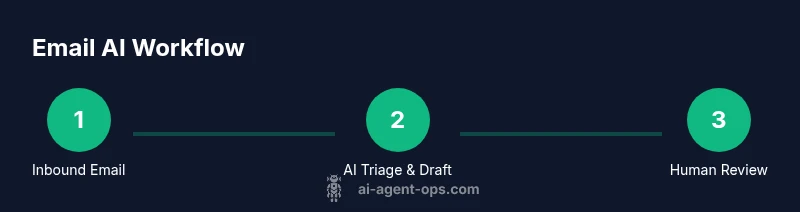
Email overload is real. Teams rely on timely, accurate responses, yet manual triage and drafting slow progress and increase errors. An ai agent to manage emails can automatically triage messages by urgency and topic, summarize threads, and draft replies aligned with policy. According to Ai Agent Ops, organizations that pilot AI-driven email workflows report faster turnarounds and more consistent messaging when governance is baked in from day one. In this section we explore the core reasons this capability is becoming essential for product teams, sales, and support desks, and how to measure impact beyond vanity metrics. By understanding the problem space, you can design a solution that scales with your business needs.
Key points to take away:
- Inboxes are signals for priorities; AI can surface the most important items first.
- Automation reduces repetitive work, enabling human agents to focus on complex conversations.
- Governance and safety controls are non-negotiable at scale.
Core capabilities you should expect from an ai agent to manage emails
A practical ai agent to manage emails should cover a range of capabilities that together deliver measurable value. Key features include:
- Triage and routing: automatically categorize messages by urgency, topic, and sender context so human agents see the right items first
- Drafting and reply generation: produce tone-matched responses with policy-aware guardrails that you can approve or modify before sending
- Thread summarization: capture the gist of long conversations and present action items
- Follow-up scheduling and calendar integration: auto-create reminders and schedule meetings when appropriate
- Compliance, privacy, and safety checks: detect sensitive data, redact when needed, and enforce access controls
- Multi-language support: handle emails in languages relevant to your workforce or customers
- Audit trails and explainability: log decisions for governance reviews and future improvements
These capabilities should be delivered with a clear ownership model, safety guards, and intuitive controls so teams can trust the AI while maintaining human oversight.
Design considerations for reliability and ethics
Designing an ai agent to manage emails requires a careful balance of automation, trust, and safety. Reliability comes from clear prompt design, strict policy enforcement, and strong monitoring. Ethical considerations include transparency about AI actions, human-in-the-loop when dealing with sensitive content, and bias mitigation in auto-generated responses.
- Guardrails: implement tone controls, style guides, and policy checks to ensure compliance with brand voice and regulatory requirements.
- Explainability: provide users with a concise rationale for why the AI classified a message or suggested a reply.
- Human-in-the-loop: keep a human review step for new or high-stakes conversations, especially with customers or executives.
- Privacy by design: minimize data retention, encrypt sensitive fields, and enforce role-based access.
Ai Agent Ops emphasizes that governance is a feature, not an afterthought. Start with guardrails and iteratively improve the model with real-world feedback.
Integration architecture: where the agent sits in your stack
The agent becomes a component in your email workflow, interfacing with your email provider (via IMAP/SMTP or API), your identity provider, and your data warehouse or CRM. A typical architecture includes:
- Inbound channel: mailbox or API webhook feeds messages into the agent
- Processing layer: the AI model analyzes, triages, drafts, and logs actions
- Policy engine: enforces tone, response length, and privacy constraints
- Output layer: sends replies or passes items to human agents for review
- Observability: centralized logs, metrics, and alerting
Security is critical: use OAuth or service accounts, restrict scopes, enable MFA, and rotate credentials regularly. Consider a staging environment to validate behavior before production.
Practical setup: getting started in 60 minutes
- Define success criteria and guardrails to guide the automation scope. 2) Choose your deployment model (no-code vs. code-based) based on your team’s skills and risk tolerance. 3) Connect a test mailbox and obtain API credentials from your email provider. 4) Create a basic policy set (tone, length, and privacy checks). 5) Run a pilot with non-sensitive emails and monitor results. 6) Iterate based on feedback and expand to more channels.
Ai Agent Ops recommends starting with a restricted pilot to demonstrate value without exposing sensitive data. This approach speeds up learning and reduces risk.
Examples and use cases
- Sales and outreach: triage inquiries, suggest personalized replies, and schedule follow-ups automatically.
- Support desk: summarize ticket threads, route to the right agent, and generate status updates for customers.
- Internal communications: draft summaries of long email threads and create action items for teams.
- Newsletter management: identify subscriber questions, draft responses, and flag unsubscribes for manual review.
Each use case benefits from clear ownership, measured KPIs, and governance rules so outcomes stay aligned with business goals.
Common pitfalls and how to avoid them
Common pitfalls include over-automation, insufficient data governance, and unclear ownership. To avoid these, define explicit escalation paths, implement guardrails for sensitive content, and require human confirmation for high-risk messages. Regularly audit prompts and outputs to catch drift or bias. Use a staged rollout to build trust before full-scale deployment.
Measuring success with clear metrics
Track both process metrics and quality metrics to assess impact:
- Time to first reply and overall response time
- Percentage of messages auto-triaged correctly
- Hit rate of policy-compliant drafts without human edits
- Customer or stakeholder satisfaction with AI-assisted replies
- Reduction in repetitive workload for human agents
Pair quantitative metrics with qualitative feedback from users to continuously improve prompts and policies. Ai Agent Ops recommends a quarterly review cycle to keep guardrails current as teams and email dynamics evolve.
Security and governance considerations
Security and governance are non-negotiable when automating email workflows. Establish data retention policies, access controls, and audit logs. Encrypt sensitive data, monitor for anomalous access, and implement incident response playbooks. Regularly train staff on AI usage policies and ensure vendors meet your security standards.