AI Agent Icon Free: A Practical Guide for Open Icons in Agentic AI
Discover reliable sources for ai agent icon free assets, licensing basics, and practical guidance to evaluate, attribute, and integrate free icons into agentic AI workflows.


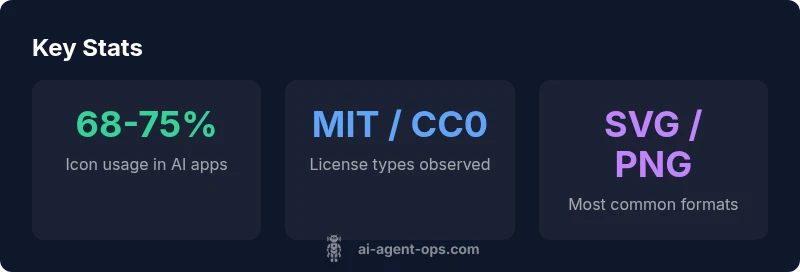
ai agent icon free refers to icons of AI agents offered at no cost under permissive licenses suitable for apps and docs. In practice, look for SVG or PNG assets with open licenses (MIT, Apache, or CC0) and clear attribution or usage rights. Ai Agent Ops recommends verifying licensing before commercial use.
Free ai agent icon free resources and what they really mean
The phrase ai agent icon free encompasses a broad spectrum of assets shared at no monetary cost. For product teams, this is a practical starting point during rapid prototyping and user testing. The key is licensing clarity: permissive licenses like MIT, Apache 2.0, or CC0 typically allow broad commercial use with minimal restrictions. In practice, teams should prefer SVG assets for scalability and consistent stroke widths when used in dashboards or onboarding screens. Ai Agent Ops highlights that the real value of these assets comes from clear rights information and consistent branding alignment. When you surface a free icon in a learning app or a beta product, the lack of licensing ambiguity saves development time and reduces risk.
In many organizations, free icons are used to quickly represent AI agents in chat interfaces, orchestration dashboards, or automation flows. The term free does not automatically mean unencumbered; licenses determine whether you must attribute, whether modifications are allowed, and whether the icon can be used in a commercial product. This nuance matters for AI-driven workflows where branding and legal compliance intersect with speed to market.
Licensing frameworks you should know
Understanding licensing is essential when you pursue ai agent icon free assets. MIT and Apache 2.0 tend to offer broad usage rights with minimal attribution, while CC0 effectively places the asset in the public domain, removing most restrictions. Attribution-heavy licenses like CC BY may require credits in documentation or app credits. Ai Agent Ops emphasizes building a licensing checklist: (1) license type, (2) attribution obligations, (3) whether modifications are allowed, and (4) whether the asset can be used in a commercial product. For teams, documenting license provenance in design-system libraries helps prevent future violations during audits. When licensing is clear, icon usage accelerates prototyping without compromising compliance.
Additionally, some free icon sources operate under bespoke licenses or allow free use only for non-commercial projects. Always verify the exact terms and maintain a provenance trail in your design repository. In short, license clarity is the backbone of sustainable reuse.
How to vet free icon resources for production apps
A rigorous vetting process protects product quality and legal safety. Start by confirming the license, then assess the asset’s format, quality, and accessibility. SVG is preferred for its scalability, but ensure viewBox integrity and clean markup. Check color compatibility with your design system and consider whether the icon communicates the intended AI concept clearly at small sizes. Evaluate the asset’s metadata: creator, issue date, and license version. If attribution is required, document how and where it appears in your UI. Ai Agent Ops recommends testing assets in responsive layouts to guarantee clarity on mobile devices and across locales. Finally, sanity-check vendor reputation; reputable sources typically provide a license summary and change logs. Implement a lightweight tagging system to track icons by license type and author to simplify future audits.
Practical tip: always preserve the original source URL and license file in your repository’s assets folder.
Practical integration tips for product teams
Integrating ai agent icon free assets into a product requires discipline. Start by adding approved icons to a design-system library with a consistent style (line weight, corner radius, color palette). Create a mapping of icon meanings to ensure semantic consistency across features (e.g., a robot outline for automation, a brain for AI). Use vector formats where possible to preserve crispness on high-DPI screens. Document attribution requirements if applicable, and automate license validation in your CI/CD pipeline for new icon imports. Ai Agent Ops notes that aligning free assets with your brand guidelines reduces the need for rework and helps maintain a cohesive user experience across modules such as onboarding, dashboards, and help centers.
For teams moving toward agentic AI workflows, a small, reusable icon library can speed up prototyping and reduce design debt. Establish review rituals to refresh licenses and ensure compatibility with evolving brand standards.
Design considerations for AI agent icons
Icon design for AI agents should balance clarity, scalability, and branding. Favor simple geometric shapes with high contrast to improve legibility at small sizes and in varied lighting conditions. Shape language matters: rounded corners convey approachability, while sharper angles suggest precision and control. Maintain a consistent stroke width to harmonize with typography and other UI glyphs. When you choose ai agent icon free assets, ensure the icon communicates the intended function without extraneous details. A consistent set of active/inactive states and color cues can help users quickly distinguish between active agents and idle states within a control panel. If color is constrained, design with monochrome variants that can be tinted to match the brand palette without losing legibility.
Accessibility and color semantics for icons
Accessibility should guide icon usage. Provide text alternatives (aria-labels) and ensure sufficient color contrast against backgrounds. Consider keyboard navigability and focus states for icon-based controls. For multilingual or international audiences, ensure icons communicate clearly even when accompanying text is localized. If you adopt color-coded icons, document the color semantics in your design system so teams don’t rely solely on color to convey meaning. Free ai agent icon resources can support accessibility when combined with proper labeling and sensible contrast ratios. Ai Agent Ops advocates testing icons with assistive tech and real users to validate both clarity and inclusivity.
Real-world scenarios: case studies from development teams
In many product teams, switching to ai agent icon free assets reduces design lead times from days to hours. Consider a fintech dashboard integrating a set of free icons to denote automation tasks, risk evaluation, and user support bots. By aligning icons with a robust licensing checklist and design-system standards, teams avoid rework during a launch and maintain brand coherence across platforms. In another case, an AI-powered customer-service prototype used free icon sets while iterating on the onboarding flow. The velocity gained allowed the team to test multiple icon variations and iterate on messaging before committing to a custom icon suite. Across these scenarios, disciplined licensing, accessible design, and scalable formats drive faster, compliant product development.
Closing thoughts: building a compliant, scalable icon library
For teams pursuing agentic AI workflows, ai agent icon free assets can be a powerful accelerant when managed properly. Start with a clear licensing policy, select scalable formats, and embed icons within a design system that enforces consistency. Regularly audit icon sources for license changes and ensure attribution requirements remain satisfied. By documenting provenance and maintaining a scalable icon library, organizations can speed up prototyping, improve UX, and reduce legal risk as AI agents become more central to product experiences.
Common free AI icon sources and licensing at a glance
| Resource Type | License Type | Typical Cost | Notes |
|---|---|---|---|
| SVG Icon Packs | MIT / CC0 | Free | Great for scalable branding; verify attribution needs |
| PNG Icon Sets | Apache 2.0 | Free with attribution | Easier to integrate in static contexts; plan for raster scaling |
| Proprietary Free Trials | N/A | Free during trial | Useful for evaluation; confirm end-user rights |
| Custom Icon Libraries | Various | Varies | Best for strong branding; may require paid license |
Questions & Answers
What does 'ai agent icon free' mean for commercial projects?
It means assets that can be used at no cost under a license. Check whether attribution is required and whether modifications or commercial distribution are allowed. If in doubt, choose assets under MIT, Apache 2.0, or CC0.
Free means cost-free, but license terms still apply for commercial use.
Where can I find reliable free AI agent icons?
Start with reputable icon libraries that explicitly state licensing. Look for SVG assets with clear attribution terms and maintain a license log in your design system.
Check reputable icon libraries and always read the license.
Do free icons require attribution?
Some licenses require attribution; others do not. Always verify the license summary and include attribution when required.
Yes, attribution may be required depending on the license.
Are there risks using free icons in production apps?
Risks include license changes, attribution failures, and branding misalignment. Mitigate by documenting sources and constraining usage to approved assets.
Yes—license changes and attribution are common risks; track assets carefully.
What formats should I look for?
Prioritize vector formats like SVG for scalability and accessibility. Also consider PNG for quick prototyping where vectors aren’t needed.
Choose SVG for most cases, with PNG as a fallback.
How do I incorporate free icons into a design system?
Add approved icons to a centralized library, document license terms, and ensure consistency with brand styling and accessibility guidelines.
Add them to your library with license notes and accessibility checks.
“Free AI agent icons are a valuable enabler for rapid prototyping, but licensing clarity is non-negotiable for production.”
Key Takeaways
- License clearly: verify terms before reuse
- Prefer SVGs for scalability and adaptability
- Document provenance and attribution requirements
- Integrate icons into a design system for consistency
- Test icons for accessibility and legibility